Controls
81
Reference At a glanceDriving tipsCommunications NavigationEntertainmentMobility
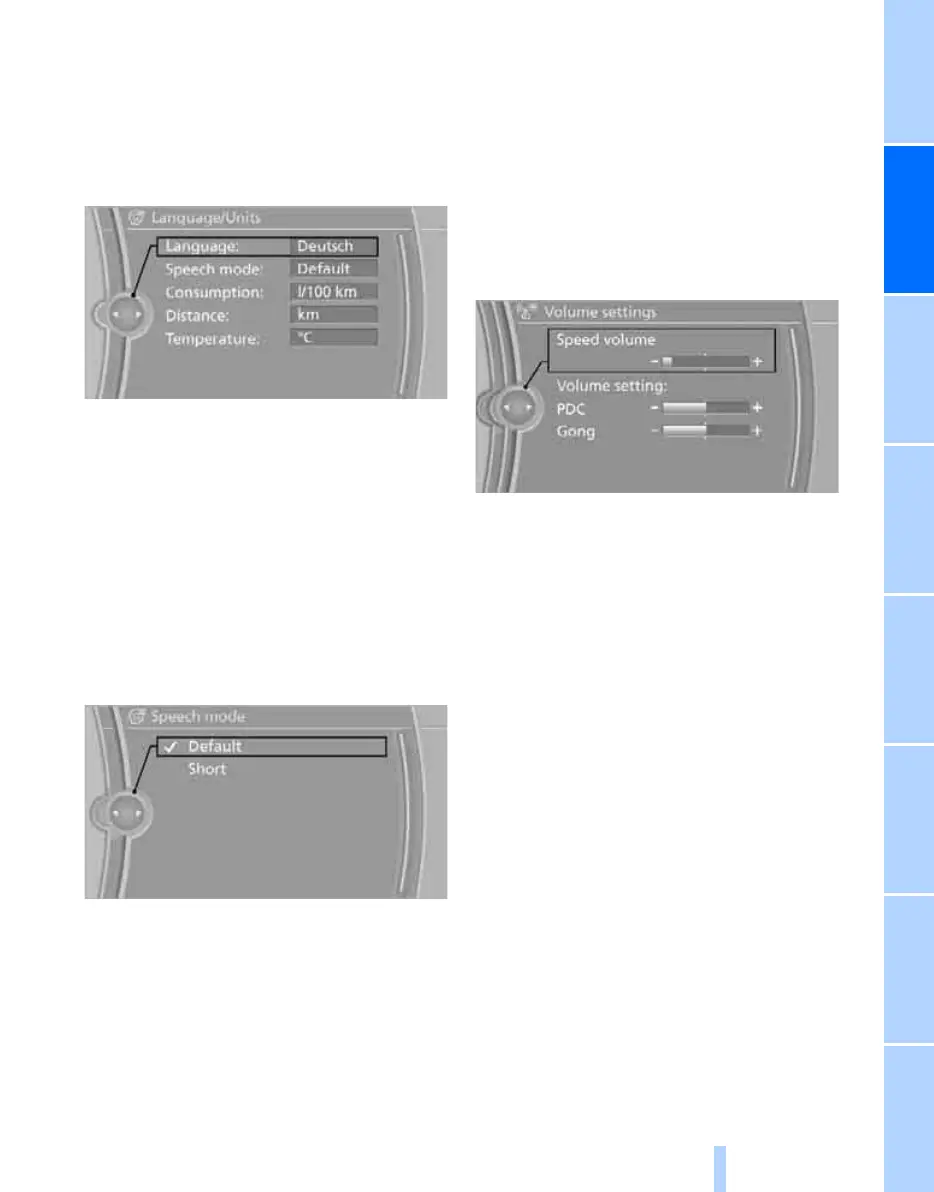
Language on Control Display
set language
1. "Settings"
2. "Language/Units"
3. "Language:"
4. Select the desired language.
The setting is stored for the remote control cur-
rently in use.
Setting the voice dialog
Switch between a standard dialog and a short
dialog.
1. "Settings"
2. "Language/Units"
3. "Speech mode:"
4. Select the desired dialog.
The setting is stored for the remote control cur-
rently in use.
Volume of warning tones
You can raise or lower the volume of the warn-
ing signals, e.g. the safety belt reminder, in rela-
tion to the entertainment sound output. The
warning tones have a specified minimum and
maximum volume that cannot be dropped
below or exceeded.
1. "Settings"
2. "Tone"
3. "Volume settings"
> "Speed volume": adaptation of the vol-
ume as a function of vehicle speed
> "PDC": volume of the PDC
* signal tone
in comparison to entertainment sound
output
> "Gong": volume of the signal tone, e.g.
for the safety belt reminder, in compari-
son to entertainment sound output
ba8_e70ag.book Seite 81 Freitag, 5. Juni 2009 11:42 11
Online Edition for Part no. 01 41 2 602 756 - © 06/09 BMW AG


 To Next Page
 Loading...