83
E
Using the Full
Range of Features
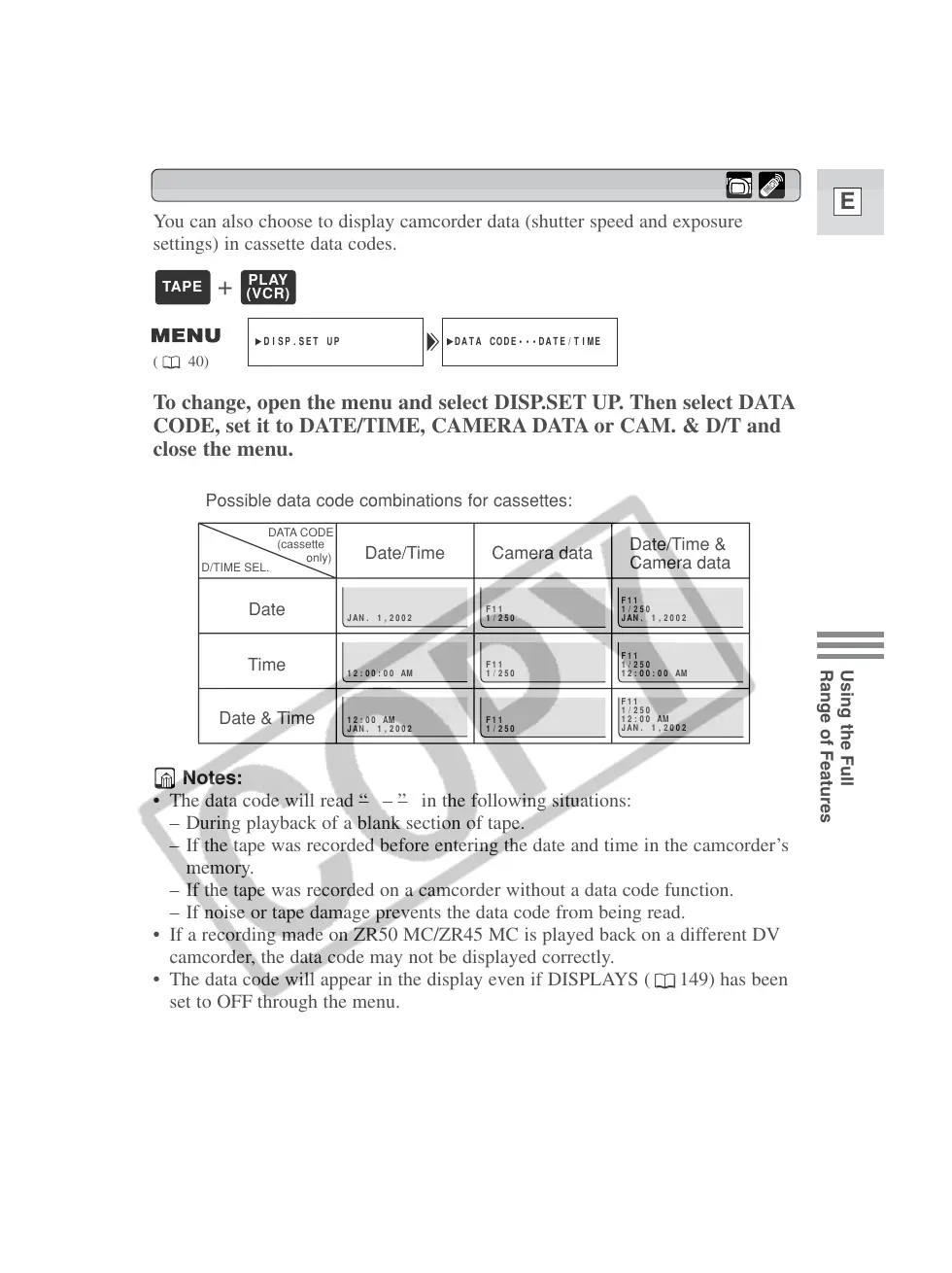
You can also choose to display camcorder data (shutter speed and exposure
settings) in cassette data codes.
To change, open the menu and select DISP.SET UP. Then select DATA
CODE, set it to DATE/TIME, CAMERA DATA or CAM. & D/T and
close the menu.
Notes:
• The data code will read “–––” in the following situations:
– During playback of a blank section of tape.
– If the tape was recorded before entering the date and time in the camcorder’s
memory.
– If the tape was recorded on a camcorder without a data code function.
– If noise or tape damage prevents the data code from being read.
• If a recording made on ZR50 MC/ZR45 MC is played back on a different DV
camcorder, the data code may not be displayed correctly.
• The data code will appear in the display even if DISPLAYS ( 149) has been
set to OFF through the menu.
Possible data code combinations for cassettes:
+



 To Next Page