fx-9750GII Quick Start Guide
3
This section is an overview of the RUN MAT Icon. To select an icon from the icon menu system,
use the !$BN to highlight the desired icon, then press l or press the number/letter in the
lower right corner of the icon. For the Run menu, press 1 to display the initial RUN screen.
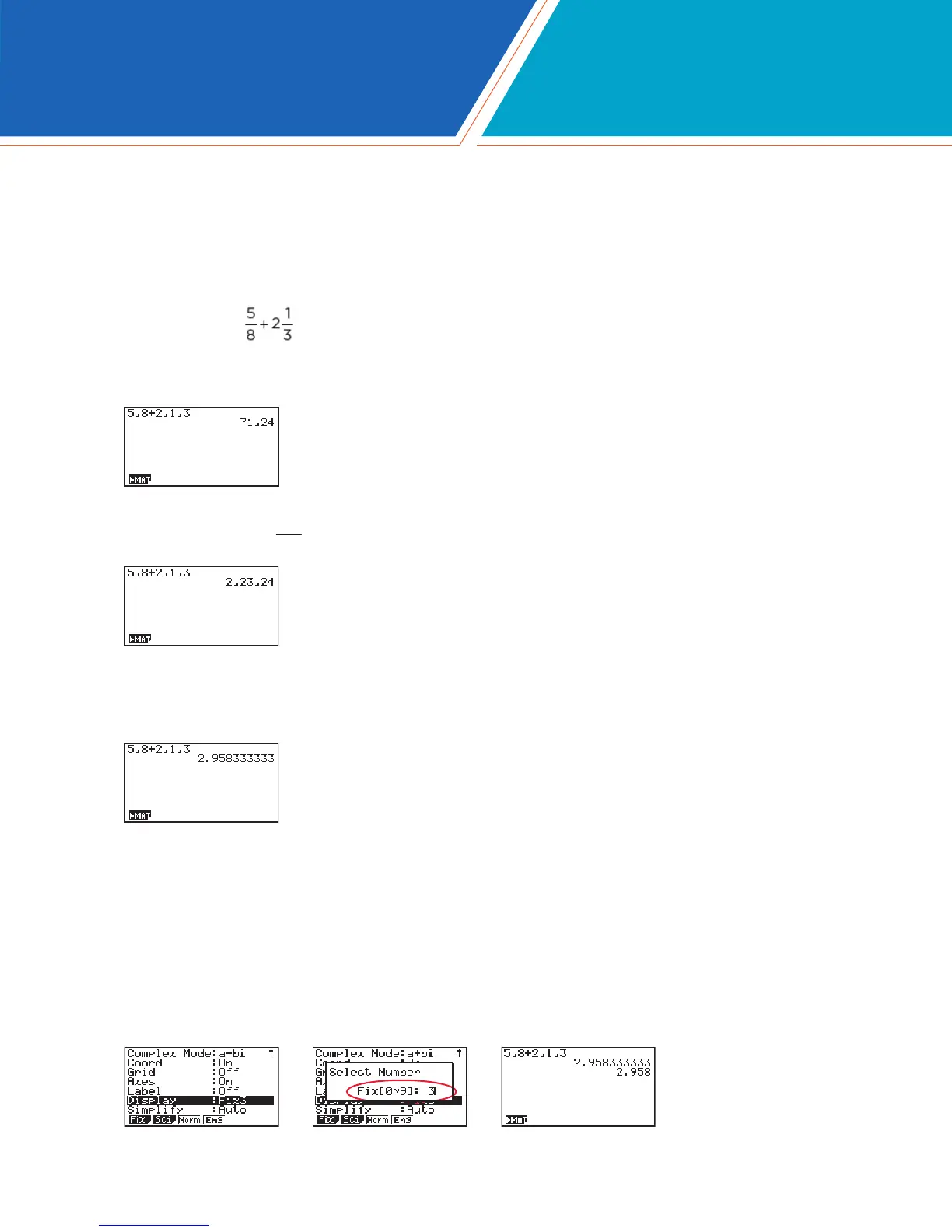
1. When performing general computations, select z to enter fractions and mixed numbers. To
solve the problem input the following:
• 5z8+2z1z3l
4. To change the displayed number of decimal places, enter the SET UP menu by pressing
Lp. N to Display, select q (Fix) and enter the desired amount of decimal places
followed by l. For this example, 3 decimal places are used.
Note: Every icon’s Set Up menu is accessed in the same manner.
• LpNNNNNNNNNNNq3ldlx
3. To change the answer to a decimal approximation, press x. x is a toggle key that will
switch entered data or answers from fraction to decimal form or decimal to fraction form.
2. To change the answer
24
71
to a mixed number, press LxX.
RUN-MATRIX



 To Next Page
 Loading...