
 Need help?
Do you have a question about the Chamberlain LiftMaster Professional CB1 and is the answer not in the manual?
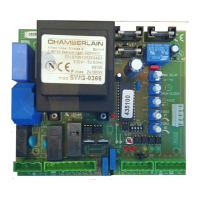
Details terminal occupancy for mains, flashing lamp, motors, and safety inputs.
Guidance on installing the control board, wiring, and cable cross-sections.
Explains the function of JP1 and JP2 jumpers for gate operation modes.
Covers flashing lamp, IR sensor, and emergency stop installations for gate safety.
Explains Dead Man's mode and general control line functions.
Details key-operated switch and electrical lock connections.
Explains the control functions of DIP switches 1 through 4.
Adjusting motor force for each wing and safety considerations.
Setting the time the gate remains open before closing.
Adjusting the maximum running time of the gate wings.
Controlling wing delay for installations with overlapping wings.
Explains the function and meaning of each LED on the control board.
Details the purpose and rating of fuses F1 through F4.
How to program up to 15 remote controls on each self-learn channel.
Procedure to delete learned remote control codes.
Instructions for reprogramming remote controls and their buttons.
Step-by-step guide for initial setup, wiring checks, and testing.
Details terminal occupancy for mains, flashing lamp, motors, and safety inputs.
Guidance on installing the control board, wiring, and cable cross-sections.
Explains the function of JP1 and JP2 jumpers for gate operation modes.
Covers flashing lamp, IR sensor, and emergency stop installations for gate safety.
Explains Dead Man's mode and general control line functions.
Details key-operated switch and electrical lock connections.
Explains the control functions of DIP switches 1 through 4.
Adjusting motor force for each wing and safety considerations.
Setting the time the gate remains open before closing.
Adjusting the maximum running time of the gate wings.
Controlling wing delay for installations with overlapping wings.
Explains the function and meaning of each LED on the control board.
Details the purpose and rating of fuses F1 through F4.
How to program up to 15 remote controls on each self-learn channel.
Procedure to delete learned remote control codes.
Instructions for reprogramming remote controls and their buttons.
Step-by-step guide for initial setup, wiring checks, and testing.
 General
| Brand | Chamberlain |
|---|---|
| Model | LiftMaster Professional CB1 |
| Category | Control Unit |
| Language | English |


 To Next Page