Procedura
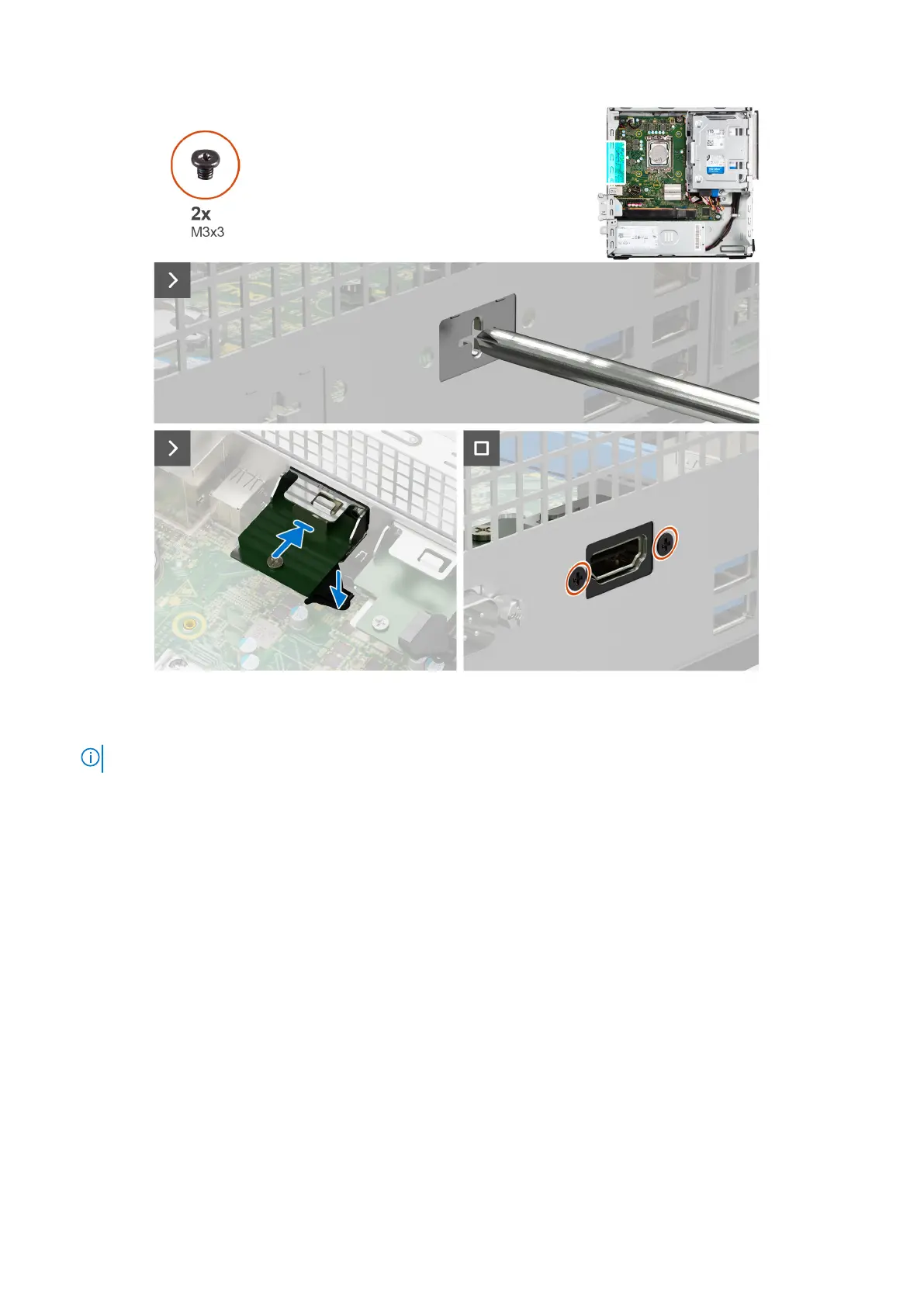
1. Utilizzando un cacciavite, rimuovere il coperchio del modulo HDMI dallo chassis.
N.B.: Questo passaggio è applicabile solo quando il modulo HDMI viene installato per la prima volta.
2. Collegare il cavo del modulo HDMI al relativo connettore (VIDEO) sulla scheda di sistema.
3. Inserire il modulo HDMI nello slot nel chassis.
4. Ricollocare le due viti (M3x3) che fissano il modulo HDMI allo chassis.
Fasi successive
1. Installare il pannello laterale.
2. Seguire le procedure descritte in Dopo aver effettuato gli interventi sui componenti interni del computer.
Scheda di sistema
Removing the system board
Prerequisites
1. Follow the procedure in Before working inside your computer.
2. Remove the side cover.
3. Remove the front bezel.
4. Remove the 2.5-inch hard drive if applicable.
5. Remove the 3.5-inch hard drive if applicable.
94
Rimozione e installazione di unità sostituibili sul campo (FRU)


 To Next Page
 Loading...