EasyManua.ls Logo

Emerson White Rodgers 1F80-361 - User Manual

Emerson White Rodgers 1F80-361
8 pages
Print Icon
To Next Page IconTo Next Page
Loading...
Whiter
Rodgers
1F80-361
Programmable Electronic Digital Thermostat
INSTALLATION AND
OPERATION INSTRUCTIONS
Operator: Save these instructions for future use!)
FAILURE TO READ AND FOLLOW ALL INSTRUCTIONS CAREFULLY
BEFORE INSTALLI N G OR OPERATI NG TH IS CONTROL COU LD CAUSE
PERSONAL INJURYAND/OR PROPERTY DAMAGE.
DESCRIPTION
Your new White-Rodgers 5-Day/I-Day/I-Day Digital Thermo-
stat uses the technology of a solid-state microcomputer to
provide precise time/temperature control. This thermostat offers
you the flexibility to design heating and cooling programs that fit
your needs.
Features:
Separate 5-day (weekday), 1-day (Sat) and 1-day (Sun) pro-
gramming with four separate time/temperature periods per day
Simultaneous heat and cool program storage
Preprogrammed temperature control
Backlit display
LCD continuously displays setpoint, and alternately dis-
plays time and room temperature
Temperature override until next program period
Manual program override (HOLD temperature)
Temporary HOLD
°F/°C convertibility
Temperature range 45° to 90°F
RC, RH, C, W, Y, G, O and B terminals
Optional C terminal (Dual Power option)
B and O terminals for single stage heat pumps (no auxiliary
heat) or damper operation
Program storage in case of power loss
2 "AA" Energizer ® alkaline batteries included
PRECAUTIONS
This thermostat is intended for use with a low voltage system; do
not use this thermostat with a line voltage system. If in doubt
about whether your wiring is millivolt, line, or low voltage, have
it inspected by a qualified heating and air conditioning contractor
or electrician.
Do not exceed the specification ratings.
All wiring must conform to local and national electrical codes and
ordinances.
This control is a precision instrument, and should be handled
carefully. Rough handling or distorting components could cause
the control to malfunction.
To prevent electrical shock and/or equipment damage,
disconnect electric power to system at main fuse or
circuit breaker box until installation is complete.
Do not use on circuits exceeding specified voltage.
Higher voltage will damage control and could cause
shock or fire hazard.
Do not short out terminals on gas valve or primary
controlto test. Short or incorrectwiring will damage
thermostat and could cause personal injury and/or
property damage.
Thermostat installation and all components of the
system shall conform to Class II circuits per the NEC
code.
ELECTRICAL DATA APPLICATIONS
SPECIFICATIONS
Electrical Rating:
8 to 30 VAC 50/60 Hz. or D.C.
0.05 to 1.0 Amps (Load per terminal)
1.5 Amps Maximum Total Load (All terminals combined)
THERMAL DATA
Setpoint Temperature Range:
45°F to 90°F (7°C to 32°C)
Operating Ambient Temperature Range:
32°F to 105°F
Operating Humidity Range:
0 to 90% RH (non-condensing)
Shipping Temperature Range:
-4°F to 149°F
For use with:
Standard heat/cool or heat only systems
Electric heat systems
Gas or oil fired systems
Gas systems with intermittent ignition devices (I.I.D.)
and/or vent dampers
Hydronic (hot water or steam) systems
Single-stage heat pump systems (no auxiliary heat)
Millivolt systems
DO NOT USE WITH:
Multi-stage systems
Systems exceeding 30 VAC and 1.5 amps
3-wire zoned hydronic heating systems
EMERSON_
White-Rodgers is a division
of Emerson Electric Co.
www.white-rodgers.com
PART NO. 37-6621B
Replaces 37-6621A
0512
Question and Answer IconNeed help?

Do you have a question about the Emerson White Rodgers 1F80-361 and is the answer not in the manual?

Summary

INSTALLATION

REMOVE OLD THERMOSTAT

Steps to safely remove an existing thermostat.

ELECTRIC HEAT OR SINGLE-STAGE HEAT PUMP SYSTEMS

Configuration settings for electric heat or heat pump systems.

ATTACH THERMOSTAT BASE TO WALL

Instructions for mounting the thermostat base to the wall.

BATTERY LOCATION

Information regarding battery installation and replacement.

HYDRONIC (HOT WATER OR STEAM) HEATING SYSTEMS

Configuration settings for hydronic heating systems.

CHECK THERMOSTAT OPERATION

Procedures to verify thermostat functionality post-installation.

Fan Operation

Testing the fan control functionality of the thermostat.

Heating System

Steps to test the heating operation of the installed system.

Cooling System

Steps to test the cooling operation of the installed system.

OPERATION

The Thermostat Buttons and Switches

Overview of the thermostat's buttons and their functions.

The Display

Explanation of the thermostat's display icons and indicators.

CONFIGURATION MENU

Guide to accessing and configuring thermostat settings.

Select Temporary Hold Time

Configuring temporary temperature overrides for specific durations.

Select FA or SL (Fast or Slow) Heating Cycle Rate

Adjusting the heating cycle rate for different system types.

Select backlit display

Enabling or disabling the display backlight for improved visibility.

Select Energy Management Recovery OFF or ON

Setting up early heating/cooling for precise temperature achievement.

Select filter replacement run time

Configuring reminders for air filter changes or cleaning.

Select Compressor Lockout LOC OFF or ON

Enabling compressor protection delay to prevent short cycling.

Select Temperature Display Adjustment 4 LO to 4 HI

Adjusting the room temperature display offset for accuracy.

Select F° or C° Readout

Changing the temperature display units between Fahrenheit and Celsius.

TEMPERATURE OVERRIDE

Temporarily changing the set temperature until the next programmed period.

HOLD TEMPERATURE

Permanently holding a specific temperature setting.

PROGRAMMING YOUR THERMOSTAT

Guidelines for planning and setting up personalized heating/cooling programs.

Planning Your Program

Strategy and planning for setting up heating and cooling schedules.

Set Current Time and Day

Instructions for setting the thermostat's internal clock and day.

Enter Cooling Program

Steps for programming the cooling schedule into the thermostat.

TROUBLESHOOTING

CHECK YOUR PROGRAMMING

Final review of programmed settings before thermostat operation.

Reset Operation

Procedure to reset the thermostat to factory default settings.

No Heat;No Cool;No Fan (common problems)

Troubleshooting common issues related to system operation.

No Heat

Diagnosing and resolving problems where the heating system does not operate.

No Cool

Diagnosing and resolving problems where the cooling system does not operate.

Heat, Cool or Fan Runs Constantly.

Diagnosing and fixing issues where the system runs continuously.

Furnace Cycles Too Fast or Too Slow

Troubleshooting furnace cycle rates and temperature swings.

Cooling Cycles Too Fast or Too Slow

Understanding and addressing cooling cycle rate issues.

Thermostat Setting and Thermometer Disagree

Adjusting the thermostat's temperature display for accuracy.

Clock Loses or Gains Time

Resolving issues with the thermostat's internal clock accuracy.

Heat or Cool Starts Early

Troubleshooting premature activation of heating or cooling.

Thermostat Does Not Follow Program

Resolving issues where the programmed schedule is not followed.

Blank Display and;or Keypad Not Responding

Fixing problems with the thermostat's display or keypad input.

Summary

INSTALLATION

REMOVE OLD THERMOSTAT

Steps to safely remove an existing thermostat.

ELECTRIC HEAT OR SINGLE-STAGE HEAT PUMP SYSTEMS

Configuration settings for electric heat or heat pump systems.

ATTACH THERMOSTAT BASE TO WALL

Instructions for mounting the thermostat base to the wall.

BATTERY LOCATION

Information regarding battery installation and replacement.

HYDRONIC (HOT WATER OR STEAM) HEATING SYSTEMS

Configuration settings for hydronic heating systems.

CHECK THERMOSTAT OPERATION

Procedures to verify thermostat functionality post-installation.

Fan Operation

Testing the fan control functionality of the thermostat.

Heating System

Steps to test the heating operation of the installed system.

Cooling System

Steps to test the cooling operation of the installed system.

OPERATION

The Thermostat Buttons and Switches

Overview of the thermostat's buttons and their functions.

The Display

Explanation of the thermostat's display icons and indicators.

CONFIGURATION MENU

Guide to accessing and configuring thermostat settings.

Select Temporary Hold Time

Configuring temporary temperature overrides for specific durations.

Select FA or SL (Fast or Slow) Heating Cycle Rate

Adjusting the heating cycle rate for different system types.

Select backlit display

Enabling or disabling the display backlight for improved visibility.

Select Energy Management Recovery OFF or ON

Setting up early heating/cooling for precise temperature achievement.

Select filter replacement run time

Configuring reminders for air filter changes or cleaning.

Select Compressor Lockout LOC OFF or ON

Enabling compressor protection delay to prevent short cycling.

Select Temperature Display Adjustment 4 LO to 4 HI

Adjusting the room temperature display offset for accuracy.

Select F° or C° Readout

Changing the temperature display units between Fahrenheit and Celsius.

TEMPERATURE OVERRIDE

Temporarily changing the set temperature until the next programmed period.

HOLD TEMPERATURE

Permanently holding a specific temperature setting.

PROGRAMMING YOUR THERMOSTAT

Guidelines for planning and setting up personalized heating/cooling programs.

Planning Your Program

Strategy and planning for setting up heating and cooling schedules.

Set Current Time and Day

Instructions for setting the thermostat's internal clock and day.

Enter Cooling Program

Steps for programming the cooling schedule into the thermostat.

TROUBLESHOOTING

CHECK YOUR PROGRAMMING

Final review of programmed settings before thermostat operation.

Reset Operation

Procedure to reset the thermostat to factory default settings.

No Heat;No Cool;No Fan (common problems)

Troubleshooting common issues related to system operation.

No Heat

Diagnosing and resolving problems where the heating system does not operate.

No Cool

Diagnosing and resolving problems where the cooling system does not operate.

Heat, Cool or Fan Runs Constantly.

Diagnosing and fixing issues where the system runs continuously.

Furnace Cycles Too Fast or Too Slow

Troubleshooting furnace cycle rates and temperature swings.

Cooling Cycles Too Fast or Too Slow

Understanding and addressing cooling cycle rate issues.

Thermostat Setting and Thermometer Disagree

Adjusting the thermostat's temperature display for accuracy.

Clock Loses or Gains Time

Resolving issues with the thermostat's internal clock accuracy.

Heat or Cool Starts Early

Troubleshooting premature activation of heating or cooling.

Thermostat Does Not Follow Program

Resolving issues where the programmed schedule is not followed.

Blank Display and;or Keypad Not Responding

Fixing problems with the thermostat's display or keypad input.

Overview

This document describes the White-Rodgers 1F80-361 Programmable Electronic Digital Thermostat, providing installation and operation instructions.

Function Description

The White-Rodgers 1F80-361 is a programmable electronic digital thermostat that utilizes solid-state microcomputer technology for precise time/temperature control. It offers flexible programming options to suit individual heating and cooling needs. The thermostat supports separate 5-day (weekday), 1-day (Saturday), and 1-day (Sunday) programming, each with four distinct time/temperature periods per day. It can store both heating and cooling programs simultaneously, eliminating the need to reprogram at the start of each season. The device comes with preprogrammed temperature control and features a backlit LCD that continuously displays the setpoint and alternately shows the current time and room temperature.

Key operational features include:

  • Temperature Override: Allows temporary adjustment of the temperature until the next program period begins, after which it automatically reverts to the programmed schedule.
  • Manual Program Override (HOLD Temperature): Enables the thermostat to maintain a desired temperature indefinitely, overriding the programmed schedule until the RUN button is pressed again.
  • Temporary HOLD: Similar to temperature override, but the duration can be set from 0 to 8 hours in 15-minute increments. The "HOLD" indicator blinks to signify this mode.
  • Energy Management Recovery (EMR): This feature causes the thermostat to begin heating or cooling early to ensure the building temperature reaches the program setpoint at the specified time. For heating, it starts 5 minutes early for every 1°F of temperature required to reach the setpoint. Cooling allows more time per degree due to longer recovery times.
  • Compressor Lockout: An optional feature that causes the thermostat to wait 5 minutes before turning on the compressor if the system loses power or between cooling cycles. This protects the compressor from short cycling.
  • Filter Replacement Reminder: Displays "FLTR" after a set operating time (0 to 1950 hours in 50-hour increments) to remind users to change or clean the air filter. This timer can be reset.

Important Technical Specifications

  • Electrical Rating: 8 to 30 VAC, 50/60 Hz, or D.C.
  • Load per Terminal: 0.05 to 1.0 Amps
  • Maximum Total Load (All terminals combined): 1.5 Amps
  • Setpoint Temperature Range: 45°F to 90°F (7°C to 32°C)
  • Operating Ambient Temperature Range: 32°F to 105°F
  • Operating Humidity Range: 0 to 90% RH (non-condensing)
  • Shipping Temperature Range: -4°F to 149°F
  • Compatibility: Designed for standard heat/cool, heat only, electric heat, gas or oil fired, gas systems with intermittent ignition devices (I.I.D.) and/or vent dampers, hydronic (hot water or steam), single-stage heat pump systems (no auxiliary heat), and millivolt systems.
  • Incompatibility: Not for use with multi-stage systems, systems exceeding 30 VAC and 1.5 amps, or 3-wire zoned hydronic heating systems.
  • Power Source: Operates on 2 "AA" Energizer® alkaline batteries (included). The thermostat maintains program memory even without power/batteries, though the clock time will be incorrect.
  • Cycle Rate: Configurable as "Fast" (FA) for gas, oil, or electric heat (cycling just under 1°F) or "Slow" (SL) for hydronic systems (cycling at approximately 1.5°F). Both settings provide accurate temperature control.
  • Temperature Display Adjustment: Allows adjustment of the room temperature display by 4° higher or lower.
  • Temperature Readout: Switchable between Centigrade (°C) and Fahrenheit (°F).

Usage Features

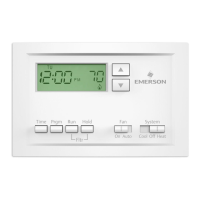
  • User Interface: Features dedicated buttons for raising/lowering temperature settings, TIME, PRGM (program), RUN, HOLD, FAN switch (ON, AUTO), and SYSTEM switch (COOL, OFF, HEAT).
  • Backlit Display: The display backlight improves contrast in low lighting conditions. It can be set to ON (light stays on for a short period after any key press) or OFF (light stays off).
  • Configuration Menu: Accessible by pressing PRGM and RUN simultaneously, this menu allows users to customize various thermostat operating characteristics, including temporary hold time, heating cycle rate, backlight display, EMR, filter replacement run time, compressor lockout, temperature display adjustment, and F°/C° readout.
  • Programming: Users can plan their heating and cooling programs using a provided table, then enter the desired times and temperatures for weekday, Saturday, and Sunday periods. The thermostat allows independent programming for heating and cooling.
  • Fan Operation: The FAN switch allows users to select continuous fan operation (ON) or automatic operation with the heating/cooling system (AUTO).
  • System Operation: The SYSTEM switch allows users to select COOL, OFF, or HEAT modes.
  • Reset Function: In case of a voltage spike or static discharge causing erratic operation, the thermostat can be reset by pressing the and TIME buttons simultaneously. This also resets factory defaults in the configuration menu.

Maintenance Features

  • Battery Replacement: The thermostat uses 2 "AA" alkaline batteries. A "BATT" indicator on the display signals low battery power, prompting replacement with fresh "AA" Energizer® alkaline batteries. Batteries should be replaced annually for optimum performance. The batteries are installed along the top of the base, with the positive (+) end to the left.
  • Filter Reminder: The "FLTR" display serves as a reminder to change or clean the air filter after a user-defined operating period.
  • Troubleshooting Guide: The manual includes a comprehensive troubleshooting section that lists common symptoms, possible causes (e.g., blown fuse, furnace power switch off, loose connections, pilot light not lit, system switch not set correctly, furnace lock-out, shorted wiring, low batteries), and corrective actions.
  • Installation Precautions: Emphasizes disconnecting electrical power before installation, proper wiring according to local and national electrical codes, and careful handling to prevent damage. It also provides guidance on handling mercury if replacing an older thermostat containing it.

Emerson White Rodgers 1F80-361 Specifications

General IconGeneral
BrandEmerson
ModelWhite Rodgers 1F80-361
CategoryThermostat
LanguageEnglish

Related product manuals