19
Remove the path separator again when resuming normal
operation!
Readout battery (accessory)
The battery compartment is located in the sealable terminal cover. It can
be tted with a lithium battery (CR 2450, 3 V), which can be replaced
when required.
CAUTION!
Risk of explosion if replaceable battery is not replaced properly!
The replaceable battery may only be inserted or removed by qualied
personnel. Batteries can leak or self-ignite.
y Never short-circuit, damage, heat or force open batteries.
In delivery condition, the battery function is inactive.
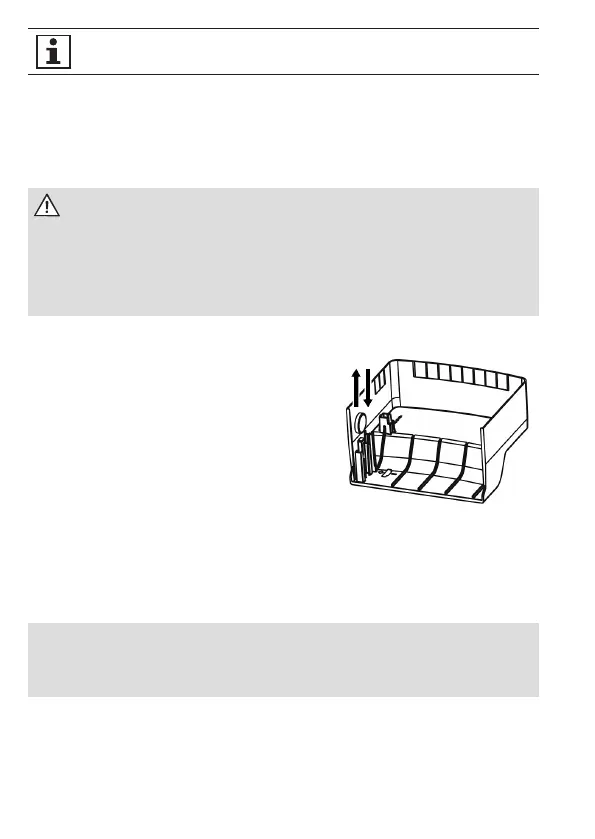
1. Remove the battery from the holder
in the terminal cover.
2. Turn the battery around and then
insert it again. While doing so,
check the terminal direction (see
illustration in terminal cover).
3. Mount the terminal cover.
Terminal cover
To prevent any unauthorised access to the connection terminals, the
terminal cover is attached with sealing screws and secured with seals.
ATTENTION!
Application of excessive torque will damage the device!
y Tighten the sealing screws to a maximum torque of 0.5 Nm.


 To Next Page
 Loading...