8
STEP 3. Establish a network connection
1. Press the Home button on the remote control and then select
Settings
to enter the Settings menu.
2. Select
Network
.
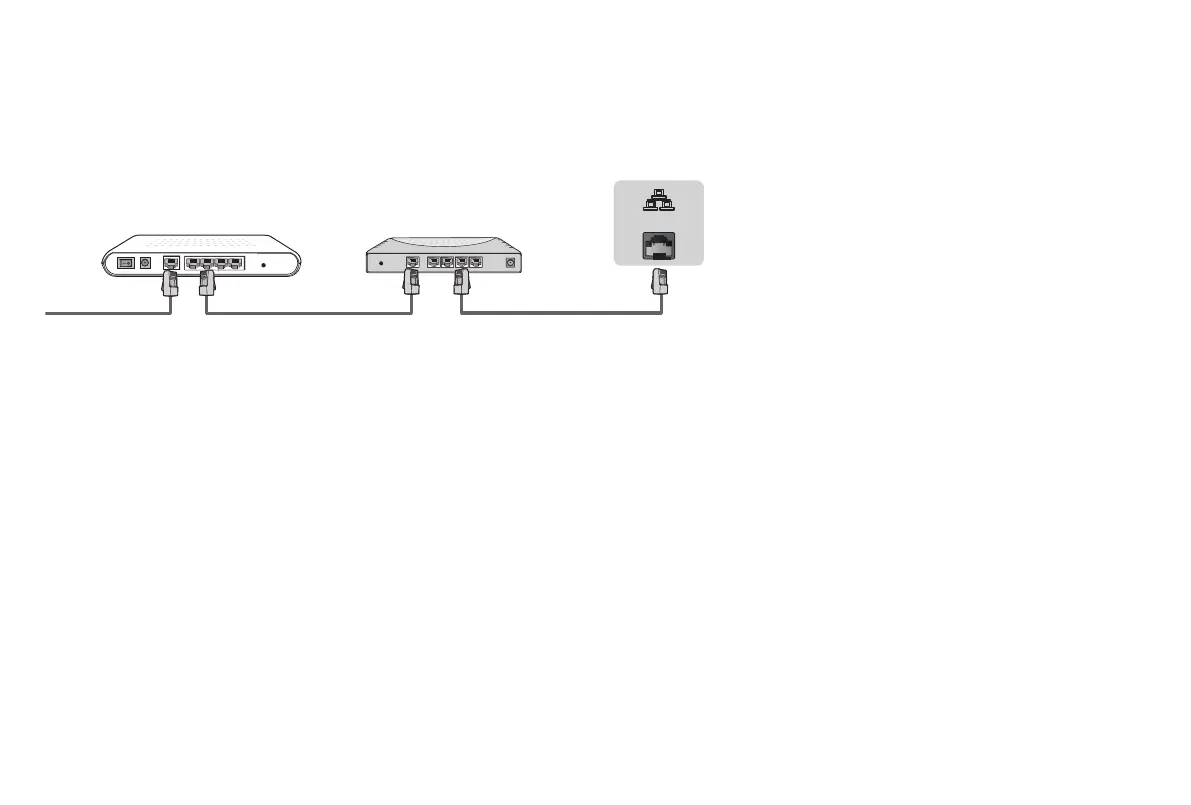
Modem Cable LAN CableLAN Cable
External Modem
(ADSL / VDSL / Cable TV)
IP Sharer (Router)
(with DHCP server)
LAN
Establish a wired network connection
Automatically obtain an IP address
1. If you have been connected to the wired network, the TV will automatically obtain an IP address and connect to the network.
NOTE: The default option of IP Settings Mode is DHCP.
2. If the connection fails then "
Not Connected
" will display for the Ethernet status. Retry or enter the
IP settings
, select
Static
to input
the information again.
Manually enter the IP address
1. Enter the
IP settings
to select
Static
.
2. Enter the IP address, Gateway, Network prefix length, DNS 1 and DNS 2 in the menu.


 To Next Page
 Loading...