e. Keyboard (see Keyboard on page 57)
f. Top cover (see
Top cover on page 59)
g. Speaker assembly (see
Speaker assembly on page 76)
h. Display assembly (see
Display assembly on page 65)
i. USB board (see
USB board on page 71)
j. Power connector cable (see
Power connector cable on page 72)
1. Turn the computer upright with the left side toward you.
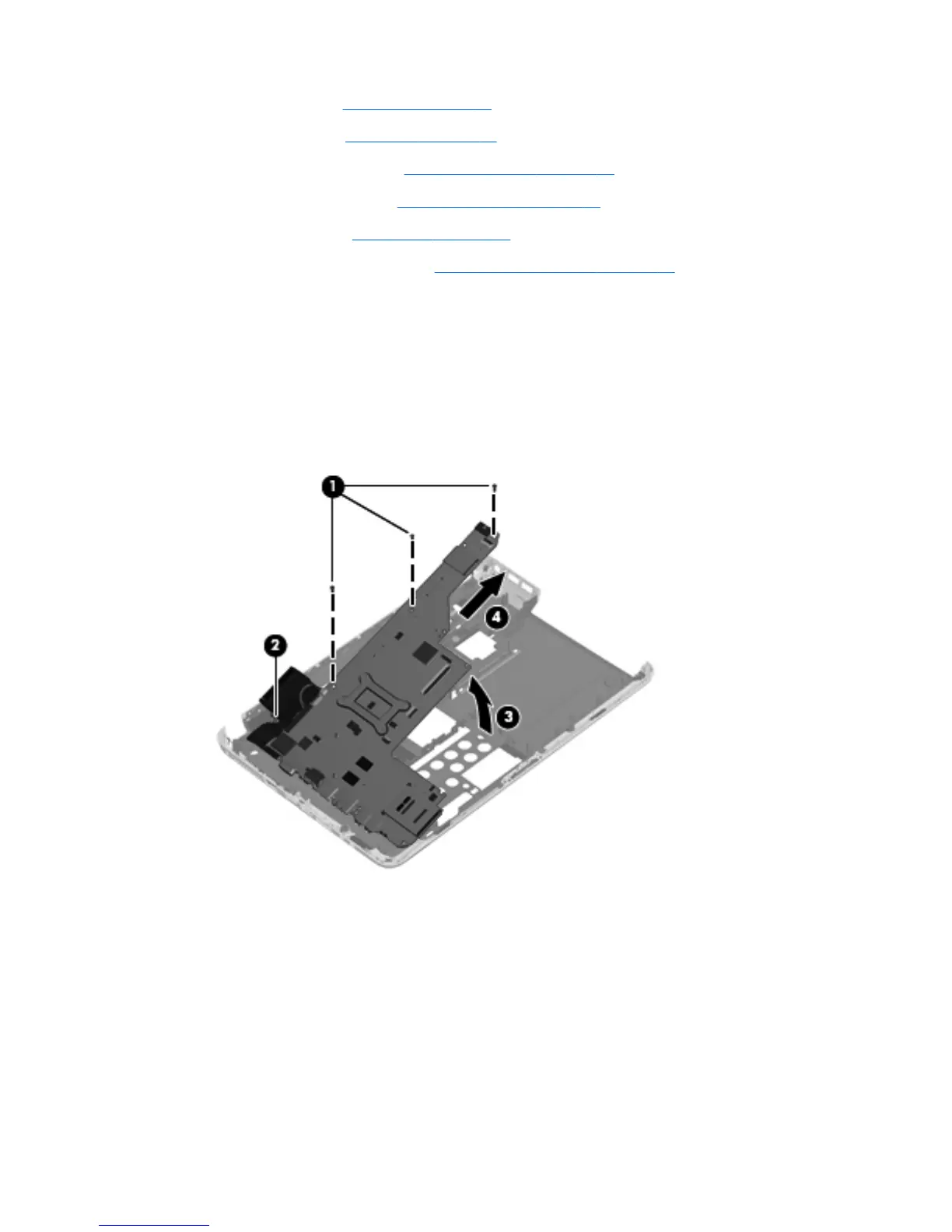
2. Remove the three Phillips PM2.5×5.0 screws (1) that secure the system board to the computer.
3. Loosen the captive screw in the fan sink that secures the system board (2).
4. Lift the right side of the system board (3).
5. Release the system board by sliding it to the right at an angle (4) until the connectors on the left
side of the system board clear the base enclosure, and then remove the system board.
Reverse the preceding procedure to install the system board.
Component replacement procedures 79



 To Next Page
 Loading...