ENGLISH
29SETTINGS
Menu Item Setting
LANGUAGE
MENU
LANGUAGE
Select the initial disc menu language. Refer also to “Language codes” on page 36.
AUDIO
LANGUAGE
Select the initial audio language. Refer also to “Language codes” on page 36.
SUBTITLE Select the initial subtitle language or remove the subtitle (OFF). Refer also to
“Language codes” on page 36.
ON SCREEN
LANGUAGE
Select the language for the on screen display.
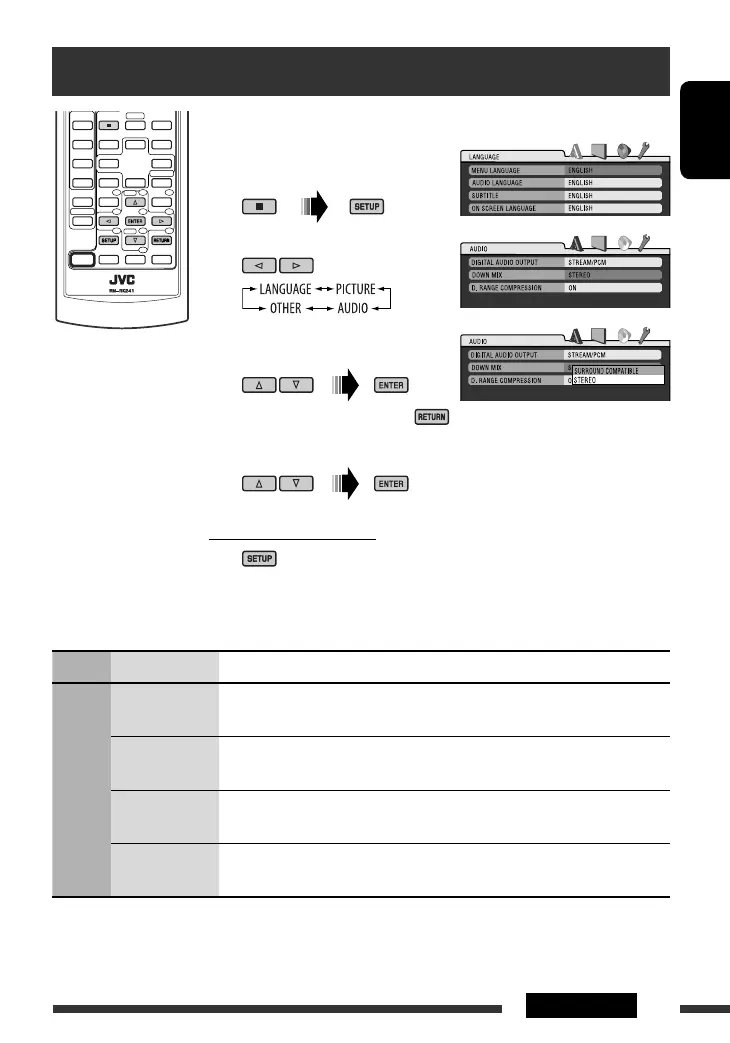
Disc setup menu
These operations are possible on the monitor using the remote controller.
~ Enter the disc setup menu
while stop.
Ÿ Select a menu.
! Select an item you want to set
up.
• To cancel pop-up menu, press .
⁄ Select an option.
To return to normal screen
Continued on the next page
EN22-29_DV5302_003A_f.indd 29EN22-29_DV5302_003A_f.indd 29 12/20/06 2:03:22 PM12/20/06 2:03:22 PM


 To Next Page
 Loading...