EasyManua.ls Logo

JVC KD-X352BT User Manual

JVC KD-X352BT
128 pages
To Next Page IconTo Next Page
To Previous Page IconTo Previous Page
Page #58 background imageLoading...
Page #58 background image
24
ESPAÑOL
Data Size: B6L (182 mm x 128 mm)
Book Size: B6L (182 mm x 128 mm)
REFERENCIAS
Mantenimiento
Limpieza de la unidad
Limpie la suciedad de la placa frontal con un paño suave o paño de silicona seco.
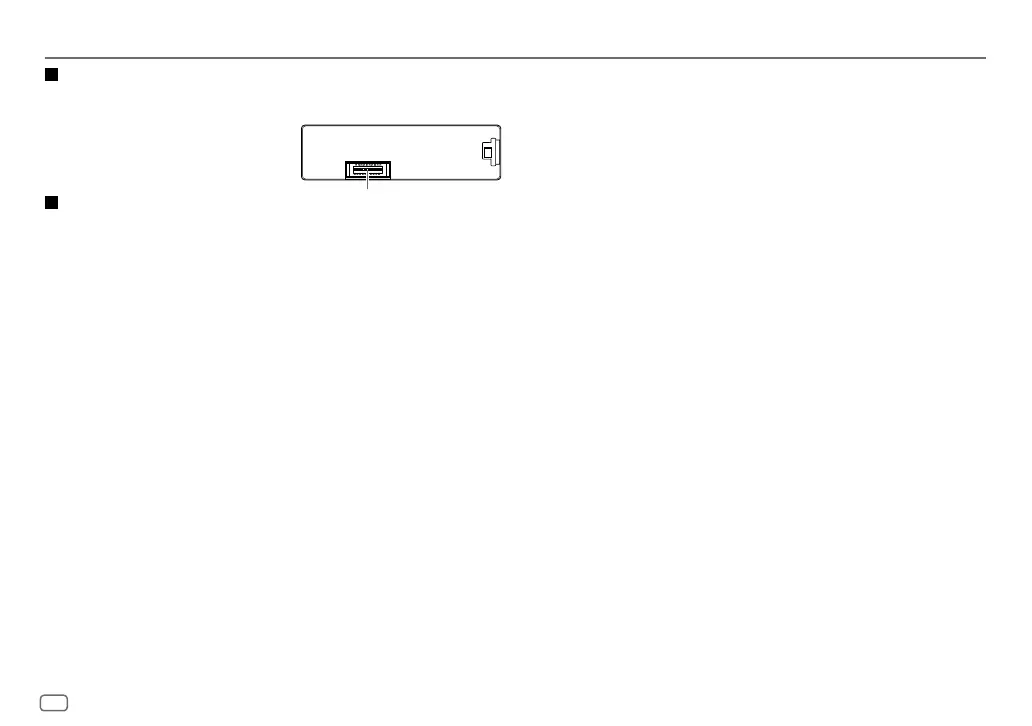
Limpieza del conector
Desmonte la placa frontal y limpie el conector con un palillo de
algodón, teniendo cuidado de no dañarlo.
Más información
Para: Últimas actualizaciones de firmware y lista de los últimos elementos compatibles
Aplicación original JVC
Cualquier otra información más reciente
Visite <http://www.jvc.net/cs/car/>.
Archivos reproducibles
Para obtener información detallada y notas acerca de los archivos de audio que pueden reproducirse, visite
<http://www.jvc.net/cs/car/>.
Archivos de audio que pueden reproducirse:
MP3 (.mp3), WMA (.wma), AAC(.aac), AAC(.m4a), WAV (.wav), FLAC (.flac)
Sistema de archivos del dispositivo USB reproducible: FAT12, FAT16, FAT32
Aunque los archivos de audio cumplan con los criterios mencionados arriba, la reproducción podría no ser posible
dependiendo de los tipos o condiciones del medio o dispositivo.
Acerca de los dispositivos USB
No es posible conectar un dispositivo USB a través de un concentrador USB.
La conexión con un cable de más de 5 m de largo puede ocasionar una reproducción anormal.
Esta unidad no puede reconocer ningún dispositivo USB cuyo régimen sea distinto de 5 V y que exceda de 1,5A.
Conector (en el reverso de la placa frontal)
Acerca del iPod/iPhone
A través del terminal de entrada USB:
Made for
iPod touch (5th y 6th generation)
iPod nano (7th generation)
iPhone 4S, 5, 5S, 5C, 6, 6 Plus, 6S, 6S Plus, SE, 7, 7 Plus
A través de Bluetooth:
Made for
iPod touch (5th y 6th generation)
iPhone 4S, 5, 5S, 5C, 6, 6 Plus, 6S, 6S Plus, SE, 7, 7 Plus
No se puede navegar a través de archivos de video en el menú “Videos en
[HEAD MODE]
.
El orden de canciones mostrado en el menú de selección de esta unidad puede diferir del que se encuentra en el
iPod/iPhone.
Según la versión del sistema operativo del iPod/iPhone, algunas funciones podrían no estar disponibles en esta
unidad.
Acerca del dispositivo Android
Esta unidad es compatible con Android OS 4.1 y superior.
Algunos dispositivos Android (con OS 4.1 y superior) pueden no ser completamente compatibles con Android Open
Accessory (AOA) 2.0.
Si el dispositivo Android es compatible con dispositivos de clase de almacenamiento masivo y con AOA2.0, esta
unidad siempre reproducirá con prioridad a través de AOA 2.0.
Acerca de Spotify
La aplicación Spotify es compatible con:
iPhone 4S, 5, 5S, 5C, 6, 6 Plus, 6S, 6S Plus, SE, 7, 7 Plus (iOS 8 o superior)
iPod touch (5th y 6th generation)
Android OS 4.0.3 o superior
Debido a que Spotify es un servicio de terceros, las especificaciones se encuentran sujetas a cambios sin previo aviso.
Por consiguiente, la compatibilidad podría verse afectada, y alguno o todos los servicios podrían dejar de estar
disponibles.
Algunas funciones de Spotify no están disponibles desde esta unidad.
Si tiene alguna duda sobre el uso de esta aplicación, póngase en contacto con <www.spotify.com>.
JS_JVC_KD_X352BT_E_SP.indd 24JS_JVC_KD_X352BT_E_SP.indd 24 21/8/2017 8:40:39 AM21/8/2017 8:40:39 AM

Table of Contents

Question and Answer IconNeed help?

Do you have a question about the JVC KD-X352BT and is the answer not in the manual?

JVC KD-X352BT Specifications

General IconGeneral
Audio systemMOS-FET
MP3 playbackYes
CD-R playbackNo
Audio formats supportedFLAC, MP3, WAV, WMA
DIN size1 DIN
Output power350 W
Product colorBlack
Volume controlRotary
Audio output channels- channels
Equalizer bands quantity13
Maximum power per channel50 W
AM band range531 - 1611 kHz
FM band range87.5 - 108 MHz
Supported radio bandsAM, FM
Preset stations quantity24
Bluetooth version3.0+HS
Bluetooth profilesA2DP, AVRCP, HFP
Display typeLCD
Illumination colorWhite
Key illumination colorRed
Package weight1000 g
Weight and Dimensions IconWeight and Dimensions
Depth53 mm
Width182 mm
Height100 mm
Weight600 g

Summary

Health and Environmental Precautions

Disposal of Old Equipment and Batteries

Information on proper disposal of electronic waste and batteries, including lead content.

Before Use

Important Safety Information

Key information for safe and proper operation, including warnings and cautions.

Manual Navigation Guide

Guidelines on understanding the manual's structure and symbols.

Basics of Operation

Faceplate Controls and Display

Overview of the unit's front panel controls and display.

Unit Reset Procedure

Procedure for resetting the unit to its default settings.

Getting Started

Initial Setup and Configuration

Steps for canceling demonstration, setting clock, and basic configurations.

Clock and Radio Settings

Clock Configuration

Options for automatic time sync and display behavior.

Radio Tuning and Memory

Methods for finding stations and storing favorite channels.

Radio Features

Tuner Settings and Options

Configuration options for radio tuning modes and reception.

Radio Timer and Station Seek

Setting timer, Auto Station Store (SSM), and Local Seek functions.

USB, iPod, and Android Connectivity

Device Playback and Control

Initiating playback and controlling connected devices.

Music Drive Selection

Specifying which storage drive to access for music playback.

Advanced USB/iPod/Android Operations

JVC Remote App and File Management

Configuring the JVC Remote app and navigating/searching audio files.

Spotify Integration

Spotify Setup and Content Management

Steps for preparing, starting, saving, and searching Spotify content.

Bluetooth Connectivity

Initial Pairing and Microphone Setup

Initial setup for pairing Bluetooth devices and connecting the microphone.

Bluetooth Mobile Phone Functions

Auto Pairing and Call Management

Automatic pairing and handling of incoming phone calls.

Bluetooth Call Quality and Settings

Voice Quality and Call Receiving Configuration

Enhancing call clarity and configuring auto-answer and ring patterns.

Bluetooth Calling Features

Making Calls and Using Contact Memory

Initiating calls via voice or stored contacts.

Bluetooth Mode Settings

Device Management and Compatibility

Adjusting modes, selecting devices, editing PIN, and checking compatibility.

Bluetooth Audio Playback

Operating the Bluetooth Audio Player

Controlling and playing audio from Bluetooth devices.

Bluetooth Application Integration

JVC Remote App and iPhone/iPod Streaming

Configuring the JVC Remote app and streaming music from iPhone/iPod.

Bluetooth Internet Radio and AUX Input

Internet Radio via Bluetooth

Streaming internet radio content via Bluetooth.

Connecting External Audio Players via AUX

Connecting and playing audio from external devices via AUX input.

Audio Settings - Equalizer and Control

Equalizer Presets and Easy EQ

Selecting preset equalizer curves and adjusting easy EQ settings.

Advanced EQ and Audio Controls

PRO EQ, 62.5HZ, Q Factor, Bass Boost, Loudness, and Subwoofer settings.

Audio Settings - Effects and Speaker Config

Sound Effects and Enhancements

Adjusting space, response, sound lift, volume link EQ, and K2 Technology.

Speaker Balance, Gain, and Output

Adjusting Fader, Balance, Volume, Amp Gain, and Speaker Output settings.

Audio Settings - Crossover Details

Speaker Size and Crossover Settings

Selecting speaker size and configuring crossover frequencies.

Audio Settings - Crossover Parameters

2-Way Crossover Settings

Specific parameters for 2-way speaker crossover configuration.

3-Way Crossover Settings

Specific parameters for 3-way speaker crossover configuration.

Audio Settings - Digital Time Alignment

DTA Setup and Car Settings

Setting speaker delay times based on listening position and car type.

Display Settings

Brightness, Text Scroll, and Dimmer

Adjusting screen brightness, text behavior, and dimmer operation.

References - Maintenance

Cleaning, Care, and Information Sources

Instructions for cleaning, finding updates, and playable file details.

References - Device Compatibility

Compatibility Information

Information on supported devices and display information for various sources.

Troubleshooting - General Issues

Sound, Connection, and Radio Problems

Solutions for common sound, connection, and reception problems.

USB/iPod and Android Device Issues

Troubleshooting steps for USB/iPod and Android device connectivity and playback.

Troubleshooting - Advanced Device Issues

Android, Spotify, and Bluetooth Problems

Solutions for intermittent playback, connectivity, and voice quality issues.

Technical Specifications

Tuner, USB, Auxiliary, and Bluetooth Specs

Detailed technical data for tuner, USB, AUX, and Bluetooth modules.

Audio, Power, and General Specs

Specifications for audio output, speaker impedance, power, and general electrical data.

Installation and Connection

Installation Warnings, Cautions, and General Specs

Safety advice, precautions, operating voltage, current, and physical specs.

Installation Procedure

Parts List and Mounting Steps

Components for installation and instructions for mounting the unit.

Wiring Connection Guide

Harness and ISO Connector Wiring

Detailed wiring diagrams for connecting the unit and ISO connectors.

Legal and Copyright Information

Software Licenses and Trademarks

Details on libFLAC license, trademarks, and compatibility notices.
Related product manuals