45
ALWAYS CHECK THE OWNER’S MANUAL FOR COMPLETE OPERATING INFORMATION AND SAFETY WARNINGS. *IF EQUIPPED †LEGAL DISCLAIMERS ON BACK INSIDE COVER
N
P
RELEASE
AUTO
HOLD
DR
DRIVE
MODE
P
Parking Distance Warning-Forward and
Reverse*
†7
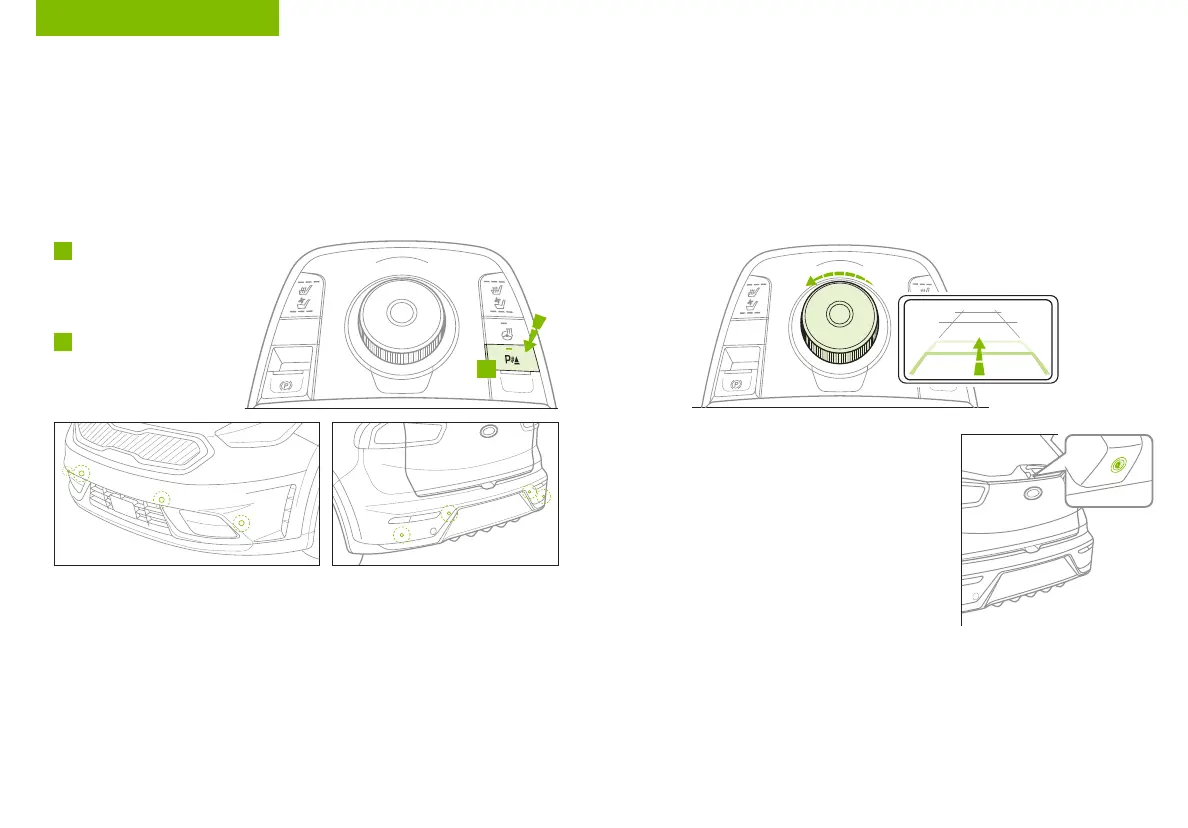
The Parking Distance Warning-Forward and Reverse* is a
supplemental system that is designed to assist the driver by chiming if any
object is detected within the sensing area to the front and rear of the vehicle
when moving forward or backing up.
The system is activated when the ignition is ON/READY and the vehicle is
in R (Reverse). To deactivate the system, press the Parking Distance
Warning-Forward* button
A
(LED illuminated),
when vehicle is in D (Drive)
or R (Reverse).
To activate, press button
A
again (LED not
illuminated).
REMINDERS:
• If the vehicle is moving at speeds over 3 mph, the system may not activate correctly
• When more than two objects are sensed at the same time, the closest one will be
recognized first
• The above images are for illustration purposes only. Operational details may vary
The Parking Distance Warning-Forward and Reverse* system is not a substitute for proper and
safe parking and backing-up procedures. Always drive safely and use caution when backing
up. The Parking Distance Warning-Forward and Reverse system* may not detect every object in
front of or behind the vehicle.
Rear-Camera Display*
†7
The Rear-Camera Display is a supplemental system that displays the
view behind the vehicle through the audio system screens while the
vehicle is in Reverse.
The Rear-Camera Display activates when the:
• POWER button is in the ON/READY position
• Rotary Dial Shifter Knob is in the R (Reverse) position
REMINDERS:
• The images shown are for illustration purposes only
and may not reflect actual operation
• UVO link – While camera is active, only the audio
controls on the Audio System can be operated
• UVO link with Navigation* – While camera is active,
only the Audio System can be operated on the Steering
Wheel and Audio Control Unit. All other features are
disabled
The Rear-Camera Display is not a substitute for proper and
safe backing-up procedures. The Rear-Camera Display may
not display every object behind the vehicle. Always drive
safely and use caution when backing up.
OTHER KEY FEATURES
N
P
P
RELEASE
AUTO
HOLD
DRIVE
MODE
DR
A



 To Next Page
 Loading...