Appendix-4 OPERATION GUIDE
1
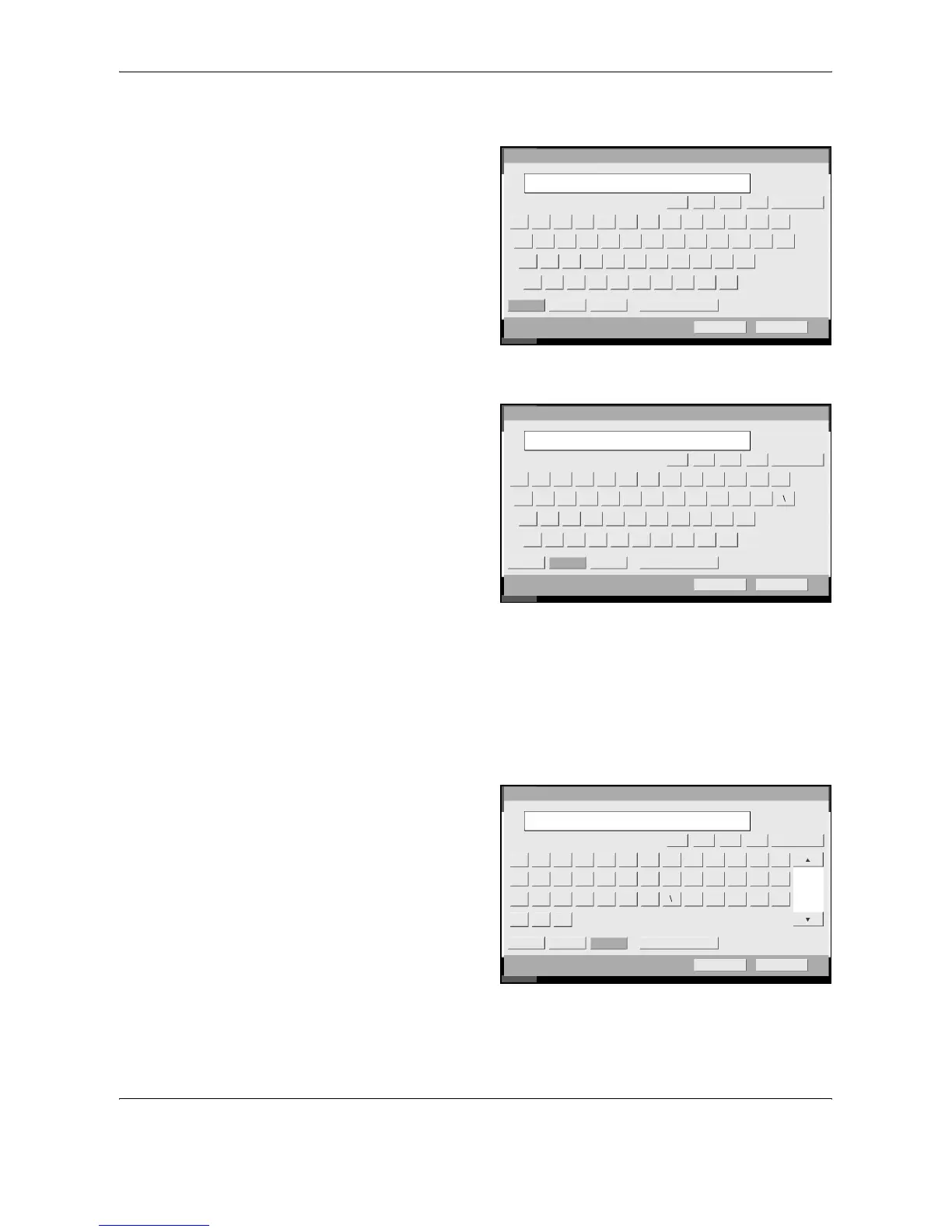
Press [Upper-case].
2
Press [L]. The letter
L is shown on the
display.
3
Press [Lower-case].
4
Press [i], [s], [t] and
[Space].
5
Press [Upper-case].
6
Press [A].
7
Press [No./Symbol].
8
Press [S] or [T] repeatedly to view the keyboard containing [-] and [1].
9
Press [-] and [1].
10
Check that the entry is correct. Press [OK].
Us e th e keybo ard to enter.
Limit: ch aracters
Lower-case N o./Symbol Space
Cancel OK
Upper-case
Status
6/6/2006 10:00
Inp ut: charact ers
1
32
L
Backspace
ZXCVBN M >?
:L
<
"KJHFDGSA
PO{IUYRETWQ }l
)(_*&^$#%@! +~
Account Name
JIKL
Us e th e keybo ard to enter.
Limit: ch aracters
Lower-case No./Symbol Space
Cancel OK
Upper-case
Status
6/6/2006 10:00
Inp ut: charact ers5
32List
Backspace
Account Name
1 2 3 4 5 6 7 8 9 0 - = `
q w e r t y u i o p [ ]
a s d f g h j k l ; ·
z x c v b n m , . /
JIKL
Us e th e keybo ard to enter.
Limit: ch aracters
Lower-case No./Symbol Space
Cancel OK
Upper-case
Status
6/6/2006 10:00
Inp ut: characters
8
32
1/4
List A-1
-,.+*)
·
&(%$ /:
09!87
6
43521 “#
Account Name
^]_[@>=?<; `{
~}l
BackspaceJIKL


 To Next Page
 Loading...