LGE Internal Use OnlyCopyright © 2007 LG Electronics. Inc. All right reserved.
Only for training and service purposes
- 12 -
6.3. Adjustment of RGB
(1) Required Equipments
- Remote controller for adjustment
- MSPG-925FS Pattern Generator
(Which has XGA [1024*768] 60Hz 8 Color bar 100%
pattern shown in Fig. 1)
(2) Method of Auto RGB Color Balance
1) Input the PC 1024x768@60Hz 100% Color Bar (MSPG-
925FS model:60, pattern:65) signal into RGB.
(Using D-sub to D-sub cable)
2) Set the PSM to Dynamic mode in Picture menu.
3) Press the IN-START key on R/C for adjustment
4) Press the
G(Vol.+) key operate To set , then it becomes
automatically.
5) Auto-RGB OK means adjustment is completed.
* Before White-balance, the AV ADC should be done.
7. White Balance
* Test Equipment
Color Analyzer (CA-210/CH.9)
-> When you adjust LCD color temperature, on Color
analyzer (CA-210), you should use Channel 9 which is
Matrix compensated (White, Red, Green, Blue revised) by
CS-1000 and adjust in accordance with White balance
adjustment coordinate which is specified on the next.
* Color temperature standards according to CSM and Module
Cool : 11,000k
Medium : 9,300k
Warm : 6,500k
* White balance adjustment coordinate and color temperature
- PC (for communication through RS-232C)
-> UART Baud rate : 115200 bps
- Luminance Y AV : upper 150 cd/m
2
(Typ : 350 cd/m
2
)
-> Applying to Cool, Medium, Warm mode
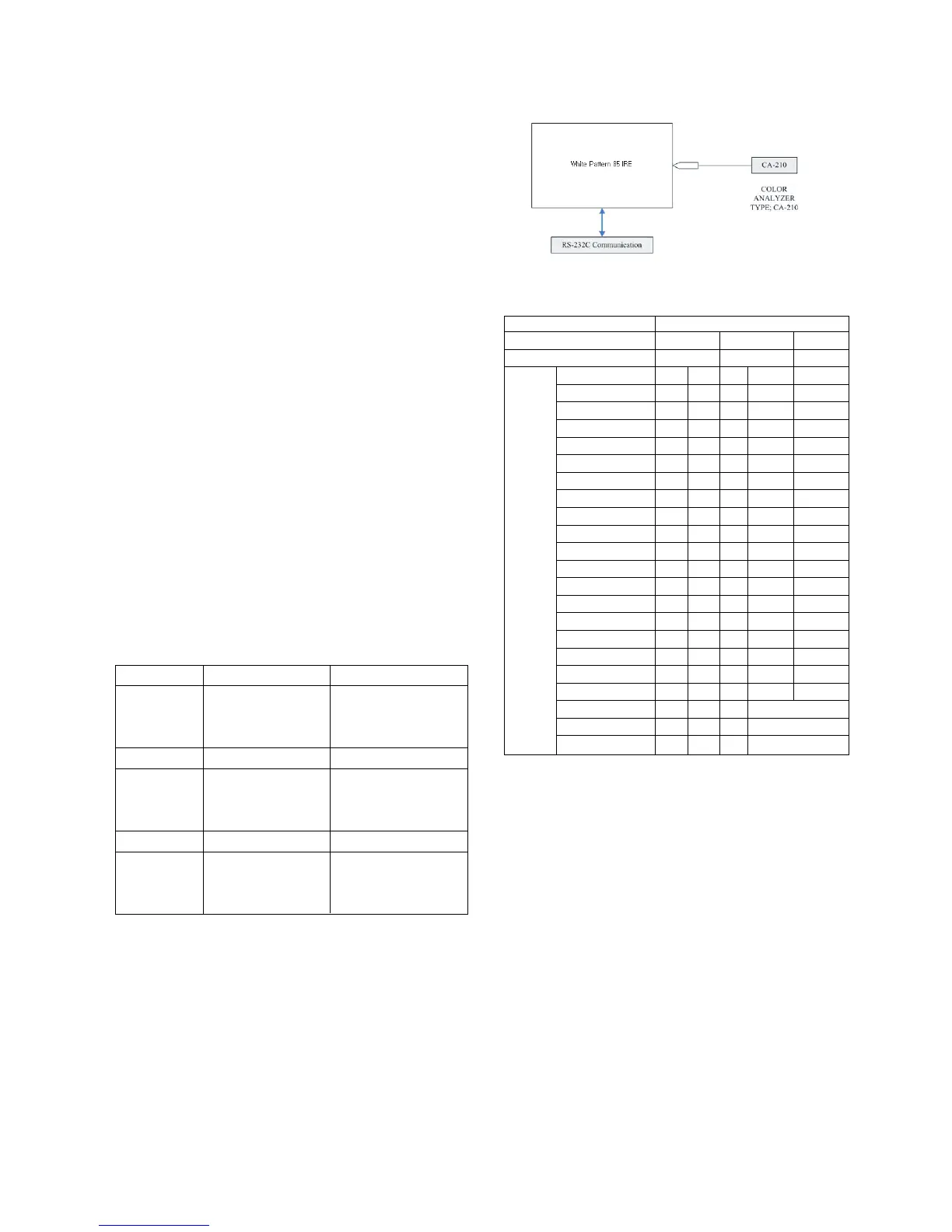
* Connecting picture of the measuring instrument (On
Automatic control)
Inside PATTERN is used when W/B is controlled. Connect to
auto controller or push control R/C IN-START
-> Enter the mode of White-Balance, the pattern will come
out.
* Auto adjustment Map (RS-232C)
* Auto-control interface and directions
1) Adjust in the place where the influx of light like floodlight
around is blocked. (illumination is less than 10ux).
2) Adhere closely the Color Analyzer ( CA-210 ) to the
module less than 10cm distance, keep it with the surface
of the Module and Color Analyzer’s Prove
vertically.(80~100°).
3) Aging time
- After aging start, keep the power on (no suspension of
power supply) and heat-run over 15 minutes.
- Using ‘no signal’ or ‘full white pattern’ or the others,
check the back light on.
Cool CS-1000 CA-210(CH 9)
x 0.276 0.276±0.002
y 0.283 0.283±0.002
∆uv 0.000 0.000
Medium CS-1000 CA-210(CH 9)
x 0.285 0.285±0.002
y 0.293 0.293±0.002
∆uv 0.000 0.000
Warm CS-1000 CA-210(CH 9)
x 0.313 0.313±0.002
y 0.329 0.329±0.002
∆uv 0.004 0.004
<Fig. 2> Connecting picture (On Automatic Control)
Type LD74A
Baud Rate Data bit Stop bit Parity
115200 8 1 None
Protocol Index Cmd 1 Cmd 2 Data Min Value Max Value
Setting R-Gain_Normal j a 00(00) 128(80)
G-Gain_Normal j b 00(00) 128(80)
B-Gain_Normal j c 00(00) 128(80)
R-Gain_Warm j d 00(00) 128(80)
G-Gain_Warm j e 00(00) 128(80)
B-Gain_Warm j f 00(00) 128(80)
R-Gain_Cool j g 00(00) 128(80)
G-Gain_Cool j h 00(00) 128(80)
B-Gain_Cool j i 00(00) 128(80)
R-Offset_Normal l j 00(00) 128(80)
G-Offset_Normal l k 00(00) 128(80)
B-Offset_Normal l l 00(00) 128(80)
R-Offset_Warm l m 00(00) 128(80)
G-Offset_Warm l n 00(00) 128(80)
B-Offset_Warm l o 00(00) 128(80)
R-Offset_Cool l p 00(00) 128(80)
G-Offset_Cool l q 00(00) 128(80)
B-Offset_Cool l r 00(00) 128(80)
Internal Pattern Signal w b 00 W/B adjustment Start
Internal Pattern Signal w b 10 Internal Pattern use
Internal Pattern Signal w b ff W/B adjustment end


 To Next Page
 Loading...