rr
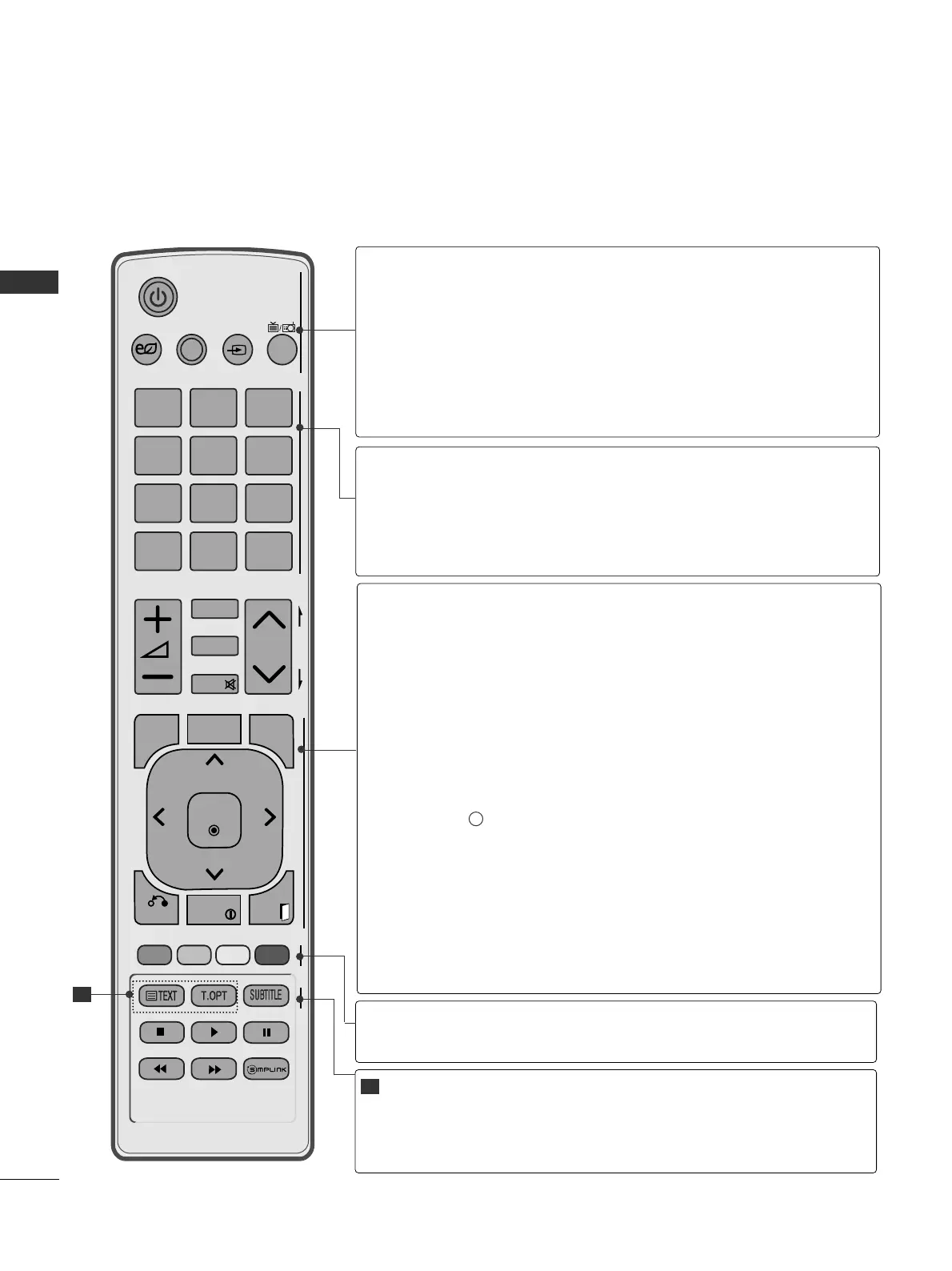
(POWER)
ENERGY SAVING
AV MODE
INPUT
TV/RAD
Switches the TV on from standby or off to standby.
Adjust the Energy Saving mode of the TV.(
GG
pp..7744
)
It helps you select and set images and sounds when con-
necting AV devices.(
GG
pp..3388
)
External input mode rotate in regular sequence.
(
GG
pp..3322
)
Selects Radio, TV and DTV channel.
0 to 9 number
button
LIST
Q.VIEW
Selects a programme.
Selects numbered items in a menu.
Displays the programme table.
(
GG
pp..3300
)
Returns to the previously viewed programme.
Coloured
buttons
These buttons are used for teletext (on
TTEELLEETTEEXXTT
models only) ,
PPrrooggrraammmmee eeddiitt
.
TELETEXT
BUTTONS
SUBTITLE
These buttons are used for teletext.
For further details, see the ‘Teletext’ section.(
GG
pp..110077
)
Recalls your preferred subtitle in digital mode.
1
1
MENU
GUIDE
Q. MENU
BACK
INFO i
EXIT
THUMBSTICK
(Up/Down/Left/Right)
OK
Selects a menu.
Clears all on-screen displays and returns to TV viewing
from any menu.
(
GG
pp..1166
)
Shows programme schedule.
(
GG
pp..6688
)
Select the desired quick menu source. (Aspect Ratio,
Clear Voice II , Picture Mode, Sound Mode, Audio, Sleep
Timer, Favourite, Energy Saving).
(
GG
pp..1155
)
Allows the user to move return one step in an interactive
application, EPG or other user interaction function.
Shows the present screen information.
Clears all on-screen displays and returns to TV viewing
from any menu.
Allows you to navigate the on-screen menus and adjust
the system settings to your preference.
Accepts your selection or displays the current mode.


 To Next Page
 Loading...