D
D
D
L
L
L
P
P
P
P
P
P
r
r
r
o
o
o
j
j
j
e
e
e
c
c
c
t
t
t
o
o
o
r
r
r
—
—
—
U
U
U
s
s
s
e
e
e
r
r
r
’
’
’
s
s
s
M
M
M
a
a
a
n
n
n
u
u
u
a
a
a
l
l
l
– 34 –
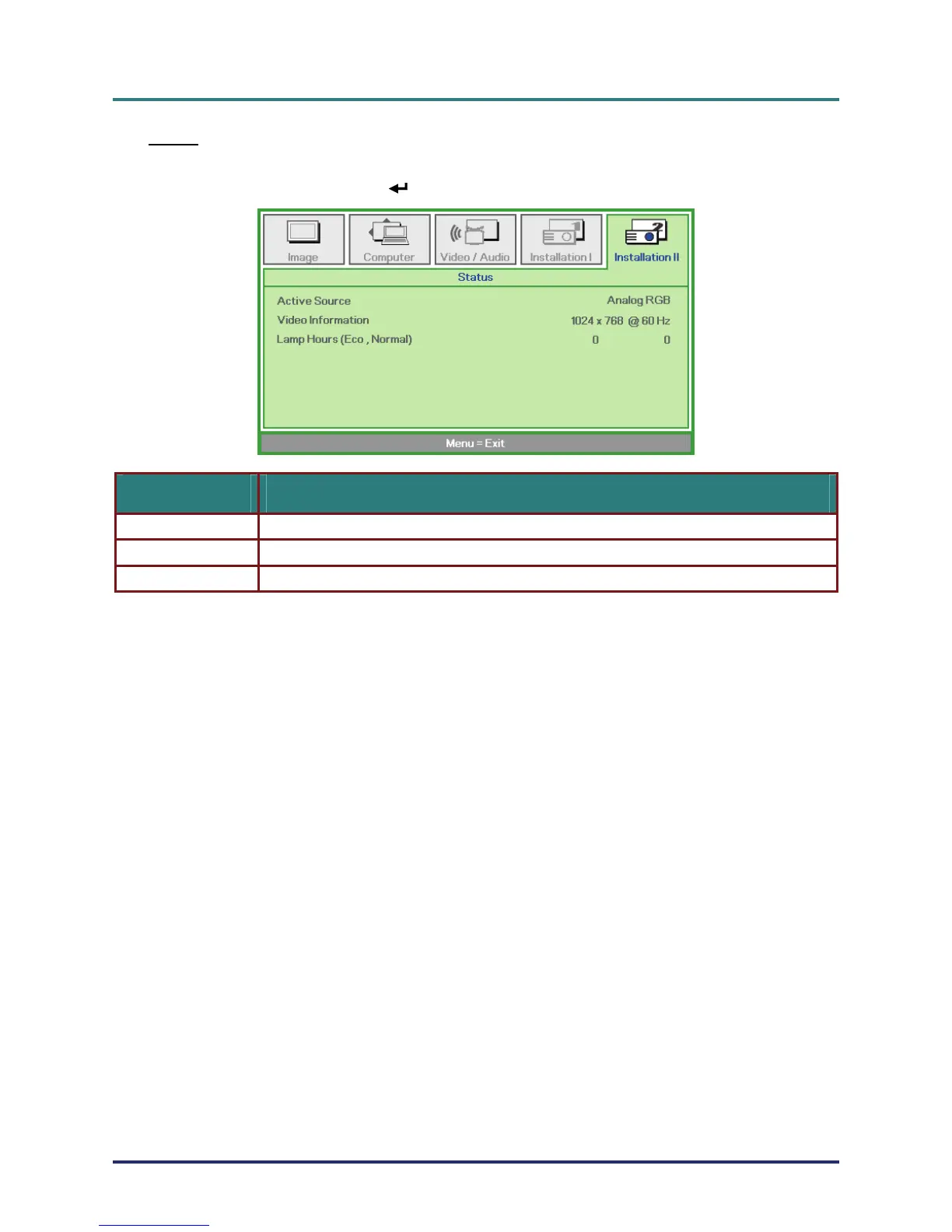
Status
Press the cursor ▲▼ button to move up and down in the Installation II menu. Select the
Installation II sub menu and press
(Enter) / ► to enter the Status sub menu.
ITEM DESCRIPTION
Active Source Display the activated source.
Video Information Displays resolution/video information for RGB source and color standard for Video source.
Lamp Hours Lamp hour used information is displayed. Eco and Normal counters are separated.


 To Next Page
 Loading...