17
EN
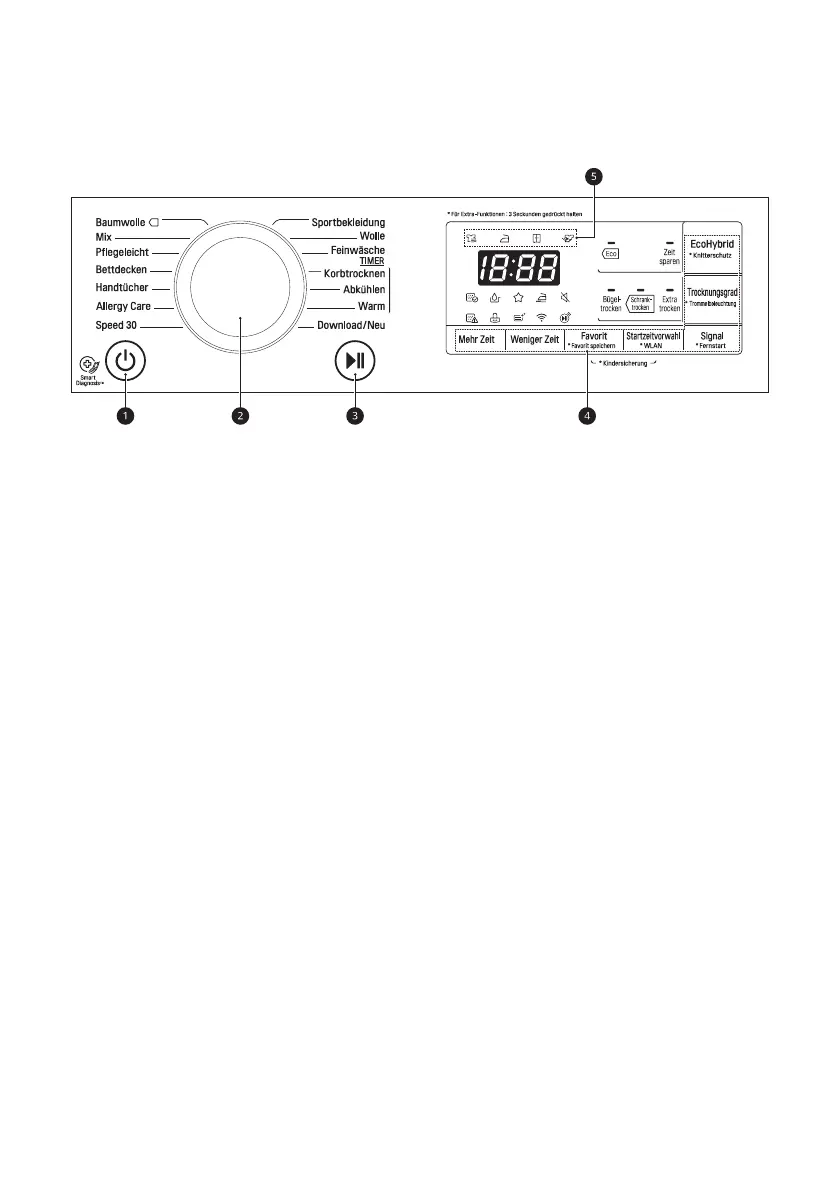
Control Panel
a
Power Button
• Press the Stromzufuhr button to turn
power on and off.
• Press the Stromzufuhr button to cancel
the Delay End function.
b
Programme Selector
• Programmes are available according to the
laundry type.
• The lamp will light up to indicate the
selected programme.
c
Start/Pause Button
• This Start/Pause button is used to start or
pause a dry cycle.
• When in Pause, the power is turned off
automatically after 14 minutes.
d
Additional Programme Buttons
• Use these buttons to select the desired
options for the selected programme.
• In order to use the Remote Start function,
refer to INTELLIGENTE FUNKTIONEN.
e
Drying Progress Indicator
• The different indicator icon lights up
depending on the drying cycle progress.
− @ : This icon lights up when the
appliance is in drying progress.
− - : This icon lights up when the
appliance is in iron drying progress.
− + : This icon lights up when the
appliance is in cupboard drying progress.
− = : This icon lights up when the
appliance is in cooling progress.
Display
• K : This icon indicates that the lint filter
should be cleaned or is clogged.
− Cleaning notice: When you press the
Power button, the icon will become
displayed.
• D : This icon indicates that the water
container needs to be emptied or is full.
− Emptying notice: When you press the
Power button, this icon will become
displayed.
− Full water notice: The icon will become
displayed and a buzzer will sound while
the appliance is in operation.
• L : This icon indicates the lint filter
insertion status. If the lint filter is not
inserted, the appliance will not operate and
the icon will become displayed.
• I : This icon indicates the condenser auto
cleaning status. The icon will be displayed
during water sprays to the condenser.


 To Next Page
 Loading...