Home
Lumens
Document Camera
DC-W80
Page 17 (Use with Ladibug (USB Mode))
Lumens DC-W80 - Use with Ladibug (USB Mode)
36 pages
Manual
To Next Page
To Next Page
To Previous Page
To Previous Page
Loading...
English
-
16
5.3
Use with Ladibug (USB Mode)
1.
Switch to
USB mode, and use a USB cable to
connect DC-
W80
and the
computer
.
2.
Open
Ladibug
, c
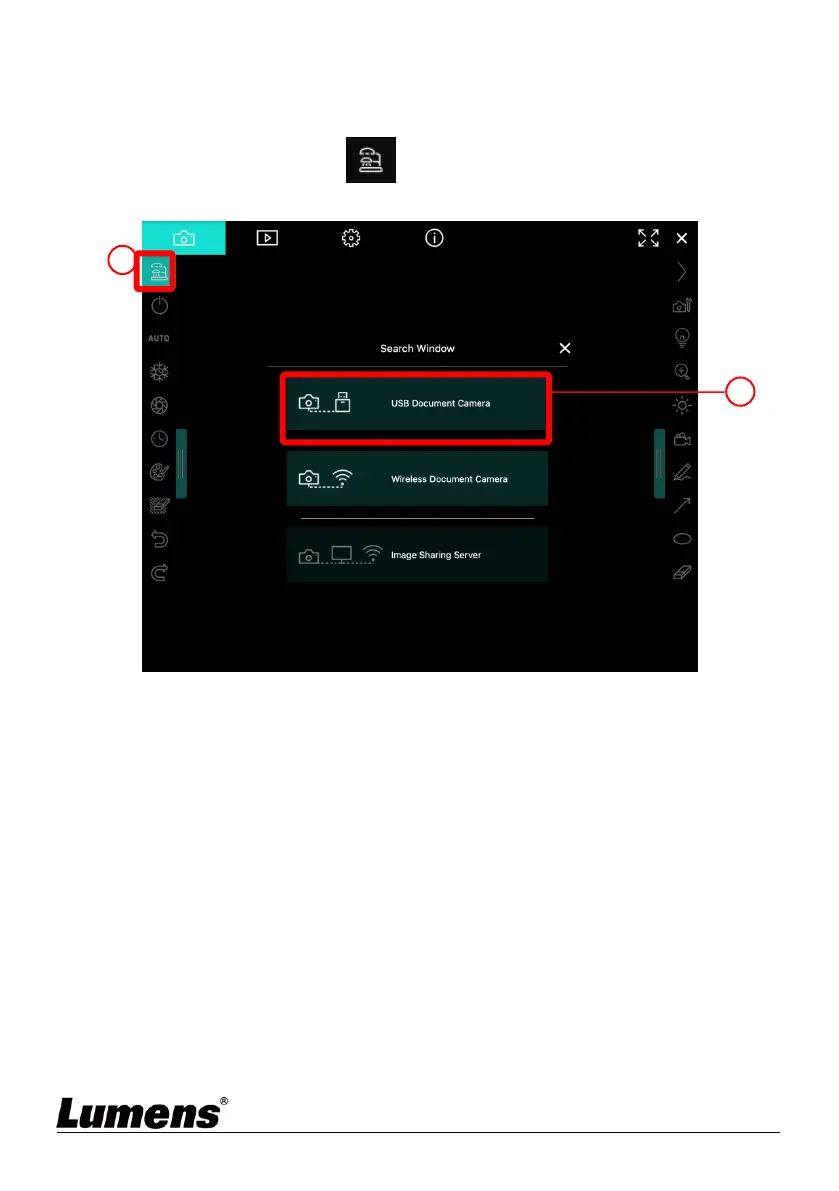
lick
to open the
[Search Window], and
select [USB Document Camera].
3.
Y
ou can start using
DC
-
W80
.
1
2
16
18
Table of Contents
Main Page
Default Chapter
2
Table of Contents
2
Copyright Information
4
Chapter 1 Safety Instructions
5
Chapter 2 Package Contents
6
Chapter 3 Product Overview
7
Overview
7
Extension Angle
7
Notes for Operation
8
I/O Functions Introduction
8
Description of LED Indicator
9
Relative Position of the Presenter and Document
10
Chapter 4 Installation and Connections
11
Machine Size
11
Installation and Setup
11
Connecting to a Computer and Use Lumens™ Software (Wi-Fi Mode)11
12
Connect to a Projector, Monitor or HDTV (HDMI Mode)
12
Connecting to a Computer and Use Lumens™ Software (USB Mode)12
13
Installing Application Software
13
Chapter 5 Start Using
14
Direct Use (HDMI Mode)
14
Use with Ladibug (Wi-Fi Mode)
15
Use with Ladibug (USB Mode)
17
Chapter 6 Introductions to Control Panel Buttons
18
Chapter 7 Descriptions of Major Functions
19
I Would Like to Automatically Adjust the Image to Have the Best Brightness and Focusing Performance
19
I Would Like to Freeze the Live Image
19
I Would Like to Turn On/Off the Lamp
19
I Would Like to Zoom In/Out Images
19
I Would Like to Adjust the Brightness
19
I Would Like to Rotate the Image
20
I Would Like to Enlarge a Part of the Image
20
Chapter 8 Wi-Fi Connection Setting
21
Network Connection
21
Log in to the Web Page
21
Web Page Menu Function Description
22
Chapter 9 Set DC-W80 as an AP
31
Connection Diagram
31
Device Requirements
31
Setting DC-W80
31
Chapter 10 DIP Switch Setting
34
Description of DIP
34
Resolution Switch
34
Chapter 11 Troubleshooting
35
Information
36
Other manuals for Lumens DC-W80
Quick Start Guide
2 pages
Related product manuals
Lumens DC-F80
21 pages
Lumens DC166
36 pages
Lumens DC170
41 pages
Lumens DC120
50 pages
Lumens DC125
57 pages
Lumens DC136
14 pages
Lumens CL510
42 pages
Lumens PS752
47 pages
Lumens PC193
42 pages
Lumens PS760
54 pages
Lumens PS660
42 pages



 To Next Page
 Loading...










