the same as setting temperature. It is
available under cooling, heating, auto
mode.
④ ON/OFF indication :
When it is on, the icon display, otherwise
it is extinguished.
⑤ Fan speed indication:
There are four fan modes: low, middle,
high, auto. For some models, no middle
fan then the middle fan is seen as high
speed.
⑥ Lock:
When the "LOCK" button is pressed, the
icon appear and other buttons is unable,
press again, the icon disappear.
⑦ Temperature display zone:
Generally it displays setting tempera-
ture, it can be adjusted by press
temperature button ▲ and ▼. But in fan
mode, no display here.
4
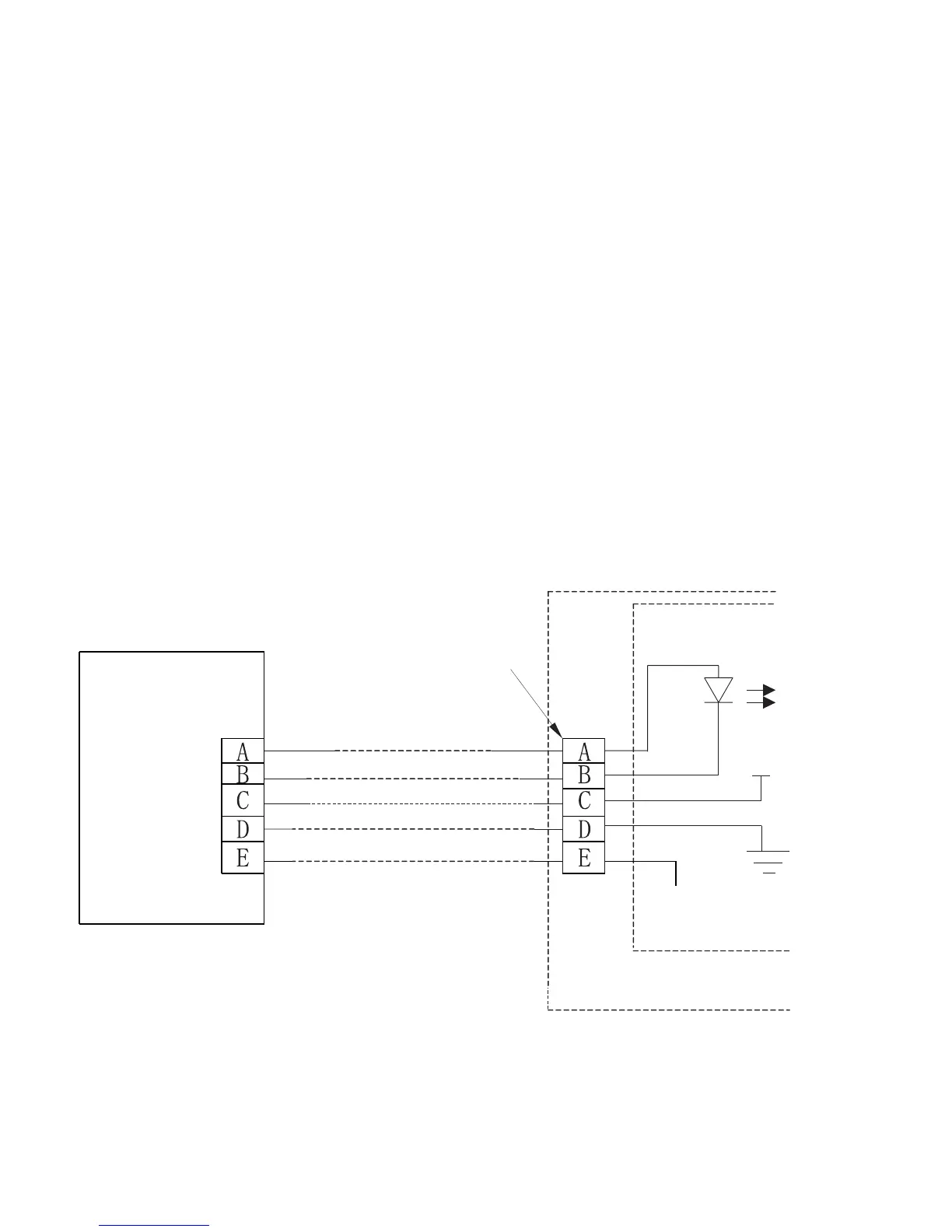
5. INSTALLATION METHOD
5-Core Shield Cable
5-way terminal
Emitter tube
Indoor Unit
RUN
GND
+5V
Indoor switch board
Wire Controller



 To Next Page
 Loading...