1-3
System Overview
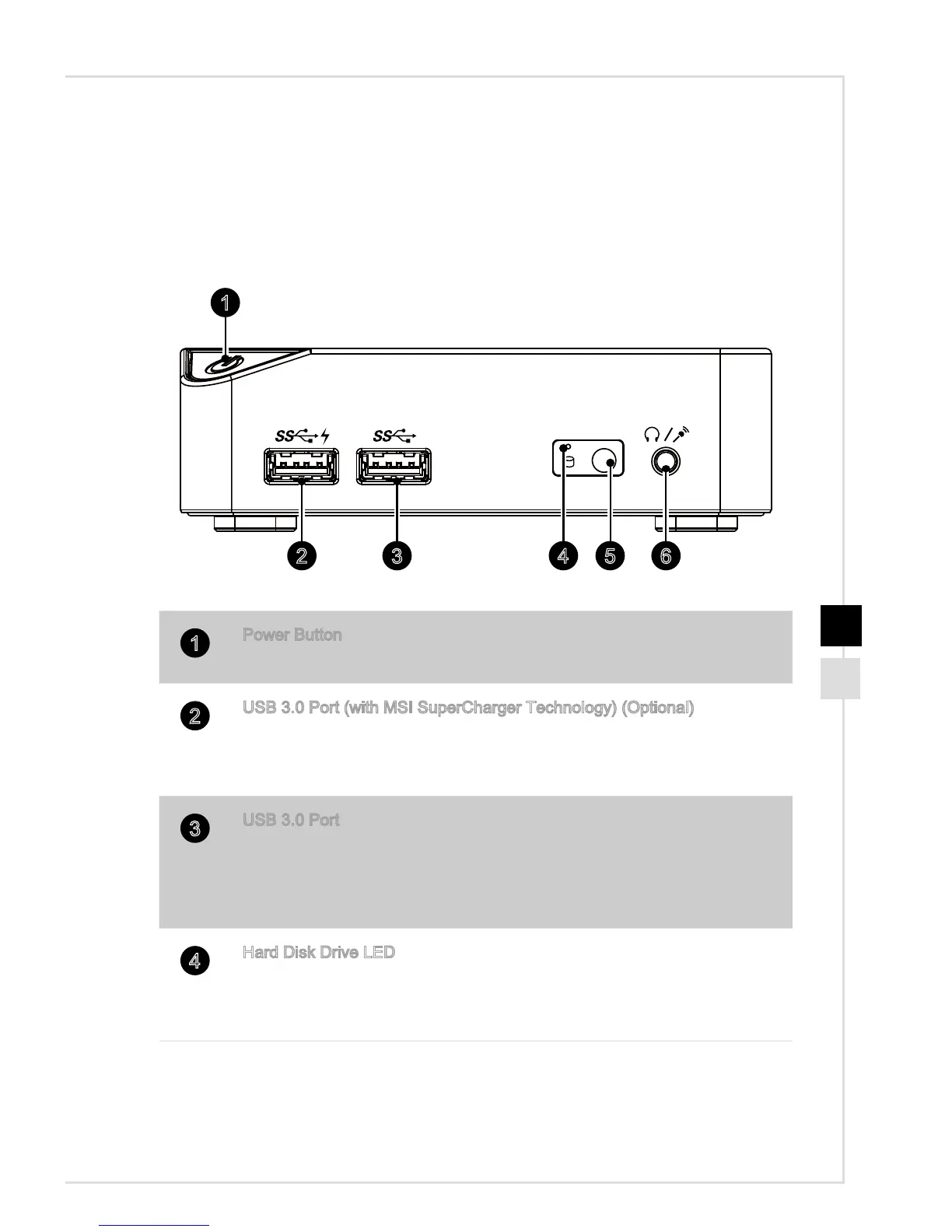
h Front View
5 6432
1
1
Power Button
Press the power button to turn the system on and o.
2
USB 3�0 Port (with MSI SuperCharger Technology) (Optional)
With MSI SuperCharger Technology, not only does it function as normal
USB 3�0 port, but it also enables users to charge USB devices even
when the system is turned o.
3
USB 3�0 Port
The USB (Universal Serial Bus) port is for attaching USB devices such
as keyboard, mouse, or other USB-compatible devices� It supports up to
5Gbit/s (SuperSpeed) data transfer rate� The USB 3�0 port is backward-
compatible with USB 2�0 devices�
4
Hard Disk Drive LED
This indicator shows the activity status of the HDD. It ashes when the
system is accessing data on the HDD and remains o when no disk
activity is detected�


 To Next Page
 Loading...