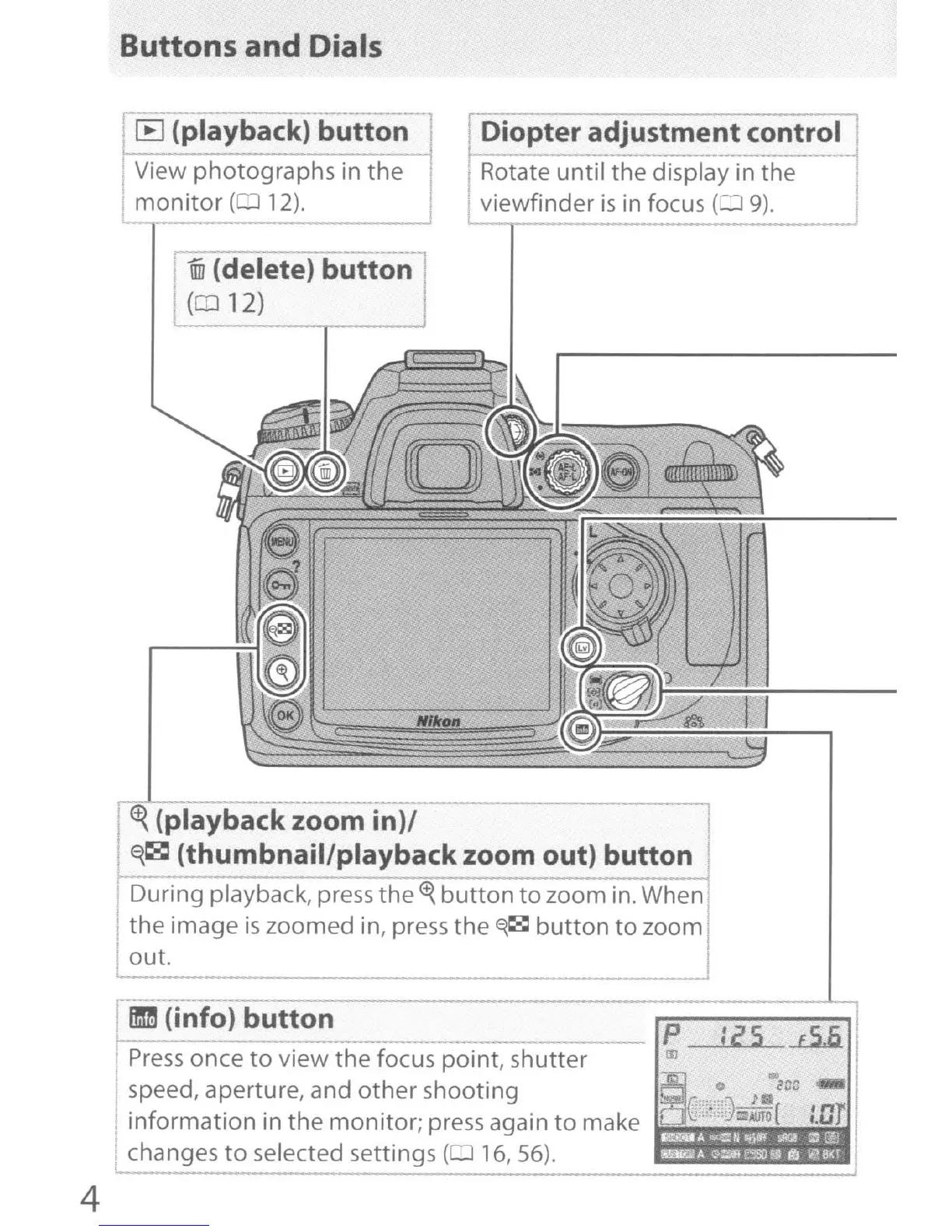
Buttons and Dials
[B
(playback) button I
View photographs in the I
monitor
(0
12).
~
I Diopter adjustment control
I -
Rotate until the display in the
viewfinder
is
in
focus
(=:1
9).
\iii
(delete) button
(012)
~
(playback zoom in)/
E{~
(thumbnail/playbackzoom out) button
- -
---I
During playback, press the
<t{
button
to
zoom
in.
When
the image
is
zoomed in, press the
~~
button
to
zoom
I
out. I
;25
.L5.5.
--
P
!II
Press
once
to
view the focus point, shutter
speed, aperture, and other shooting
information in the monitor; press again
to~m:ak:eJ~~~~~~
changes
to
selected settings ( 16,56).
-
----
-
--------------------~
mm
(info) button
4


 To Next Page
 Loading...











