72
Basic Camera Settings: The Setup MenuSetup
New
Create a folder with a new name as described in “Naming Folders,” be-
low.
Rename
Rename an existing folder. Select the folder from a list of existing folders
and rename it as described in “Naming Folders,” below.
Delete
Delete all empty folders on the memory card.
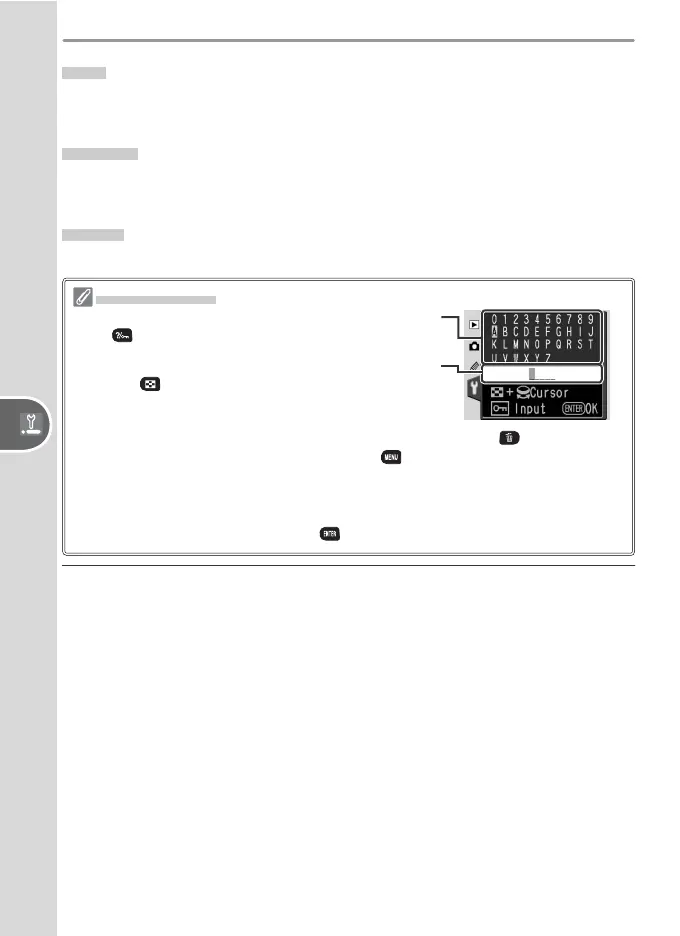
Naming Folders
Keyboard area: Use multi selector to highlight letters,
press button to select.
Name area: Folder name appears here. To move cur-
sor, press button and use multi selector.
To delete the character at the current cursor position, press the button. To exit
without changing the folder name, press the button.
Folder names can be up to fi ve characters long. Any additional characters will be
deleted.
After editing the folder name, press to return to the setup menu.


 To Next Page
 Loading...












