C310/C330/C510/C530 How to remove Jammed Paper
<3>
© Copyright 2010 Oki Data Corporation
Error Message of Paper Jam (Displayed on LCD panel)
CODE # Operator panel display
370
CHECK UNDER BELT
370:PAPER JAM
371
CHECK UNDER BELT
371:PAPER JAM
372
CHECK UNDER BELT
372:PAPER JAM
380
OPEN TOP COVER
380:PAPER JAM
381
OPEN TOP COVER
381:PAPER JAM
382
OPEN TOP COVER
382:PAPER JAM
385
OPEN TOP COVER
385:PAPER JAM
389
OPEN TOP COVER
389:PAPER JAM
390
CHECK MP TRAY
390:PAPER JAM
391
OPEN TOP COVER
391:PAPER JAM
392
OPEN TOP COVER
392:PAPER JAM
400
OPEN TOP COVER
400:PAPER SIZE ERROR
409
OPEN TOP COVER
409:FACE UP STACKER ERROR
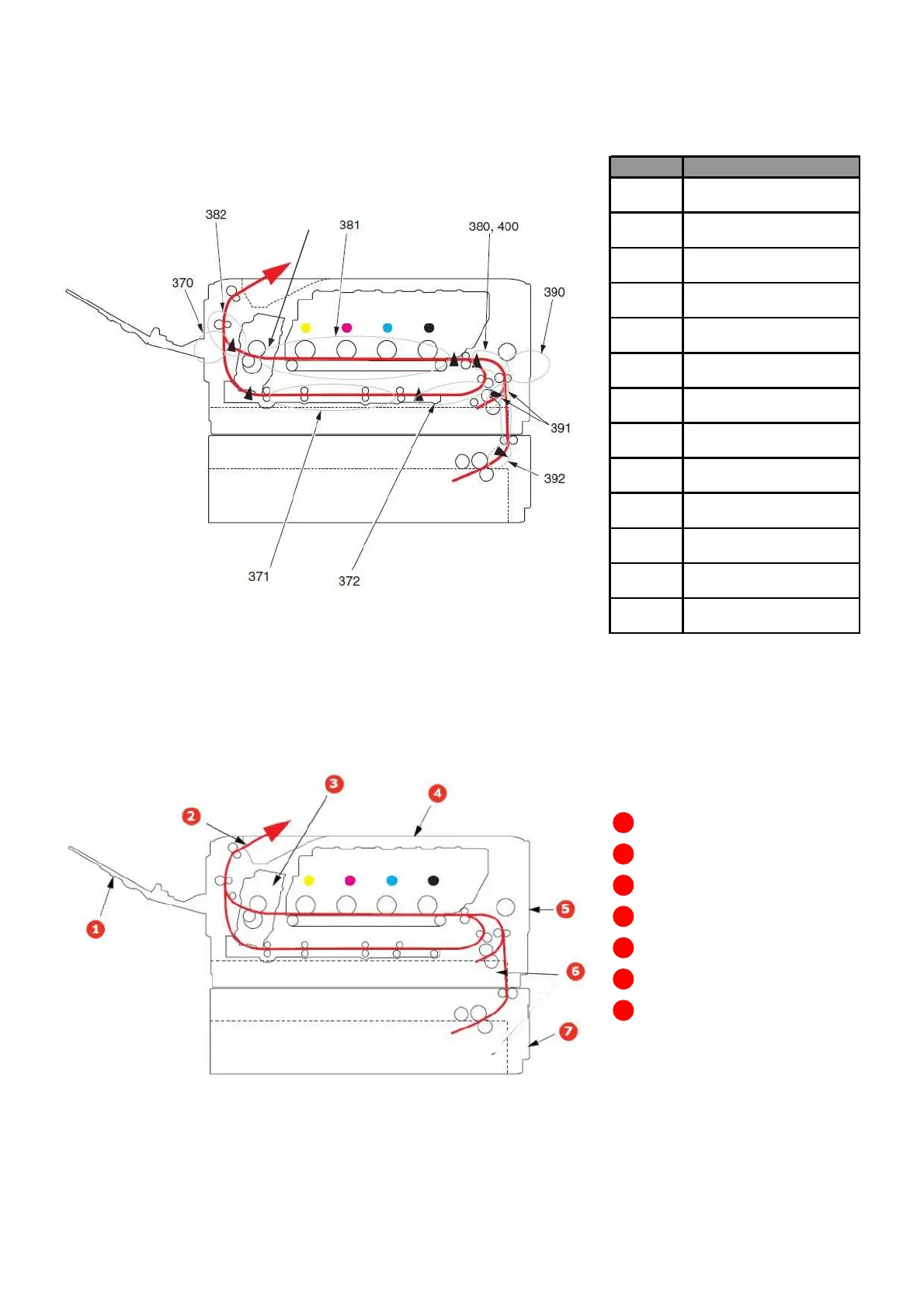
Media path
Understanding the printer’s media pass will help you locate media misfeeds.
Face-up stacker
Paper exit
Fuser unit
Top cover
Front cover
Paper tray
Additional paper tray
(if fitted)


 To Next Page
 Loading...