RQT8317
12
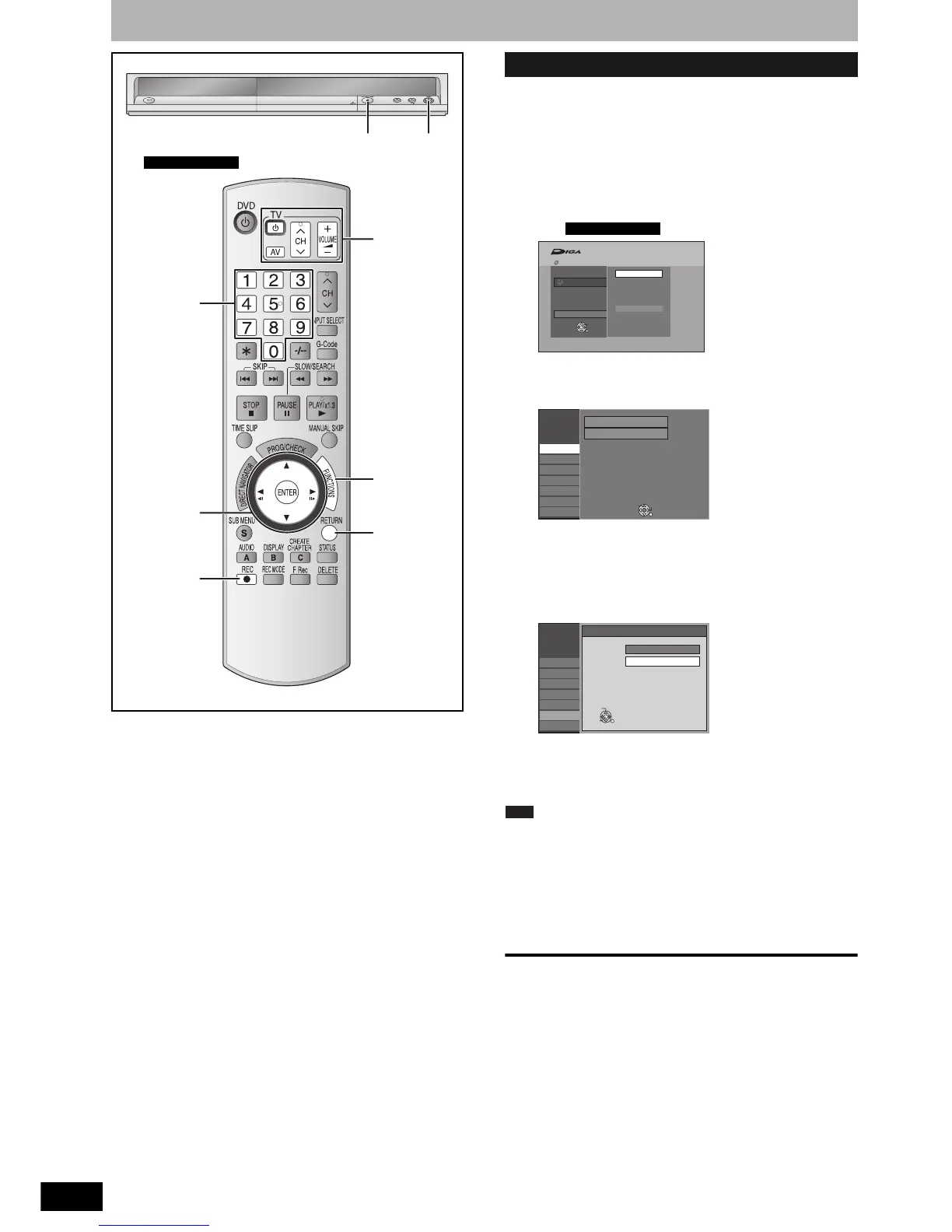
Set up to match your television and remote control
You can enjoy progressive video by connecting this unit’s
COMPONENT VIDEO OUT terminals to an LCD/plasma television
or LCD projector compatible with progressive scan (Ô page 50).
1 While stopped
Press [FUNCTIONS].
2 Press [e,r] to select “To Others” and
press [ENTER].
e.g.,
3 Press [e,r] to select “Setup” and
press [ENTER].
4 Press [e,r] to select “Connection”
and press [q].
5 Press [e,r] to select “Progressive”
and press [ENTER].
6 Press [e,r] to select “On” and press
[ENTER].
Output becomes progressive.
Note
• When connected to a CRT (Cathode ray tube) television or a multi
system television using PAL mode, even if it is progressive
compatible, progressive output can cause some flickering. Turn off
“Progressive” if this occurs.
• Picture will not be displayed correctly if connected to an
incompatible television.
• There is no output from the COMPONENT VIDEO OUT terminals if
“AV1 Output” in the Setup menu is set to “RGB 1 ( without
component )” or “RGB 2 ( without component )” (Ô page 40).
To exit the screen
Press [RETURN] several times.
To return to the previous screen
Press [RETURN].
Numbered
buttons
RETURN
e,r,w,q
ENTER
TV operation
buttons
FUNCTIONS
; OPEN/CLOSE * REC
* REC
e.g.,
Australia and N.Z.
To enjoy progressive video
Australia and N.Z.
Recording
To Others
G-Code Record
Setup
FUNCTIONS No Disc
No Disc
ENTER
RETURN
Setup
Tuning
Disc
Picture
Sound
Display
Connection
Others
Manual
Auto-Setup Restart
SELECT
TAB
RETURN
Setup
Tuning
Disc
Picture
Sound
Display
Connection
Others
Progressive
On
Off
ENTER
SELECT
RETURN


 To Next Page
 Loading...