10
IMPORTANT!
– The progressive scan video quality
is only possible when using YPbPr
and a progressive scan television is
required.
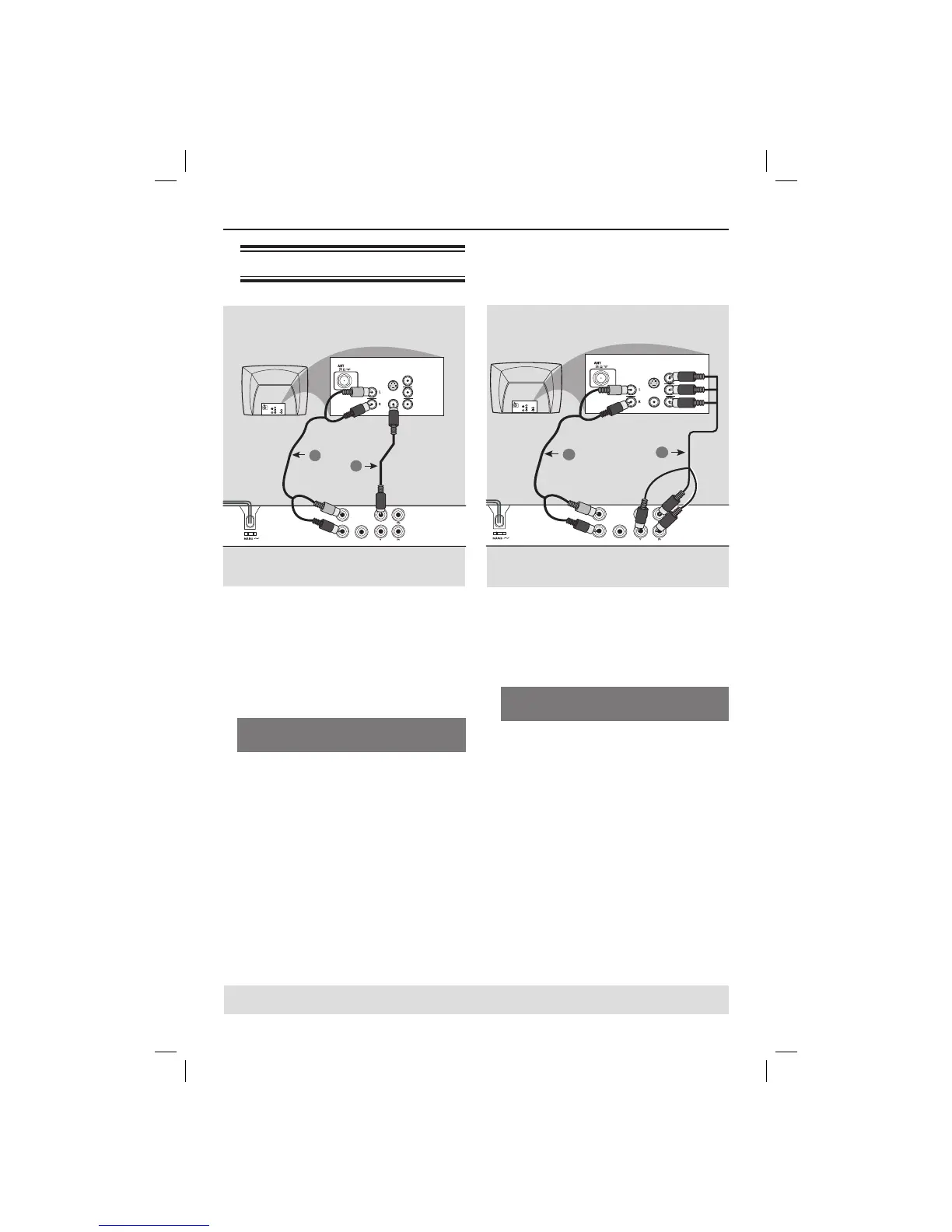
Using Component Video jacks
(YPbPr)
A
Use the component video cables (red/
blue/green) to connect the DVD player’s
YPbPr jacks to the component video
input jacks (or labeled as YPbPr) on the
television (cable not supplied).
B To hear sound of this DVD player
through your television, use the audio
cables (white/red) to connect AUDIO
OUT (L/R) jacks of the DVD player to
the corresponding AUDIO IN jacks on
the television (cable supplied).
C Proceed to page 16 for detailed
progressive scan setup.
Connections
TIPS: Before making or changing any connections, make sure that all the devices are disconnected
from the power outlet.
Connecting to television
IMPORTANT!
– You only need to make one video
connection from the following
options, depending on the
capabilities of your television.
– Connect the DVD player directly
to the television.
Using Composite Video jacks
(CVBS)
A
Use the composite video cable (yellow)
to connect the DVD player’s TV OUT
(CVBS) jack to the video input jack (or
labeled as A/V In, Video In, Composite or
Baseband) on the television (cable
supplied).
B To hear sound of this DVD player
through your television, use the audio
cables (white/red) to connect AUDIO
OUT (L/R) jacks of the DVD player to
the corresponding AUDIO IN jacks on
the television (cable supplied).
AUDIO OUT
DIGITAL
OUT
TV OUT
COAXIAL
COMPONENT VIDEO OUT
AUDIO
IN
V (Pr/Cr)
U (Pb/Cb)
Y
S-VIDEO
IN
VIDEO IN
COMPONENT
VIDEO IN
AUDIO
OUT
V (Pr/Cr)
U (Pb/Cb)
Y
S-VIDEO
IN
VIDEO IN
COMPONENT
VIDEO IN
2
1
AUDIO OUT
DIGITAL
OUT
TV OUT
COAXIAL
COMPONENT VIDEO OUT
AUDIO
IN
V (Pr/Cr)
U (Pb/Cb)
Y
S-VIDEO
IN
VIDEO IN
COMPONENT
VIDEO IN
AUDIO
OUT
V (Pr/Cr)
U (Pb/Cb)
Y
S-VIDEO
IN
VIDEO IN
COMPONENT
VIDEO IN
2
1
dvp3144_75_eng2.indd 10dvp3144_75_eng2.indd 10 2007-04-16 1:40:51 PM2007-04-16 1:40:51 PM



 To Next Page
 Loading...