Controls and displays
03
18
En
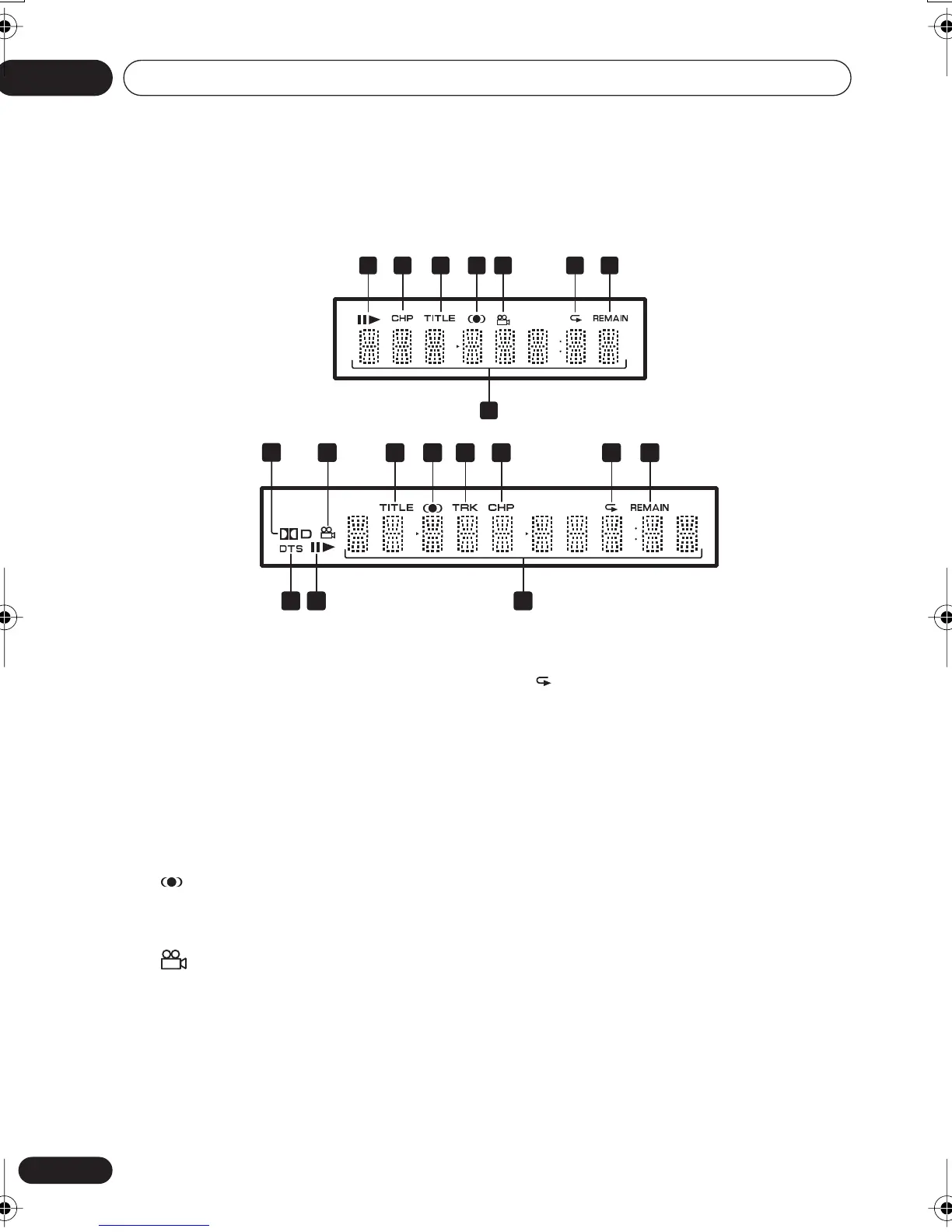
Display
1
and
Indicates whether a disc is playing or paused.
2 CHP
Indicates that the character display is
showing a DVD chapter number.
3 TITLE
Indicates that the character display is
showing a DVD title number.
4
Lights when
2
V/SRS TruSurround is
selected.
5
Lights during multi-angle scenes on a DVD
disc.
6
Lights in any of the repeat play modes.
7 REMAIN
Indicates that the character display is
showing the disc or title/chapter/track remain
time.
8 Character display
9
2
D
Lights when a Dolby Digital soundtrack is
playing.
10 TRK
Indicates that the character display is
showing a CD or Video CD track number.
11 DTS
Lights when a DTS soundtrack is playing.
8
1 2 3 4 5 6 7
DV-2650
11 81
43 10 2 6 7
9
5
DV-360 / DV-464
DV260.book 18 ページ 2002年12月27日 金曜日 午後8時58分


 To Next Page
 Loading...