Text input ���������������������
2�1 Using Onscreen Keyboard
Onscreen Keyboard settings
Touch Settings\Language & input, touch the keyboard you want
to setup and a series of settings will become available for your
selection.
Adjust the Onscreen Keyboard orientation
Turn the device sideways or upright to adjust the Onscreen
Keyboard orientation. You can also adjust it by changing the settings
(Touch Settings\Display\When device is rotated).
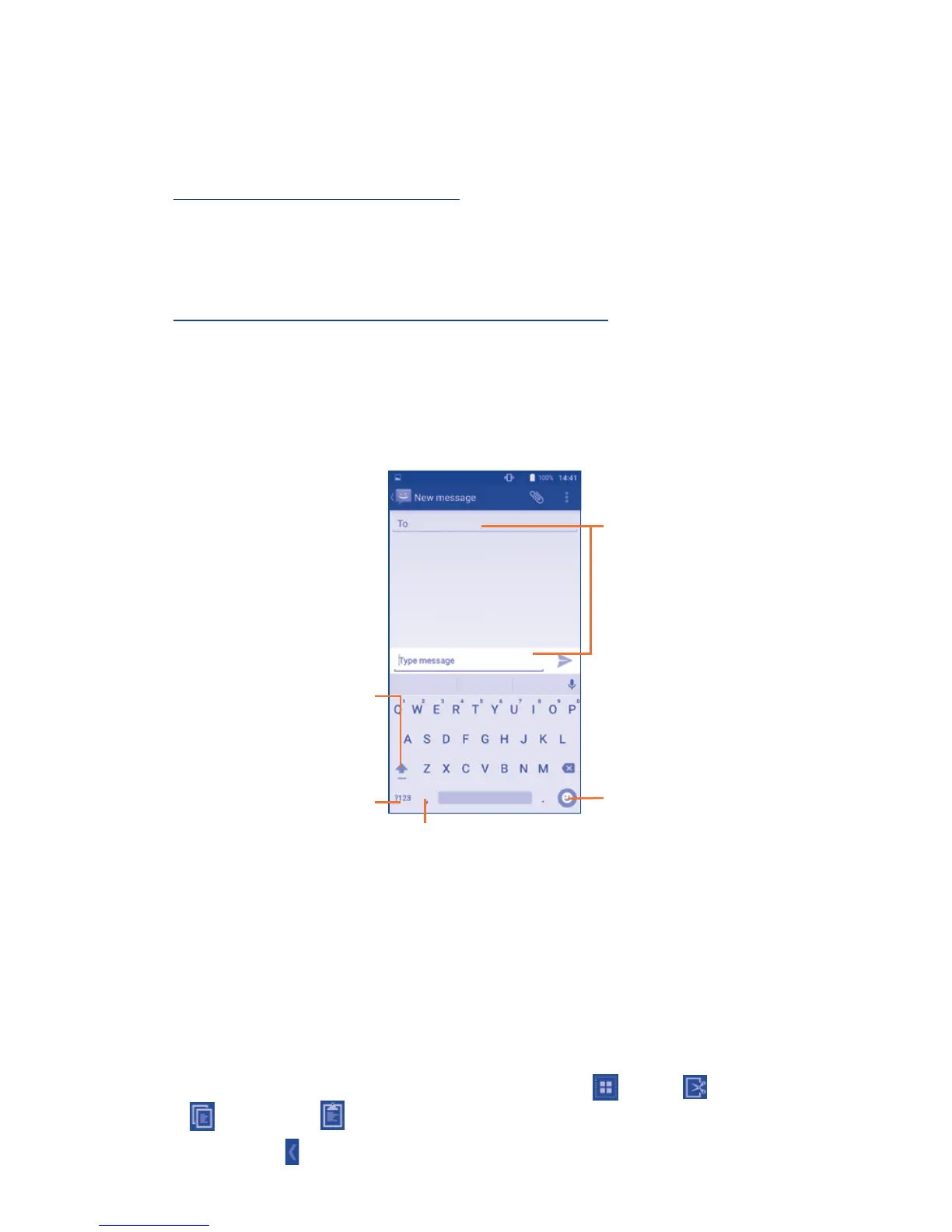
2�1�1 Android
TM
keyboard
Touch to switch
between symbol and
numeric keyboard.
Touch & hold to
select symbols.
Touch to enter
text or numbers.
Touch to input comma;
touch & hold to show
input options.
Touch to switch
"abc/Abc" mode;
Touch & hold to
switch "abc/ABC"
mode.
2�2 Text editing
You can edit the text you have entered.
• Touch and hold or double-tap within the text you would like
to edit.
• Drag the tabs to change the highlighted selection.
• The following options will show: Select all , Cut , Copy
and Paste .
• Touch the icon to go back without any action.



 To Next Page
 Loading...


