7
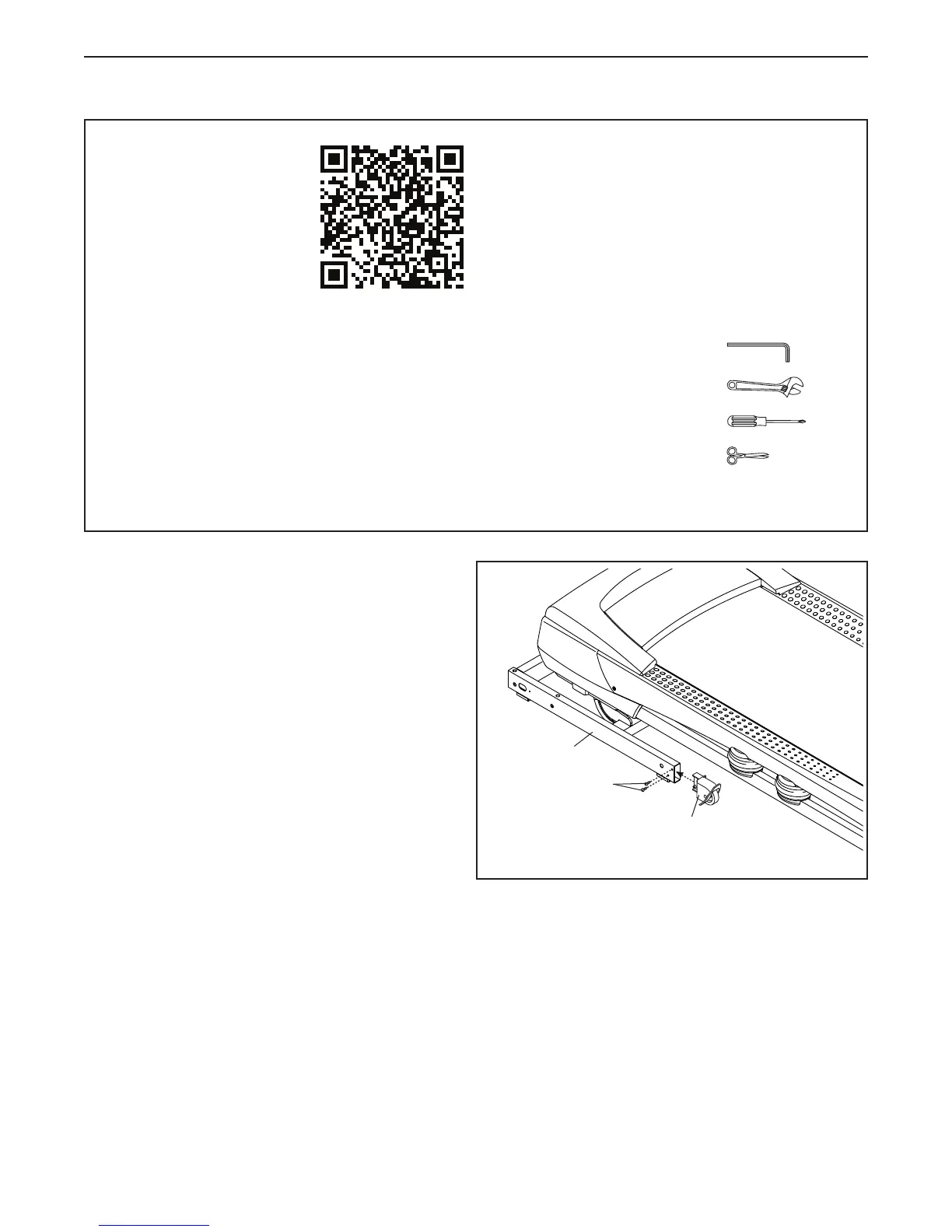
1. Make sure that the power cord is unplugged.
Attach the Left Wheel Cap (94) to the Base (95)
with two #8 x 3/4" Screws (2).
Attach the Right Wheel Cap (not shown) to
the Base (95) in the same way.
1
94
95
2
• To watch an assembly
video, go to
http://productvideo.co/
assembly/proform or
use your mobile phone
or smartphone to read
the QR code at the right.
• To hire a service technician to assemble this
product in your home, call 1-800-445-2480.
• Assembly requires two persons.
• Place all parts in a cleared area and remove the
packing materials. Do not dispose of the packing
materialsuntilyounishallassemblysteps.
• After shipping, there may be an oily substance
on the exterior of the treadmill. This is normal. If
there is an oily substance on the treadmill, wipe
it off with a soft cloth and a mild, non-abrasive
cleaner.
• Left parts are marked “L” or “Left” and right parts
are marked “R” or “Right.”
• To identify small parts, see page 6.
• Assembly requires the following tools:
the included hex keys
an adjustable wrench
one Phillips screwdriver
scissors
To avoid damaging parts, do not use power tools.
ASSEMBLY


 To Next Page
 Loading...