Need help?
Do you have a question about the Pulsafeeder PULSAblue 3300 Series and is the answer not in the manual?
 General
| Power Supply | 100-240 VAC, 50/60 Hz |
|---|---|
| Display | Backlit LCD |
| Output Signal | 4-20mA |
| Communication | Modbus RTU |
| Relative Humidity | 0-95% non-condensing |
| Series | 3300 |
| Type | Controller |
| Enclosure Rating | NEMA 4X |
| Control Modes | Manual |
| Inputs | 4-20mA, Pulse |
| Outputs | Relay, 4-20mA |
| Operating Temperature | 14°F to 140°F (-10°C to 60°C) |
Highlights of the controller's main functionalities and functions.
Advantages and value propositions offered by the controller.
Procedures for safely unpacking and physically mounting the controller.
Connecting incoming power and wiring the relay outputs for device control.
Wiring for sensors, 4-20mA outputs, and network interface nodes.
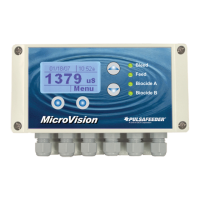
Description of the controller's front panel components and illuminated display.
Explanation of keypad functions and how to navigate the controller's menu system.
Managing user access and security permissions for the controller.
Understanding the controller's main display screens for monitoring process values.
How to manually activate relays for testing or specific control needs.
Step-by-step guide for calibrating the conductivity sensor.
Step-by-step guide for calibrating the ORP sensor.
Reference table for converting conductivity readings to parts per million.
Detailed configuration of all relays, including blowdown, setpoint, and timers.
Selecting water meter type and setting volume units (gallons/liters).
Calibrating water meter inputs for accurate flow measurement.
Setting the output range, process source, and calibration for 4-20mA signals.
Setting process names, damping, initialization, and firmware checks.
Managing security levels, passwords, communication, and node installation.
Adjusting the internal clock and date for accurate timekeeping.
Modifying the controller's operational security level.
Cleaning and maintaining conductivity and ORP sensors for optimal performance.
Cleaning and maintaining the flow switch assembly.
Instructions for safely replacing blown fuses.
Explains common error messages and provides corrective actions.

 To Next Page