EasyManua.ls Logo

Rigol MSO5000-E Series Service Guide

Rigol MSO5000-E Series
27 pages
To Next Page IconTo Next Page
To Previous Page IconTo Previous Page
Page #13 background image
Chapter 1 Disassembly and Assembly RIGOL
MSO5000-E Service Guide 1-5
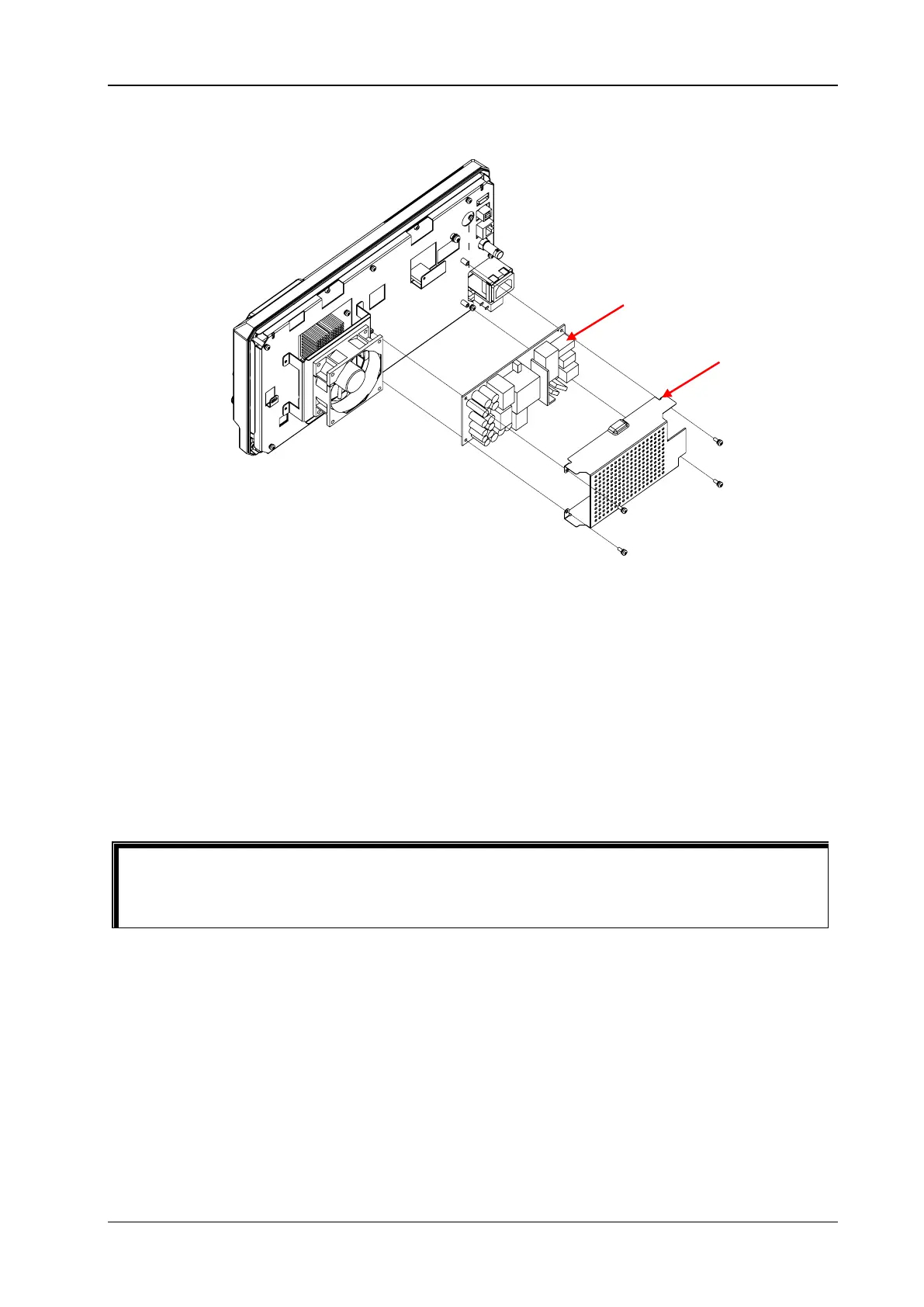
Disassemble the Shield and Power Supply Board
Figure 1-3 Disassemble the Shield and Power Supply Board
Part Description:
4 screws (M3x8 torx pan head combination screw, used for fastening the shield and the power
supply board)
Disassembly Steps:
1. Use the T10 screwdriver to remove 4 screws () that secure the shield and the power supply
board.
2. Take off the shield gently.
3. Remove the power cable from the power supply board.
4. Take off the power supply board gently.
Tip
Before disconnecting the cables from the power supply board, pay attention to the connecting
positions of the cables to avoid incorrect connection or incomplete connection when assembling
the cables.
Power Supply Board
Shield

Other manuals for Rigol MSO5000-E Series

Question and Answer IconNeed help?

Do you have a question about the Rigol MSO5000-E Series and is the answer not in the manual?

Rigol MSO5000-E Series Specifications

General IconGeneral
Analog Channels4
Digital Channels16 (Optional)
Vertical Sensitivity1 mV/div to 10 V/div
Vertical Resolution8 bits
Sample Rate (Analog)1 GSa/s
Sample Rate (Digital)1 GSa/s
Waveform Capture Rate500, 000 wfms/s
Display10.1 inch capacitive touch screen
Input Impedance1 MΩ ± 1%
Trigger TypesEdge, Pulse, Slope, Video, Pattern, Duration, Timeout, Window, Runt, Setup/Hold, Delay, Nth Edge
Protocol DecodingI2C, SPI, UART, CAN, LIN
FFTYes
ConnectivityUSB Host, USB Device, LAN, HDMI
Power SupplyAC 100V-240V, 50/60Hz

Related product manuals