6
Charging without the cradle
You can charge the headset directly from a USB device.
When power is rst applied to the headset, the mic muting indicator lights up solid red for two seconds and then ashes on and off until the
headset is fully charged.
PAIRING YOUR HEADSET
Before you can use the Bluetooth
®
headset with any device, such as a PS3™ system or a mobile phone, the headset must be paired with
the desired device.
You can pair your headset in either of two ways:
• Automatic mode (using the supplied USB cable)—Enables the headset’s advanced features for the PS3™ system. Using automatic
mode, you can pair (register) the headset with any PS3™ system, but only the most recently paired PS3™ system will be saved in the
headset’s list of paired devices. (For more information, see “Connecting your headset to Bluetooth
®
devices.”)
• Bluetooth
®
discovery mode—Sets up the headset as a standard Bluetooth
®
headset. Using Bluetooth
®
discovery mode, you can pair the
headset with many other Bluetooth
®
devices. The eight most recently paired devices are saved in the headset’s list of paired devices.
(For more information, see “Connecting your headset to Bluetooth
®
devices.”)
Hints: The headset’s advanced features for the PS3™ system are available only when you use the automatic mode to pair the headset
with the PS3™ system.
The system software for the PS3™ system must be version 2.50 (or later) to access the advanced features.
Pairing with the PS3™ system: automatic mode
You must use the USB cable to pair your headset using the PS3™ system automatic mode.
1 Check that the PS3™ system is turned on.
2 Check that the PS3™ system software is version 2.50 or later. If you have an earlier version, you need to update the software before you
can use the automatic mode for pairing.
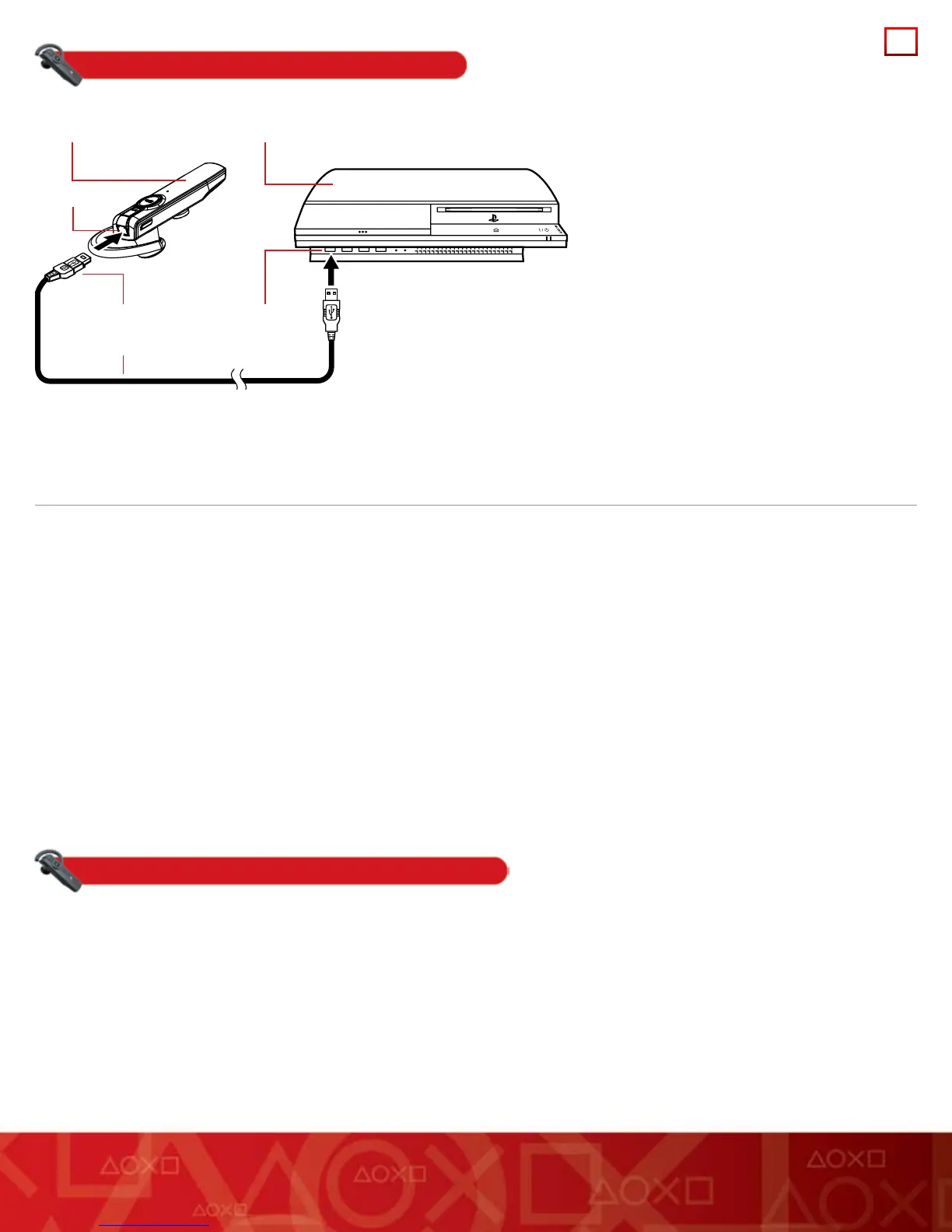
3 Insert the mini-B connector of the supplied USB cable directly into the USB connector on your headset. Insert the other end of the cable
into a USB connector on the PS3™ system.
The power indicator on the headset lights up in solid green for two seconds to indicate that the headset and the PS3™ system have been paired.
Bluetooth® headset
USB connector
USB connector
USB cable
mini-B connector
PS3™ system
1
2
3
1
Check that the device to be connected to the
headset (the PS3™ system in this example) is
turned on.
2 Insert the USB connector of the supplied USB
cable into an available USB connector (port).
3 Insert the mini-B connector of the USB cable
into the headset USB connector.


 To Next Page
 Loading...