10
GB
Connection
Step 1-: Connecting a 2ch Sound Device
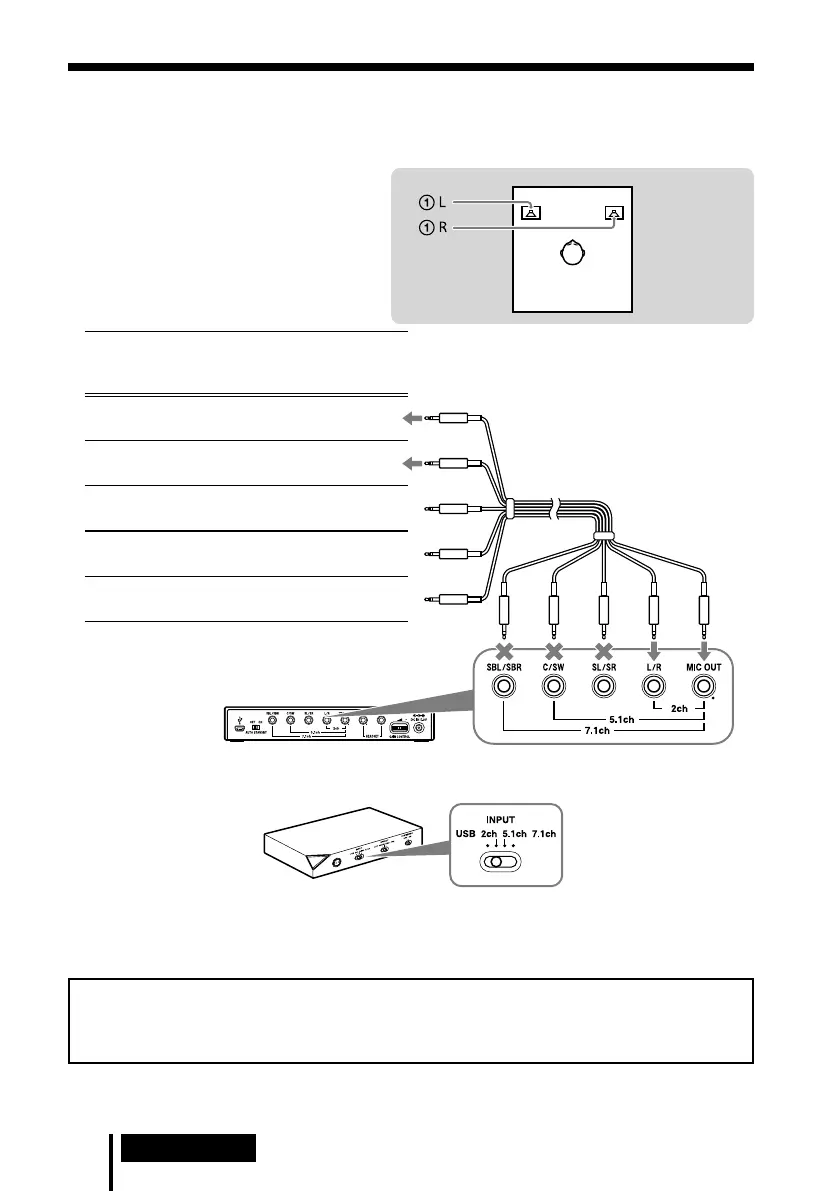
Connect the 2ch jacks of the processor by the supplied multi-channel cable. The EFFECT
function provides 7.1ch extended surround output from a 2ch input source.
1 Connect the processor to the
sound device as illustrated below.
Connecting jacks of the sound
device*
Cable
plug
names
MIC IN
Connect to MIC IN jack
MIC
L/R OUT
Connect to L/R OUT jack
L / R
Not connected
SL / SR
Not connected
C / SW
Not connected
SBL / SBR
* The jack name varies depending on the sound
device.
Multi-channel cable
(supplied)
Rear panel of processor
2 Slide the INPUT switch to “2ch.”
Front panel of
processor
3 Set the 2ch speaker mode in the computer.
For details on operation of your computer/sound device, refer to the operating instructions
for it.
Do not connect the USB cable with multi-channel cable at the same time when you connect
the processor to the computer. The computer sound setting may be switched to an
unintended device.


 To Next Page
 Loading...