5-32
4. Contrast Adjustment (PD-126 board)
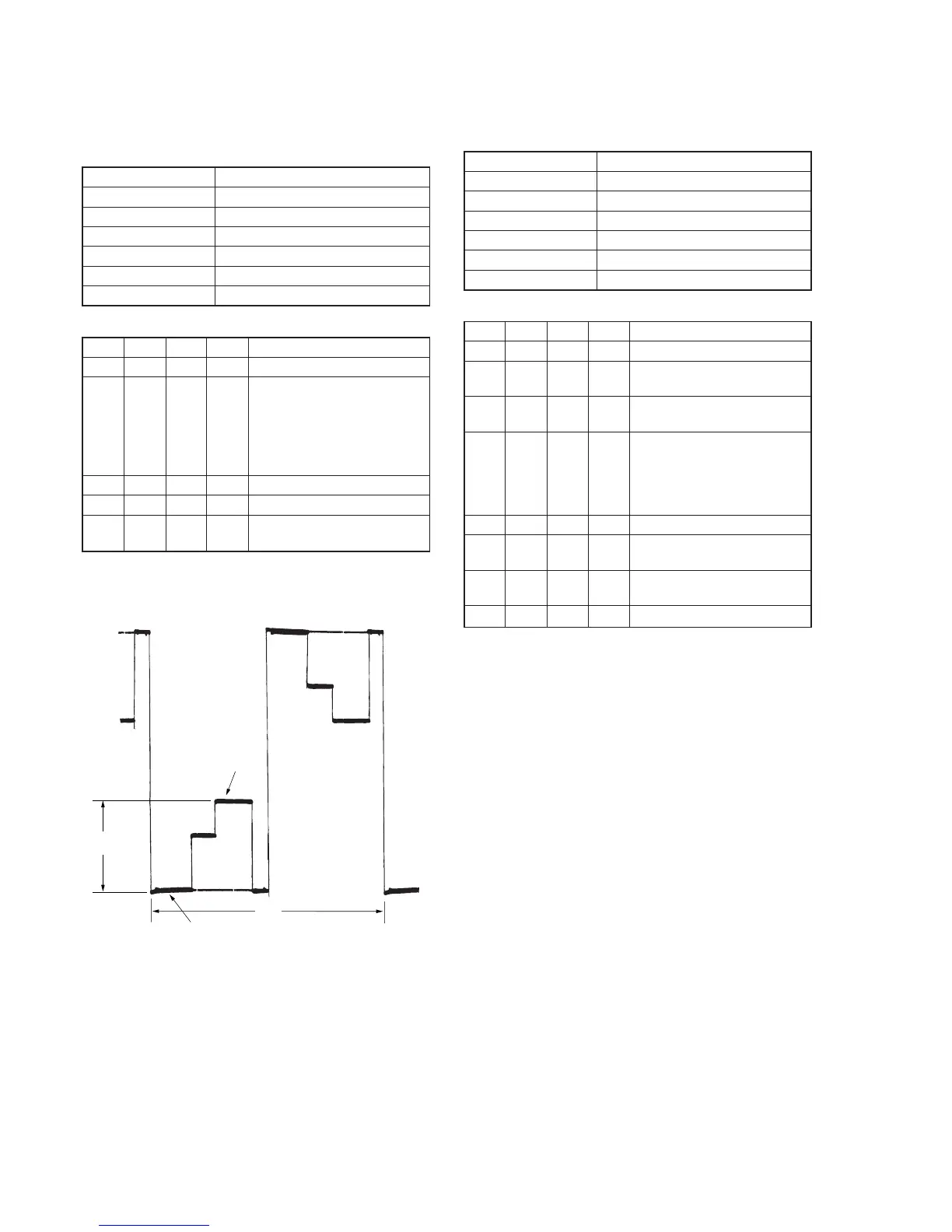
Set the level of the VIDEO signal for driving the LCD to the specified
value. If deviated, the screen image will be blackish or saturated
(whitish).
Mode VTR stop
Signal No signal
Measurement Point Pin 1 of CN2105 (VG)
Measuring Instrument Oscilloscope
Adjustment Page D
Adjustment Address AA
Specified Value A = 3.10 ± 0.05V
Adjusting method:
Order Page
Address
Data Procedure
1 0 01 01 Set the data.
2 D AA Change the data and set the
voltage (A) between the 3 steps
peak and pedestal to the
specified value.
(The data should be “00” to
“7F”.)
3 D AA Press PAUSE button.
4 0 01 00 Set the data.
5 Check that the specified value of
“Bright Adjustment” is satisfied.
5. Center Level Adjustment (PD-126 board)
Set the video signal center level of LCD panel to an appropriate
level.
Mode VTR stop
Signal No signal
Measurement Point Pin 1 of CN2105 (VG)
Measuring Instrument Digital voltmeter
Adjustment Page D
Adjustment Address AB
Specified Value A = 7.00 ± 0.05Vdc
Adjusting method:
Order Page
Address
Data Procedure
1 0 01 01 Set the data.
2 3 0C 60 Set the data, and press PAUSE
button.
3 3 22 08 Set the data, and press PAUSE
button.
4 D AB Change the data and set the DC
voltage (A) to the specified
value.
(The data should be “00” to
“7F”.)
5 D AB Press PAUSE button.
6 3 0C 00 Set the data, and press PAUSE
button.
7 3 22 00 Set the data, and press PAUSE
button.
8 0 01 00 Set the data.
3 steps peak
Pedestal
A
2H
Fig. 5-1-21.



 To Next Page
 Loading...