D:\SONY DVD\2581693121 DVP-NS50P_US\SOURCE\DVP-
NS50P_US\01US05GET-CEK.fm
master page=right
17
Hookups
DVP-NS41P
2-581-693-12(1)
Step 3: Connecting the Video Cords
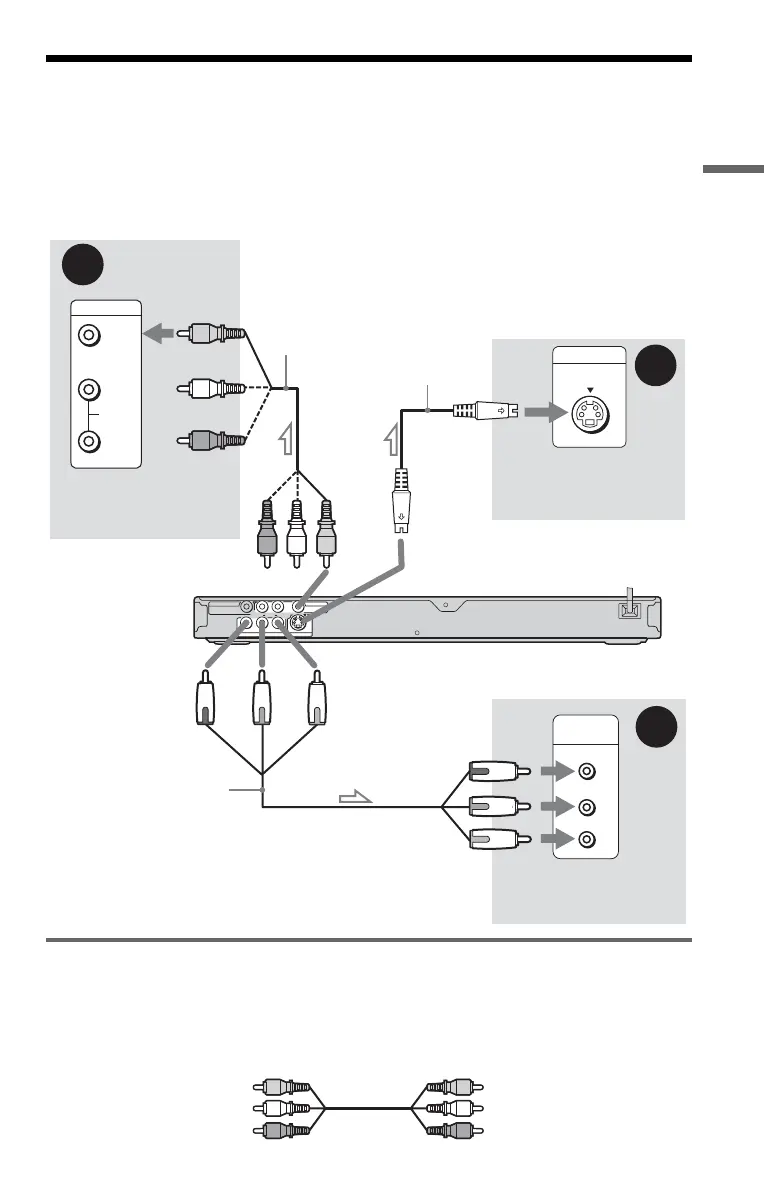
Connect this player to your TV monitor, projector, or AV amplifier (receiver) using a video cord.
Select one of the patterns A through C, according to the input jack on your TV monitor,
projector, or AV amplifier (receiver).
In order to view progressive signal (480p) pictures with a compatible TV, projector, or monitor,
you must use pattern C.
A If you are connecting to a video input jack
Connect the yellow plug of an audio/video cord (supplied) to the yellow (video) jack. You will
enjoy standard quality images.
With this connection, select “NORMAL (INTERLACE)” (default) by pressing the
PROGRESSIVE button on the front panel.
A
VIDEO
AUDIO
INPUT
L
R
C
P
R
P
B
Y
COMPONENT
VIDEO IN
B
INPUT
S VIDEO
AUDIO
R
L
P
R
YP
B
VIDEO
COAXIAL
LINE OUT
COMPONENT VIDEO OUT
S VIDEO OUT
DIGITAL OUT
Audio/video
cord
(supplied)
l : Signal flow
S VIDEO cord
(not supplied)
(yellow)
TV, projector or AV
amplifier (receiver)
CD/DVD player
TV, projector or AV
amplifier (receiver)
(green)
Component
video cord
(not supplied)
TV, projector or AV
amplifier (receiver)
(red)
(blue)
(yellow)
to LINE OUT (VIDEO)
to COMPONENT
VIDEO OUT
to S VIDEO OUT
(green)
(blue)
(red)
Yellow
White (L)
Red (R)
Yellow
White (L)
Red (R)
,continued
01ΥΣ01ΧΟς.βοοκ Παγε 17 Μονδαψ, Μαρχη 14, 2005 10:08 ΑΜ


 To Next Page
 Loading...