EasyManua.ls Logo

Sony LBT-DR330 - Playing CD Tracks Repeatedly; Playing CD Tracks in Random Order

Sony LBT-DR330
36 pages
Print Icon
To Next Page IconTo Next Page
To Previous Page IconTo Previous Page
Loading...
Playing
CD
tracks
repeatedly
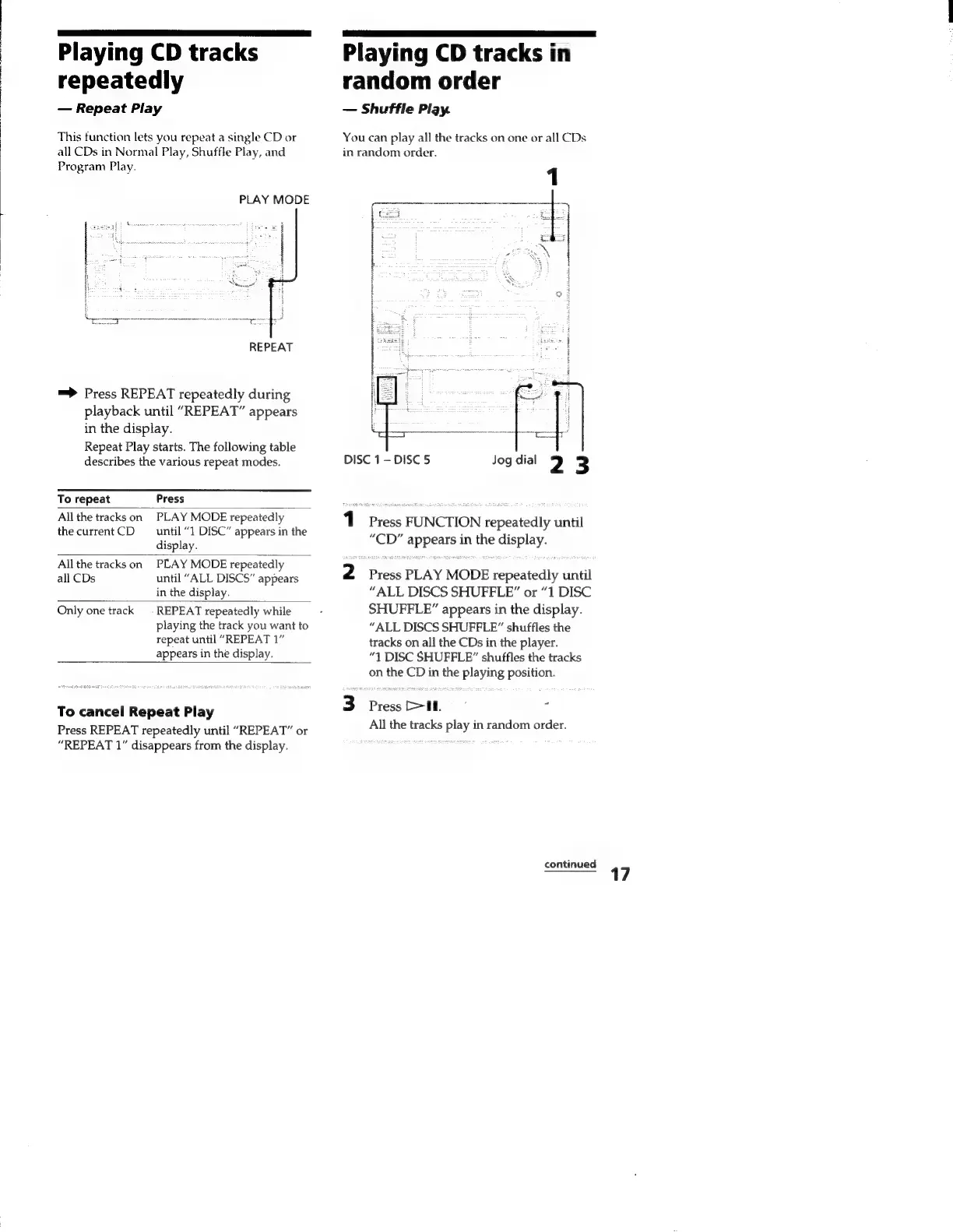
Repeat
Play
This
function
lets
you
repeat
a
single
CD
or
all
CDs
in
Normal
Play,
Shuffle
Play,
and
Program
Play.
PLAY
MODE
REPEAT
=>
Press
REPEAT
repeatedly
during
playback
until
“REPEAT”
appears
in
the
display.
Repeat
Play
starts.
The
following
table
describes
the
various
repeat
modes.
To
repeat
Press
All
the
tracks
on
PLAY
MODE
repeatedly
the
currentCD
until
“1
DISC”
appears
in
the
display.
All
the
tracks
on
PLAY
MODE
repeatedly
all
CDs
until
“ALL
DISCS”
appears
in
the
display.
Only
one
track
=
REPEAT
repeatedly
while
playing
the
track
you
want
to
repeat
until
“REPEAT
1”
appears
in
the
display.
To
cancel
Repeat
Play
Press
REPEAT
repeatedly
until
“REPEAT”
or
“REPEAT
1”
disappears
from
the
display.
Playing
CD
tracks
in
random
order
Shuffle
Play.
You
can
play
all
the
tracks
on
one
or
all
CDs
in
random
order.
EN
ae
‘i
ca
i
DISC
1-
DISC
5
Jog
dial
u
3
1
Press
FUNCTION
repeatedly
until
“CD”
appears
in
the
display.
2
Press
PLAY
MODE
repeatedly
until
“ALL
DISCS
SHUFFLE”
or
“1
DISC
SHUFFLE”
appears
in
the
display.
“ALL
DISCS
SHUFFLE”
shuffles
the
tracks
on
all
the
CDs
in
the
player.
“71
DISC
SHUFFLE”
shuffles
the
tracks
on
the
CD
in
the
playing
position.
3
Press.
z
All
the
tracks
play
in
random
order.
continued

Related product manuals