EasyManua.ls Logo

Sony LBT-DR330 - Timer-Recording Radio Programs

Sony LBT-DR330
36 pages
Print Icon
To Next Page IconTo Next Page
To Previous Page IconTo Previous Page
Loading...
g
Lt
a
Lt
Timer-recording
radio
programs
To
timer-record,
you
must
preset
the
radio
station
(see
“Step
3:
Presetting
radio
stations”
on
page
7)
and
set
the
clock
(see
“Step
2:
Setting
the
time”
on
page
6)
beforehand.
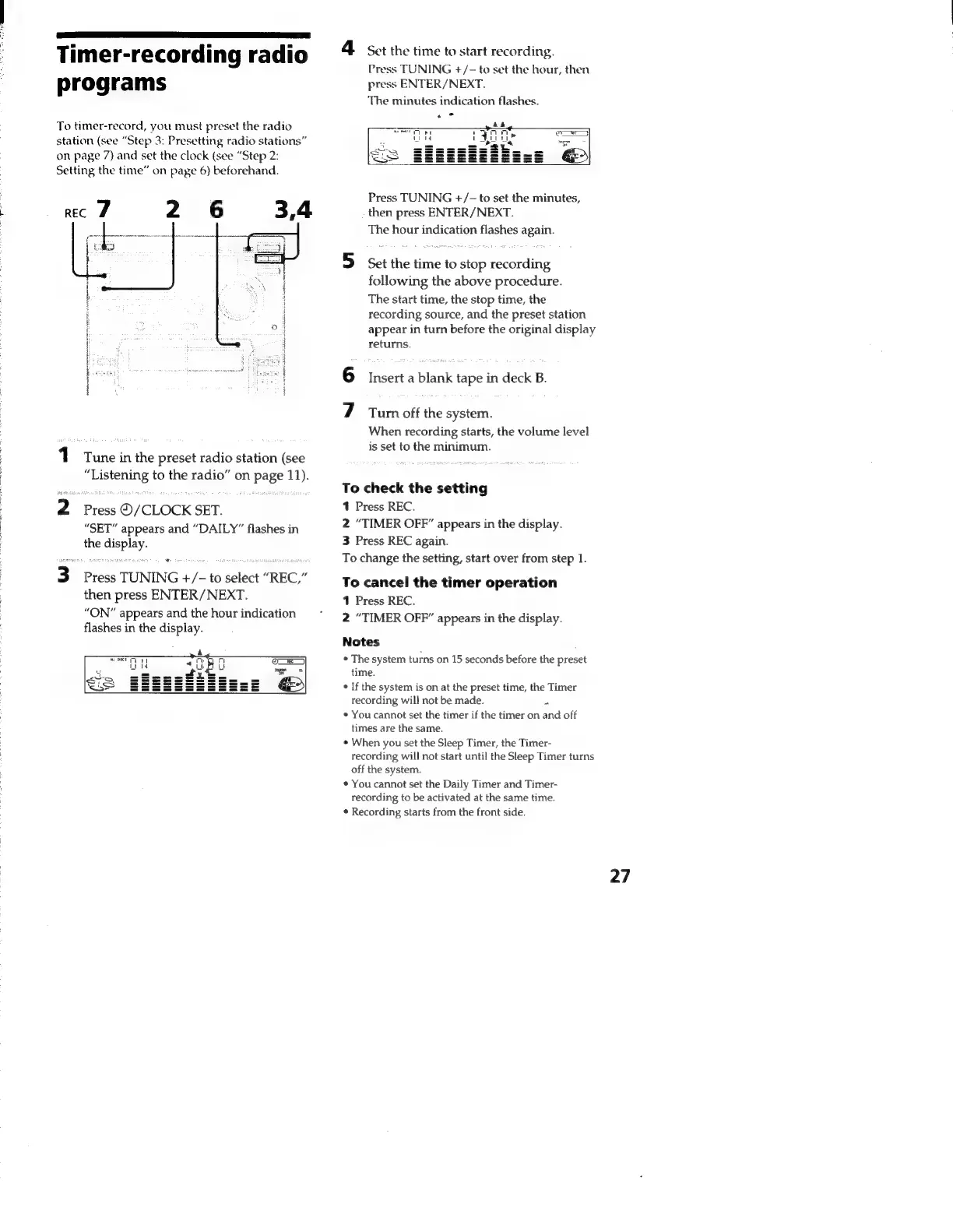
rec
2 6
3,4
1
Tune
in
the
preset
radio
station
(see
“Listening
to
the
radio”
on
page
11).
2
Press
©/CLOCK
SET.
“SET”
appears
and
“DAILY”
flashes
in
the
display.
3
Press
TUNING
+/-
to
select
“REC,”
then
press
ENTER/NEXT.
“ON”
appears
and
the
hour
indication
flashes
in
the
display.
4
Set
the
time
to
start
recording.
Press
TUNING
+/-
to
set
the
hour,
then
press
ENTER/NEXT.
The
minutes
indication
flashes.
&
See
ri
tr
ny:
a)
lida
fe
Ae)
S351
Te
ith
or
Press
TUNING
+/-
to
set
the
minutes,
then
press
ENTER/
NEXT.
The
hour
indication
flashes
again.
5
set
the
time
to
stop
recording
following
the
above
procedure.
The
start
time,
the
stop
time,
the
recording
source,
and
the
preset
station
appear
in
turn
before
the
original
display
returns.
6
Insert
a
blank
tape
in
deck
B.
7
Tur
off
the
system.
When
recording
starts,
the
volume
level
is
set
to
the
minimum.
To
check
the
setting
1
Press
REC.
2
“TIMER
OFF”
appears
in
the
display.
3
Press
REC
again.
To
change
the
setting,
start
over
from
step
1.
To
cancel
the
timer
operation
1
Press
REC.
2
“TIMER
OFF”
appears
in
the
display.
Notes
*
The
system
turns
on
15
seconds
before
the
preset
time.
*
If
the
system
is
on
at
the
preset
time,
the
Timer
recording
will
not
be
made.
¥
*
You
cannot
set
the
timer
if
the
timer
on
and
off
times
are
the
same.
¢
When
you
set
the
Sleep
Timer,
the
Timer-
recording
will
not
start
until
the
Sleep
Timer
turns
off
the
system.
*
You
cannot
set
the
Daily
Timer
and
Timer-
recording
to
be
activated
at
the
same
time.
¢
Recording
starts
from
the
front
side.
27

Related product manuals