NEX-VG30/VG30E/VG30EH/VG30H_L2
3-1
3. ASSEMBLY
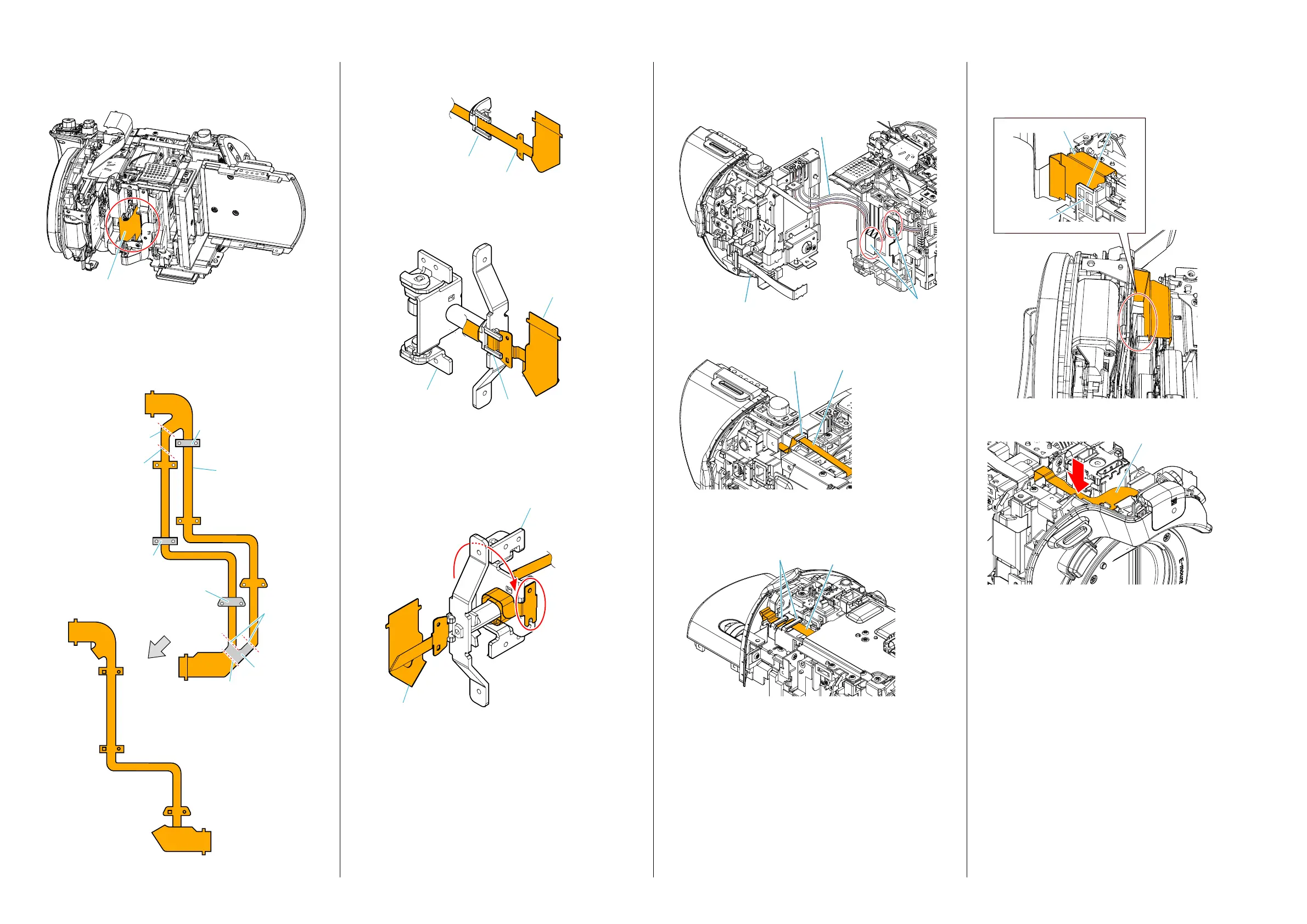
Assembly-1: Installation Cautions of the Cabinet (R)
Section.
FP-1438 Flexible Board
Route the FP-1438 Flexible Board as shown.
Assembly-2: The Method of attachment of the FP-1442
Flexible Board
A Fold dotted line parts of the FP-1442 Flexible Board as
shown in figure.
Mountain fold
Valley fold
FP-1442
Flexible Board
Mountain
fold
Valley fold
Adhesive tape
Adhesive tape
Adhesive tape
Adhesive tape
Assembly-3: Installation Cautions of the Cabinet (L)
Block Section.
Route the Battery Connector Harness as shown.
Hooks
Battery Connector
Harness
Cabinet (L) Block Section
Route the Flexible Flat Cable (FFC-233) as shown.
Flexible Flat Cable
(FFC-233)
Hook
(Guard panel VC)
Route the Flexible Board of the PS36000 Control Switch Block as shown.
Flexible Board of the
PS36000 Control Switch
Block
Hooks
Assembly-4: Installation Cautions of the Mount Block
Section.
Route the FP-1449 Flexible Board as shown.
Slit
Guard panel
FP-1449 Flexible Board
FP-2061 Flexible Board
Route the FP-2061 Flexible Board as shown.
B Insert the FP-1442 Flexible Board to the Flexible Clamp as
shown in figure.
FP-1442
Flexible Board
Flexible Clamp
C Insert the FP-1442 Flexible Board and the Flexible Clamp to
the Pannel Hinge Assy.
Flexible Clamp
FP-1442
Flexible Board
Panel Hinge
Assy
D Roll the FP-1442 Flexible Board 1 times and half in the Panel
Hinge Assy as shown in figure.
And attach the FP-1442 Flexible Board to the Panel Hinge
Assy.
Attach the FP-1442
Flexible Board.
Roll the FP-1442
Flexible Board.
FP-1442
Flexible Board
Panel Hinge
Assy
3-1. ASSEMBLY


 To Next Page
 Loading...