EasyManua.ls Logo

Sony Trinitron KV-27510 - Adjusting the Sound

Sony Trinitron KV-27510
27 pages
Print Icon
To Next Page IconTo Next Page
To Previous Page IconTo Previous Page
Loading...
Adjusting
screen
brightness
automatically
(LUMISPONDER)
Adjusting
the
sound
(AUDIO)
MW
KV-27V10/29V11C/29V10M
only
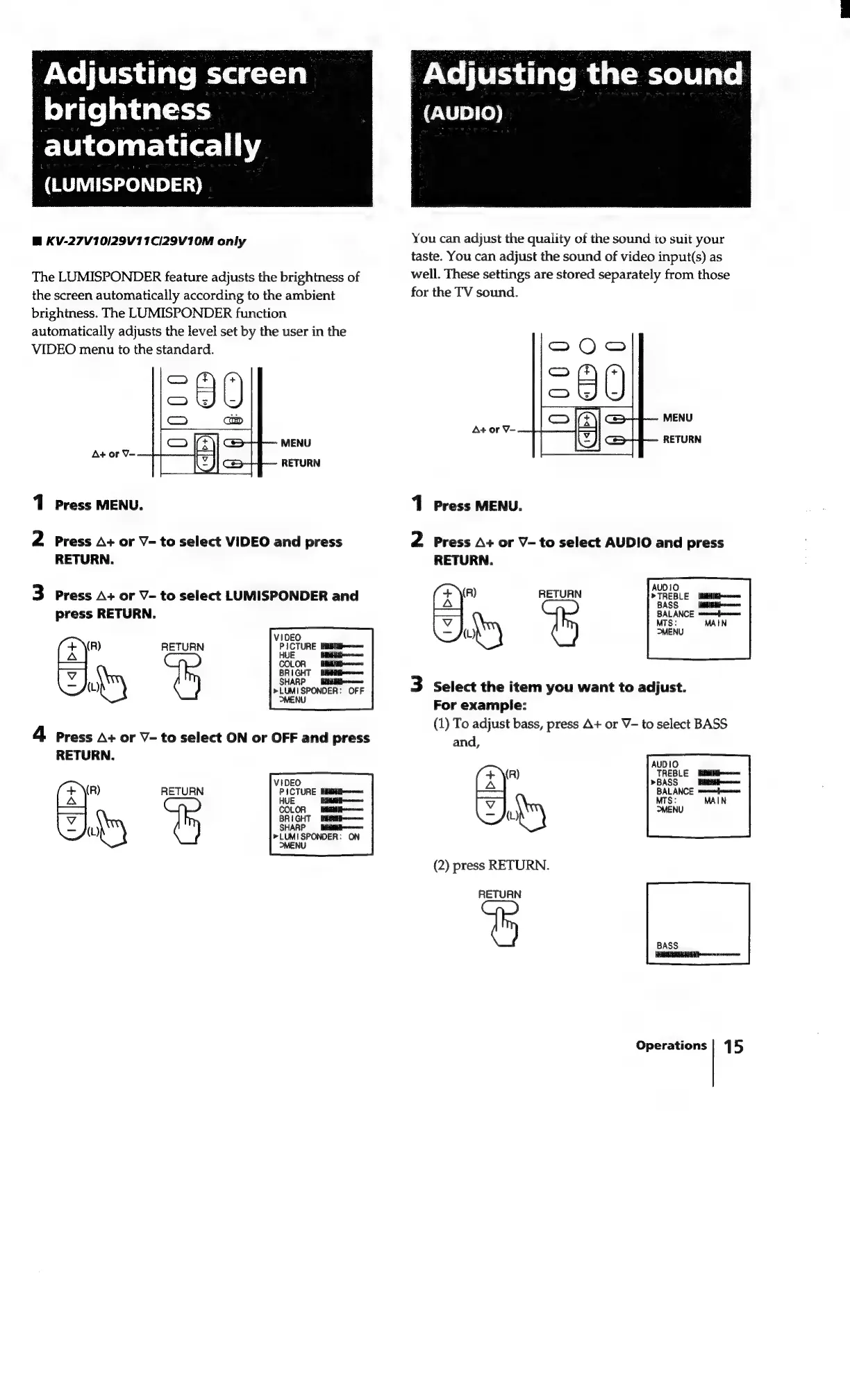
The
LUMISPONDER
feature
adjusts
the
brightness
of
the
screen
automatically
according
to
the
ambient
brightness.
The
LUMISPONDER
function
automatically
adjusts
the
level
set
by
the
user
in
the
VIDEO
menu
to
the
standard.
1
Press
MENU.
2
Press
A+
or
V-
to
select
VIDEO
and
press
RETURN.
3
Press
A+
or
V-
to
select
LUMISPONDER
and
press
RETURN.
(R)
R
RETURN
Ay
VIDEO
PICTURE
BM
ittemomenn
HUE
sine
COLOR
IIL
pom
BRIGHT
BAH
pommnn
SHARP
——_BitgHE
Biposone
»LUMISPONDER:
OFF
MENU
4
press
A+
or
V-
to
select
ON
or
OFF
and
press
RETURN.
RETURN
You
can
adjust
the
quality
of
the
sound
to
suit
your
taste.
You
can
adjust
the
sound
of
video
input(s)
as
well.
These
settings
are
stored
separately
from
those
for
the
TV
sound.
SO)
Sa
OWk
MENU
RETURN
1
Press
MENU.
2
Press
A+
or
V-
to
select
AUDIO
and
press
RETURN.
(R)
R
RETURN
EY)
3
Select
the
item
you
want
to
adjust.
For
example:
(1)
To
adjust
bass,
press
A+
or
V-
to
select
BASS
and
(R)
ol
oy
(2)
press
RETURN.
RETURN
Operations
|
15

Related product manuals