32
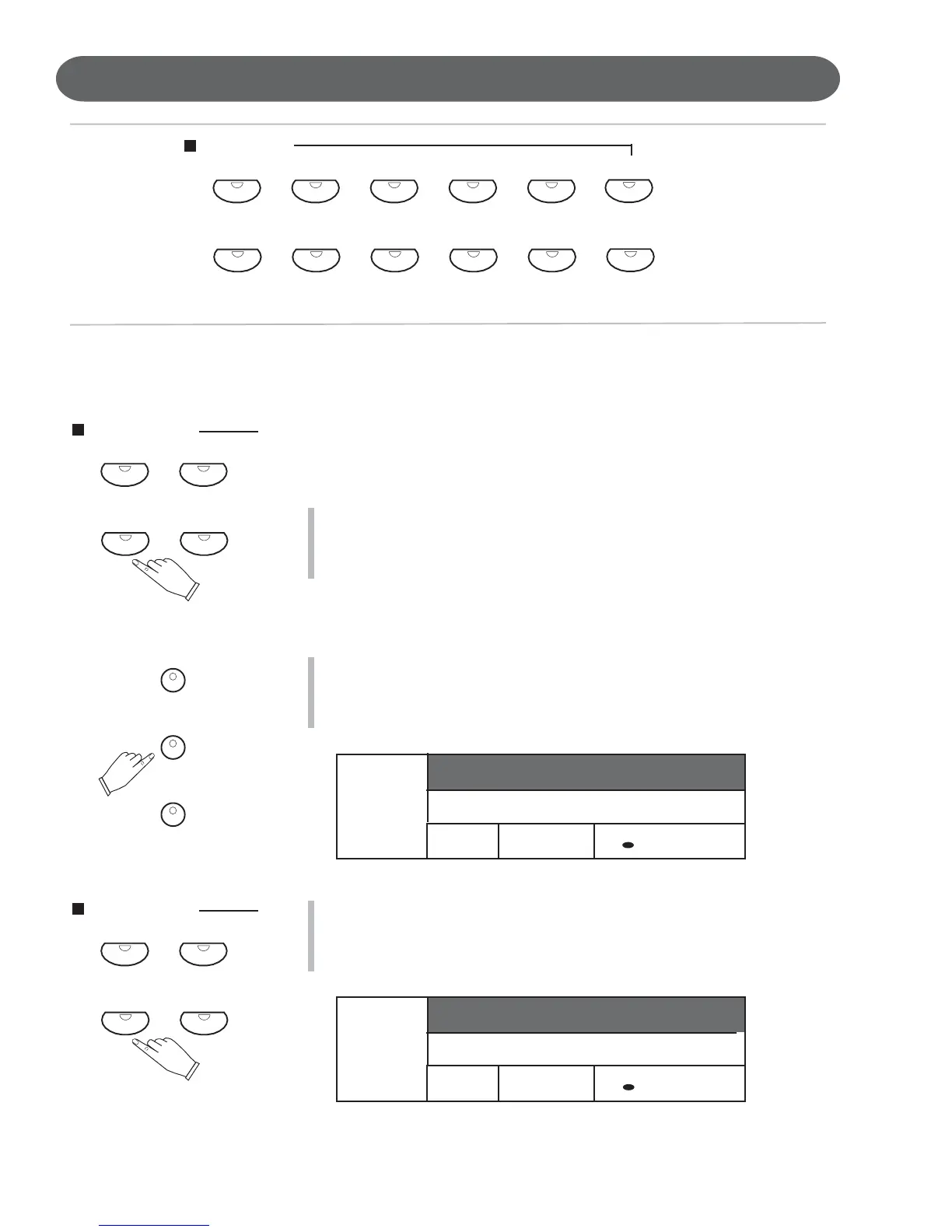
Quick Select Sound Group Buttons Shown Above.
To select an Instrument Voice for your Piano follow the easy steps shown
below:
QUICK SELECT -
For all 88 Key voice selections (Upper Mode)
There are 12 voices that can be selected quickly by pressing one of the
12 quick select SOUND GROUP buttons.
1. Select one of the 12 Quick Select Instrument Voice Buttons.
The Instrument Voice Button indicator LED will light and the LCD
Display Screen will show the selected Instrument Voice number and it’s
name will be highlighted.
In our example we have selected the Saxophone Voice.
For the Layer and Lower Sound Mode Sections of the Piano
1. Select the Sound Mode Button LAYER or LOWER, for the Instrument
Voice that you want to change.
The Button’s LED will turn on and the LCD Display will show the se-
lected Sound Mode and its currently selected instrument voice.
In our example we have selected the Layer Sound Channel Mode
2. Select one of the 12 Quick Select Instrument Voice Buttons.
The Instrument Voice Button indicator LED will light and the LCD
Display Screen will show the selected Instrument Voice number and it’s
name will be highlighted.
In our example above we have selected the Saxophone Voice.
PIANO VOICES - QUICK SELECTION
LAYER
NC
1 : Big Band
A1
/ = 100
1 : Grand Piano
LAYER
NC
1 : Big Band
A1
/ = 100
65 : Soprano Sax
SOUND GROUP
SAXOPHONE
TRUMPET
PIANO VIBES
UPPER
LAYER
LOWER
SOUND GROUP
SAXOPHONETRUMPET
PIANO VIBES
SOUND GROUP
SYNTH FXSYNTHFLUTESAXOPHONE
ORGAN
TRUMPET
GUITAR BASSPIANO VIBES
SOUND FX
STRINGS


 To Next Page
 Loading...