118
6-1. Phone operation (Hands-free system for cellular phones)
COROLLA_HV(TMUK)_OEM_MM_(EE)
E-mail:
• “Incoming E-mail display” is set to
“Full screen”. (P.123)
• “E-mail notification pop-up” is set to
on. (P.123)
SMS/MMS:
• “Incoming SMS/MMS display” is set to
“Full screen”. (P.123)
• “SMS/MMS notification pop-up” is set
to on. (P.123)
●
Depending on the type of Bluetooth
®
phone being connected, e-mail func-
tion cannot be used via Bluetooth
®
.
1 Display the message screen.
(P. 11 7 )
2 Select a desired account name.
3 Select the desired message
from the list.
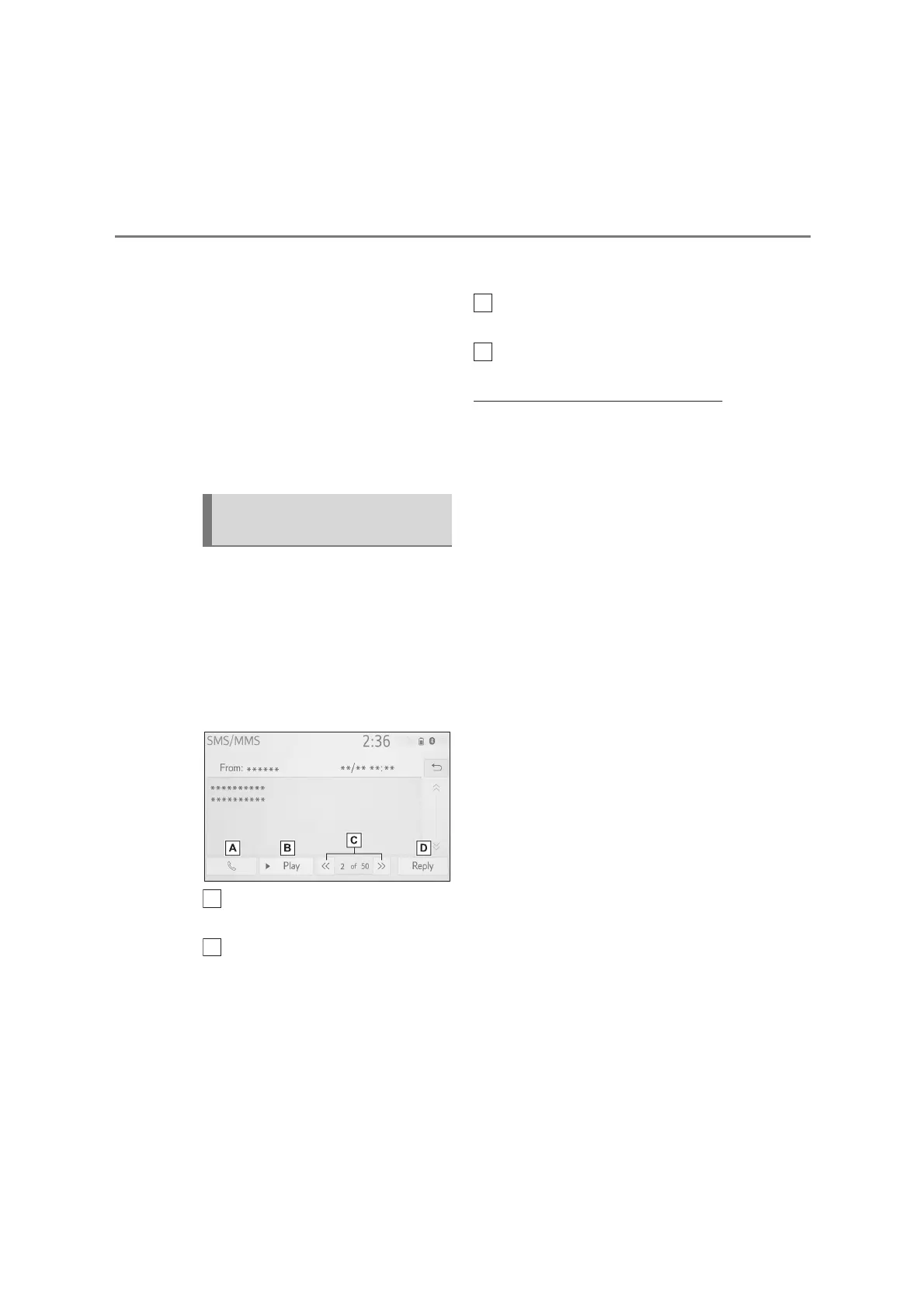
4 Check that the message is dis-
played.
Select to call the message
sender.
Select to have messages read
out.
To cancel this function, select
“Stop”.
When “Automatic message
readout” is set to on, messages
will be automatically read out.
(P.129)
Select to display the previous or
next message.
Select to reply the message.
(P.120)
●
Depending on the type of Bluetooth
®
phone being connected, it may be
necessary to perform additional steps
on the phone.
●
Messages are displayed in the appro-
priate connected Bluetooth
®
phone’s
registered mail address folder. Select
the desired folder to be displayed.
●
Only received messages on the con-
nected Bluetooth
®
phone can be dis-
played.
●
The text of the message is not dis-
played while driving.
●
Turn the “POWER VOLUME” knob, or
use the volume control switch on the
steering wheel to adjust the message
read out volume.
●
“Subject:” field is not shown on SMS
case.
●
E-mail only: Select “Mark unread” or
“Mark read” to mark mail unread or
read on the message screen.
This function is available when
“Update message read status on
phone” is set to on. (P.129)
Checking received mes-
sages


 To Next Page
 Loading...