English
27
Digital settings – favourite programmes,
locked programmes, encrypted programmes
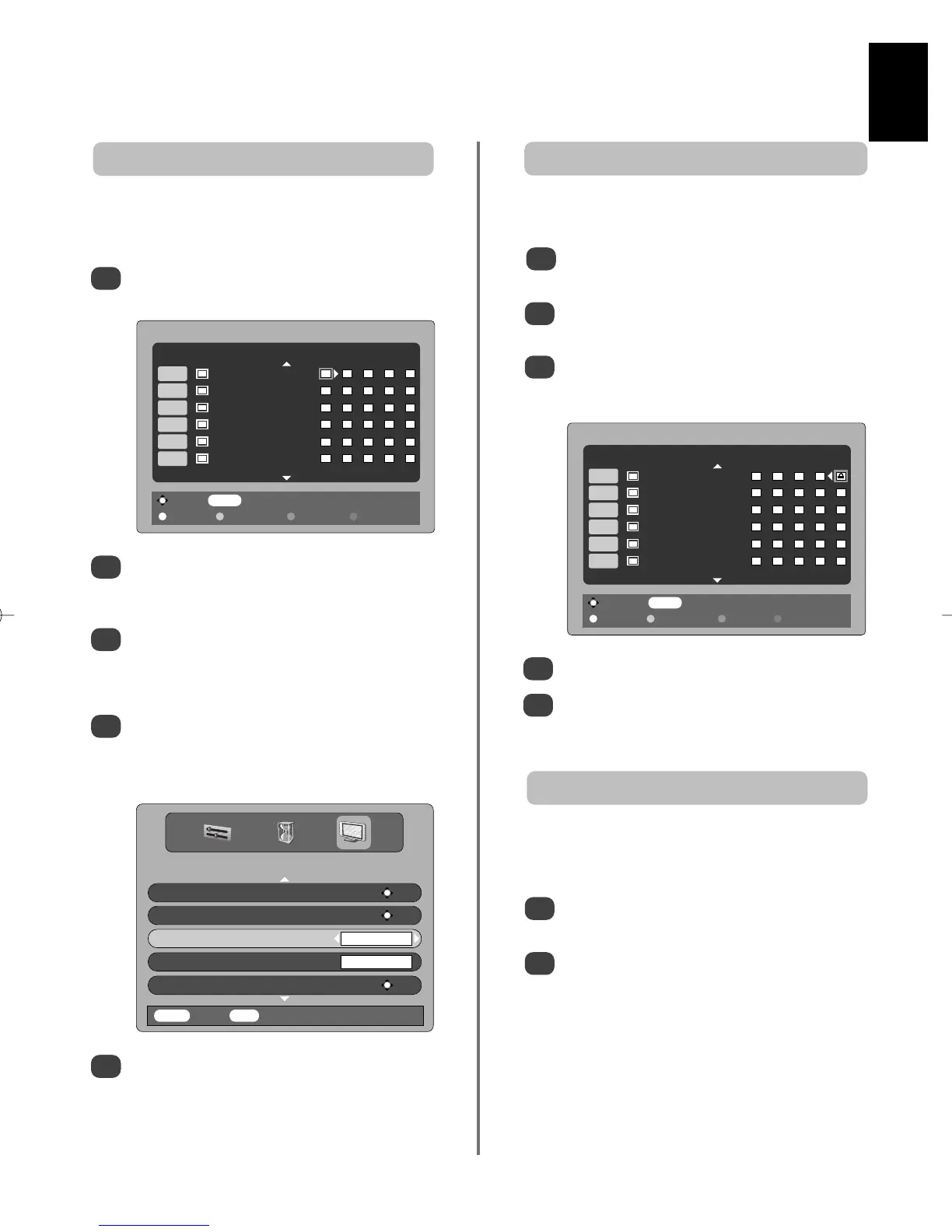
Locked Programmes stops the viewing of digital
channels, they can only be accessed by entering the PIN.
Locking programmes
1
From the FEATURE MENU press Q to select
Favourite and Locked Programmes.
Press
R
repeatedly to select the Locked
Programme list.
Use
P
and Q to go through the list of channels
pressing OK to select the ones required, a
padlock will appear in the box.
2
3
Press EXIT to finish
When any of the channels in the Locked
Programme list are now selected the PIN must
be entered before they can be accessed.
4
5
Selecting Encrypted Programmes allows all encrypted
programmes to be shown in the programme list even if
they are not available to select.
Encrypted programmes
1
In the FEATURE MENU press
P
or Q to select
Encrypted Programmes.
Use
S
or
R
to select ON or OFF.
NOTE: CAMs (Conditional Access Modules) are
available from service providers (see 'Common
Interface' section)
2
Deselect MENU Back
Page Up Page Down Lock all Unlock all
FAVOURITE AND LOCKED PROGRAMMES
Locked Programme: Yes
1 BBC ONE
2 BBC TWO
7 BBC THREE
10 BBC FOUR
30 CBBC Channel
31 CBeebies
Favourite Programmes creates a list of the digital
channels that are watched most. Four lists can be created,
these can be a mixture of television, text and radio channels.
Selecting favourite programmes
1
From the FEATURE MENU press Q to select
Favourite and Locked Programmes .
2
3
4
Use
P
and Q to go through the list of channels
pressing OK to select the ones required, a tick will
appear in the box.
Press
R
to select List 2. Follow the same
procedure to make the selection. When all
favourites have been selected press MENU to
return to the FEATURE menu.
Use Q to highlight Favourites and
S
or
R
to
select between ALL, TV, RADIO, FAV-1 and
FAV-2. The number of favourites available
depends on how many lists have been created.
2
Press EXIT.
Using the
f
P
e
buttons will now only access
those channels in Favourite List 1 when FAV-1 is
selected.
5
Select MENU Back
Page Up Page Down Select all Deselect all
FAVOURITE AND LOCKED PROGRAMMES
Favourite List 1: No
1 BBC ONE
2 BBC TWO
7 BBC THREE
10 BBC FOUR
30 CBBC Channel
31 CBeebies
FEATURE MENU
Parental Control OK
Favourite and Locked Programmes OK
Favourites FAV-1
Common Interface Slots
NO MODULE
Software Upgrade OK
MENU
Back
EXIT
Watch TV


 To Next Page
 Loading...