26
Appendix B: Troubleshooting
T1. What should I do if PC cannot find the new hardware?
Check to see if the network adapter is inserted in the PCI Express slot properly; otherwise,
please reinsert the adapter.
If the problem remains, please try to change another PCI Express slot.
T2. What should I do if I could not find “Ethernet Controller” under “(My)
Computer >Device Manager >Other Devices”?
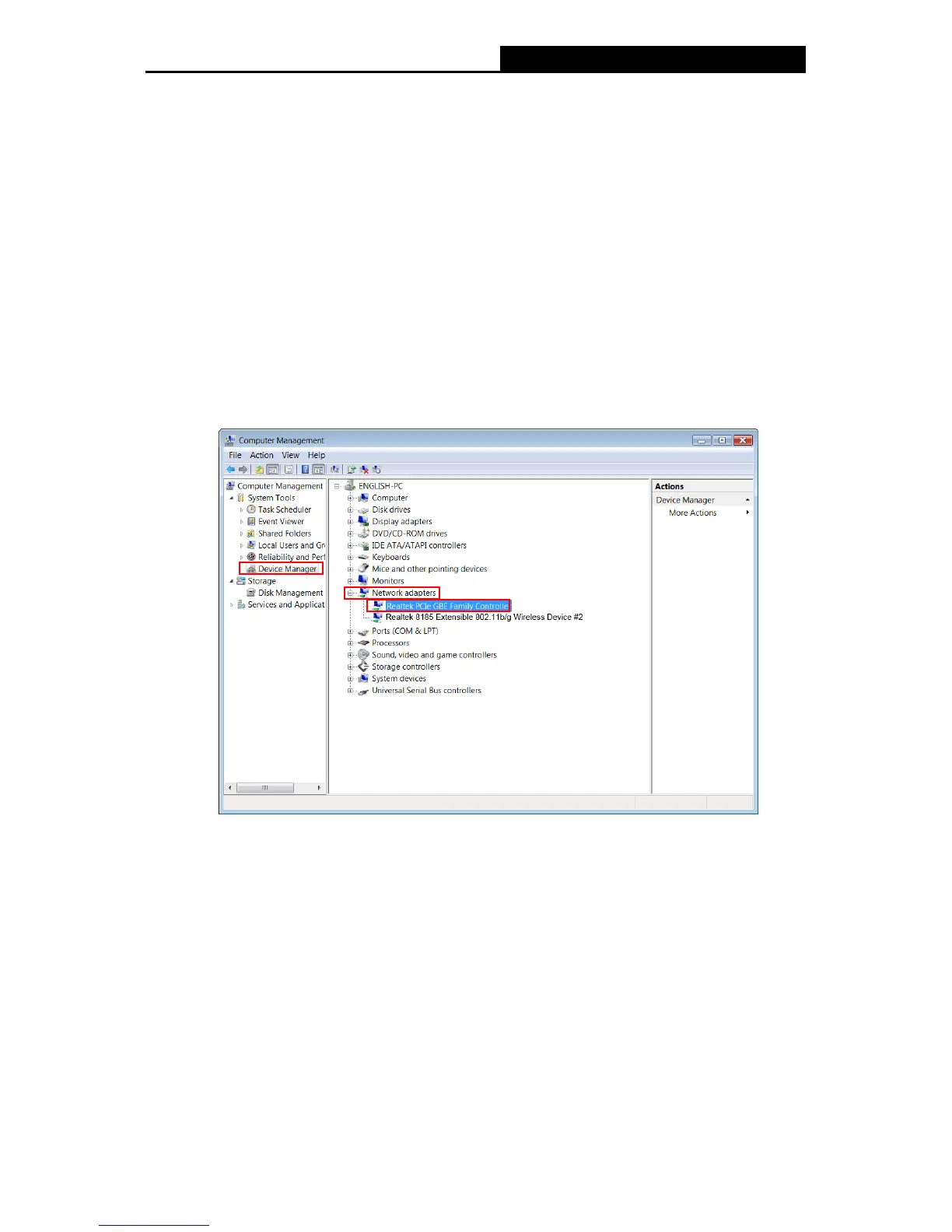
In such circumstance, you are recommended to go to “(My) Computer >Device
Manager >Network adapters” to find “Realtek PCIe GBE Family Controller” instead, and
continue with the rest steps of installation.
Figure B-1
T3. How could I know whether the operating system of my computer is 32-bit or 64-bit?
1) Right-click Computer on the desktop, and then select Properties, as shown in Figure B-2
(for OS Windows 7) and Figure B-3 ( for OS Windows Vista) below.


 To Next Page
 Loading...