5
Instructions
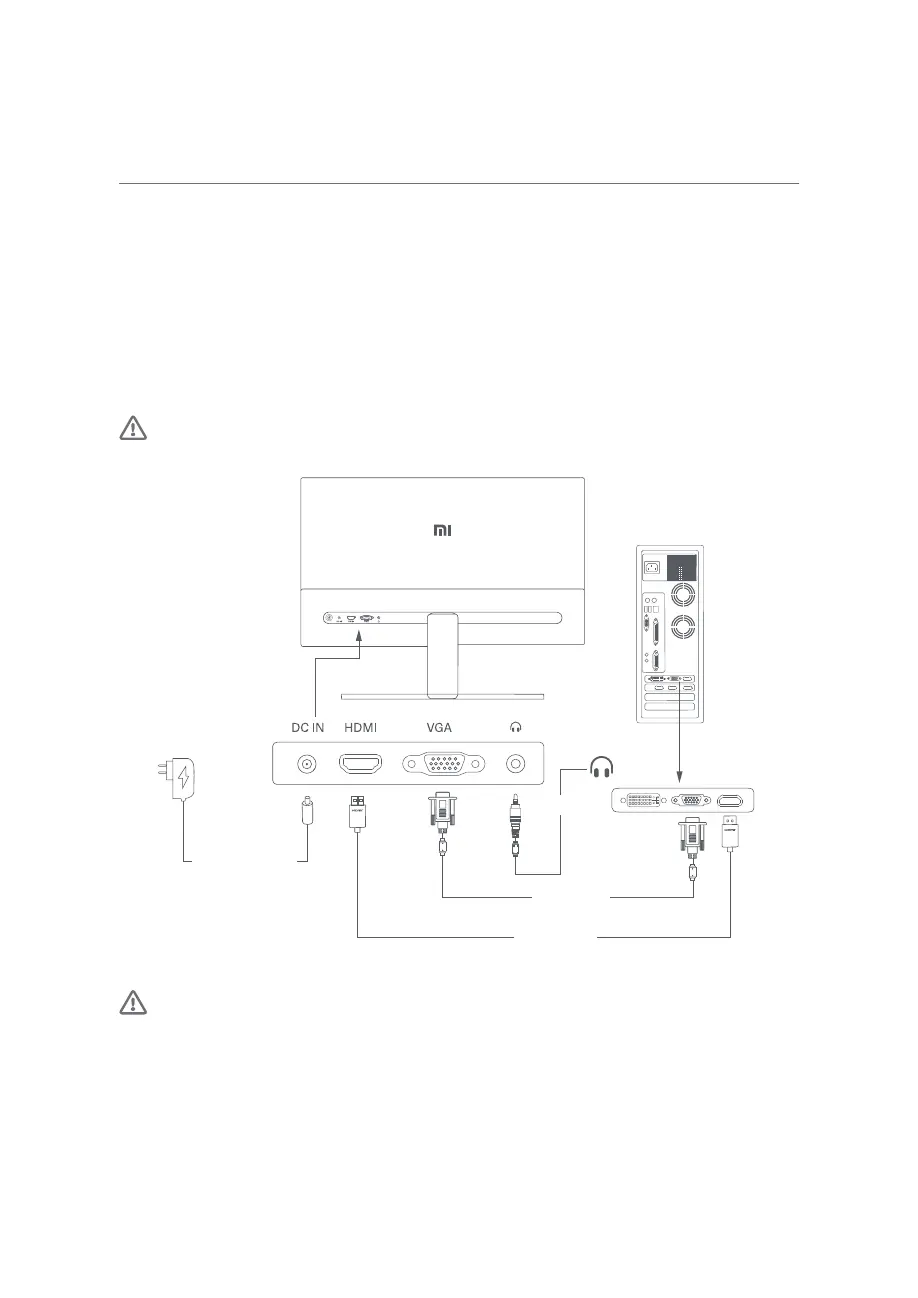
Connections
• Connect the VGA cable. VGA cable is only used for transferring data or signals via the VGA port. It is sold
separately.
a. Make sure the monitor and the computer are both turned off.
b. Connect one end of the VGA cable to the computer's VGA output port, and the other end to the
monitor's VGA port.
• Connect the HDMI cable. HDMI cable is only used for transferring data or signals via the HDMI port.
a. Make sure the monitor and the computer are both turned off.
b. Connect one end of the HDMI cable to the computer’s HDMI output port, and the other end to the
monitor's HDMI port.
• Connect a headset or any 3.5 mm compatible external audio device to the monitor’s audio port
Note: If the power cord or HDMI cable is damaged, it must be replaced with a genuine one purchased
from the manufacturer or after-sales service department.
DC Power Cord
HDMI Cable
VGA Cable
(sold separately)
Earphone
Note: The audio port is only used for the output of audio signals.
1. Power Port (DC IN): Power input.
2. HDMI(1.4) Port: Maximum resolution 1920 × 1080, maximum refresh rate 75 Hz.
3. VGA Port: Maximum resolution 1920 × 1080, maximum refresh rate 60 Hz.
4. Audio Port: Audio output.


 To Next Page
 Loading...