Notebook PC User Manual
35
If warnings are still given during bootup after running a software
disk checking utility, you should take your Notebook PC in for
servicing. Continued use may result in data loss.
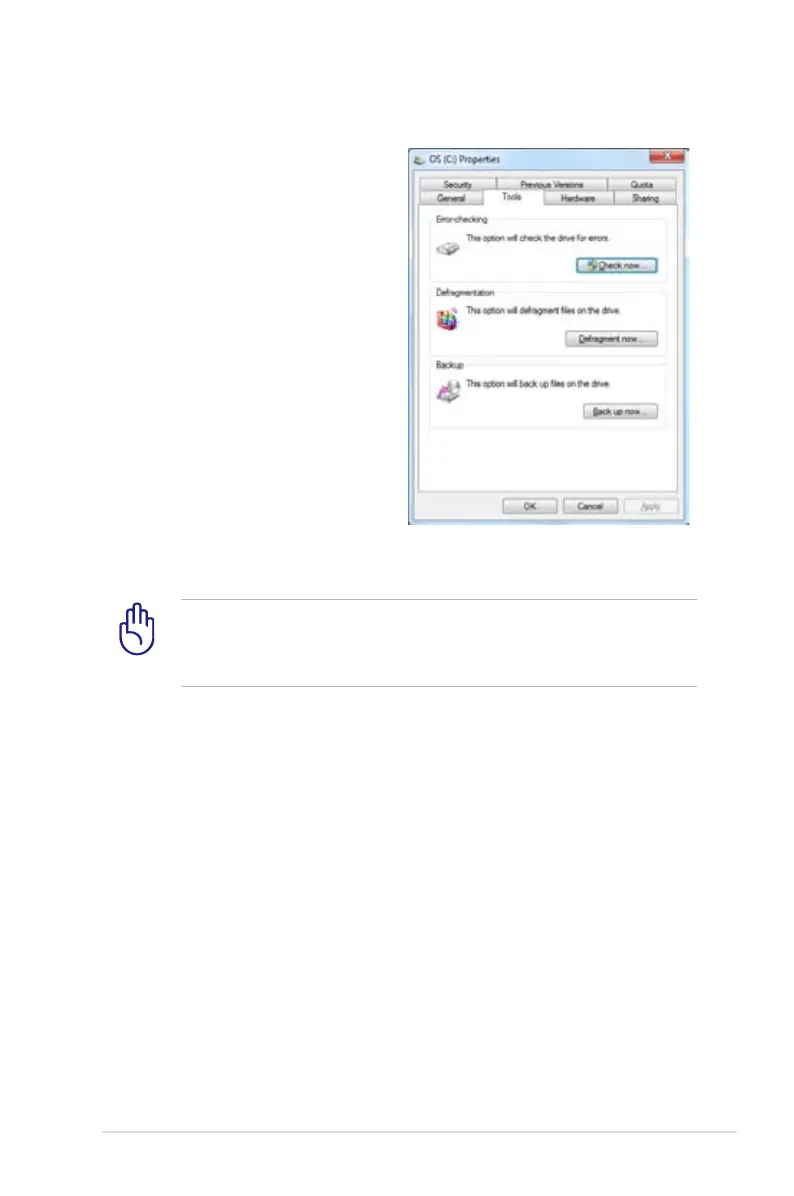
Self Monitoring and Reporting Technology
The S.M.A.R.T. (Self Monitoring and
Reporting Technology) checks the
hard disk drive during POST and
gives a warning message if the
hard disk drive requires servicing.
If any critical hard disk drive
warning is given during bootup,
backup your data immediately
and run Windows disk checking
program. To run Window’s disk
checking program: click Windows
> select Computer > right-click
a hard disk drive icon > choose
Properties > click the Tools tab >
click Check Now > click Start. You
can also select “Scan ... sectors” for more effective scan and repair but
the process will run slower.


 To Next Page
 Loading...