ASUS P8B-C series 5-37
4. The Adapter Properties screen appears.
Use the arrow keys to select RAID Properties, then press <Enter>.
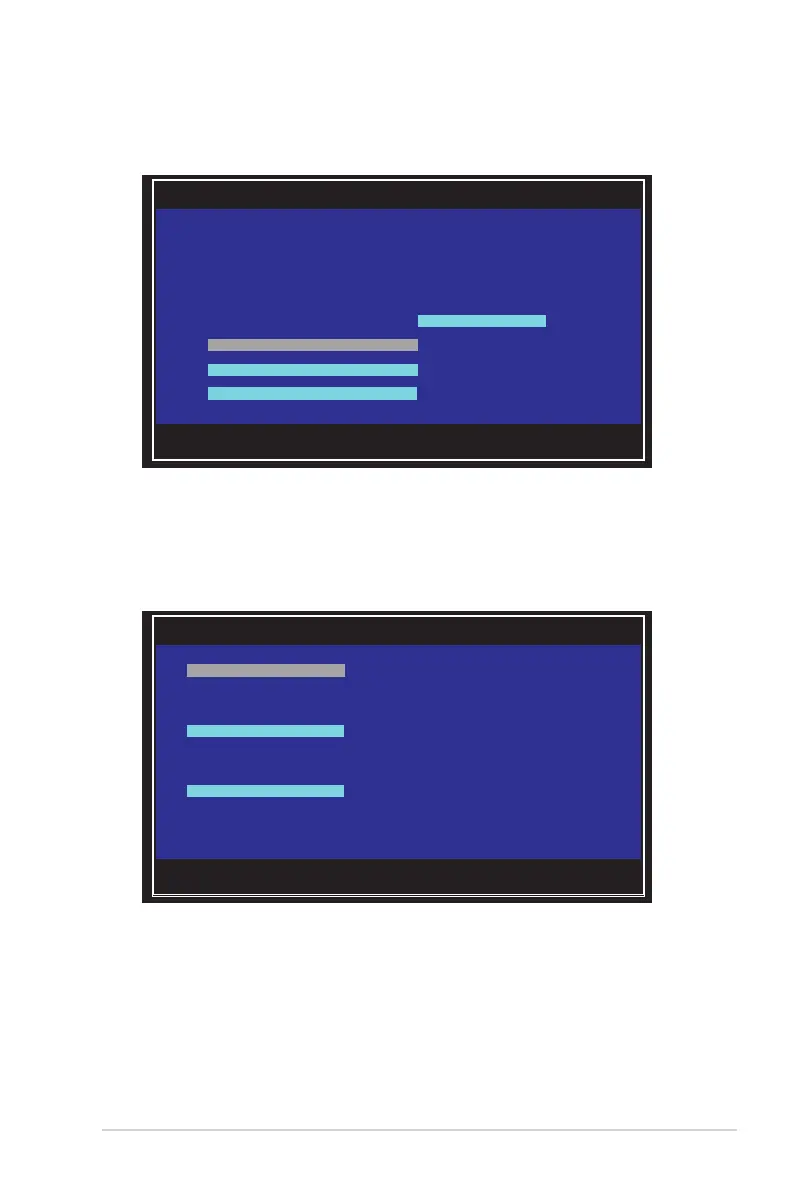
5. The Select New Volume Type screen appears.
Use the arrow keys to select Create RAID 1 Volume, then press <Enter>.
Esc = Exit Menu F1/Shift+1 = Help
Enter = Select Item -/+/Enter = Change Item
LSI Corp Cong Utility v7.07.00.00 (2010.04.30)
Adapter Properties -- SAS2008
Adapter SAS 2008
PCI Slot 00
PCI Address(Bus/Dev) 01:00
MPT Firmware Revision 8.00.00.00-IR
SAS Address 500E0180:00010424
NVDATA Version 07.01
Status Enabled
Boot Order 0
Boot Support [Enabled BIOS & OS]
RAID Properties
SAS Topology
Advanced Adapter Properties
Esc = Exit Menu F1/Shift+1 = Help
Enter = Choose volume type to create
LSI Corp Cong Utility v7.07.00.00 (2010.04.30)
Select New Volume Type -- SAS2008
Create RAID 1 Volume Create a RAID 1 volume
consisting of 2 disks plus up to 2
optional hot spares. ALL DATA on
volume disks will be DELETED!
Create RAID 1E/10 Volume Create a RAID 1E or RAID 10 volume
consisting of 3 to 10 disks including up
to 2 optional hot spares. ALL DATA on
volume disks will be DELETED!
Create RAID 0 Volume Create a RAID 0 volume consisting of
2 to 10 disks. ALL DATA on
volume disks will be DELETED!


 To Next Page
 Loading...