Controls
81
Reference At a glanceDriving tipsCommunications NavigationEntertainmentMobility
Settings on Control Display
iDrive, for operating principle refer to page 16.
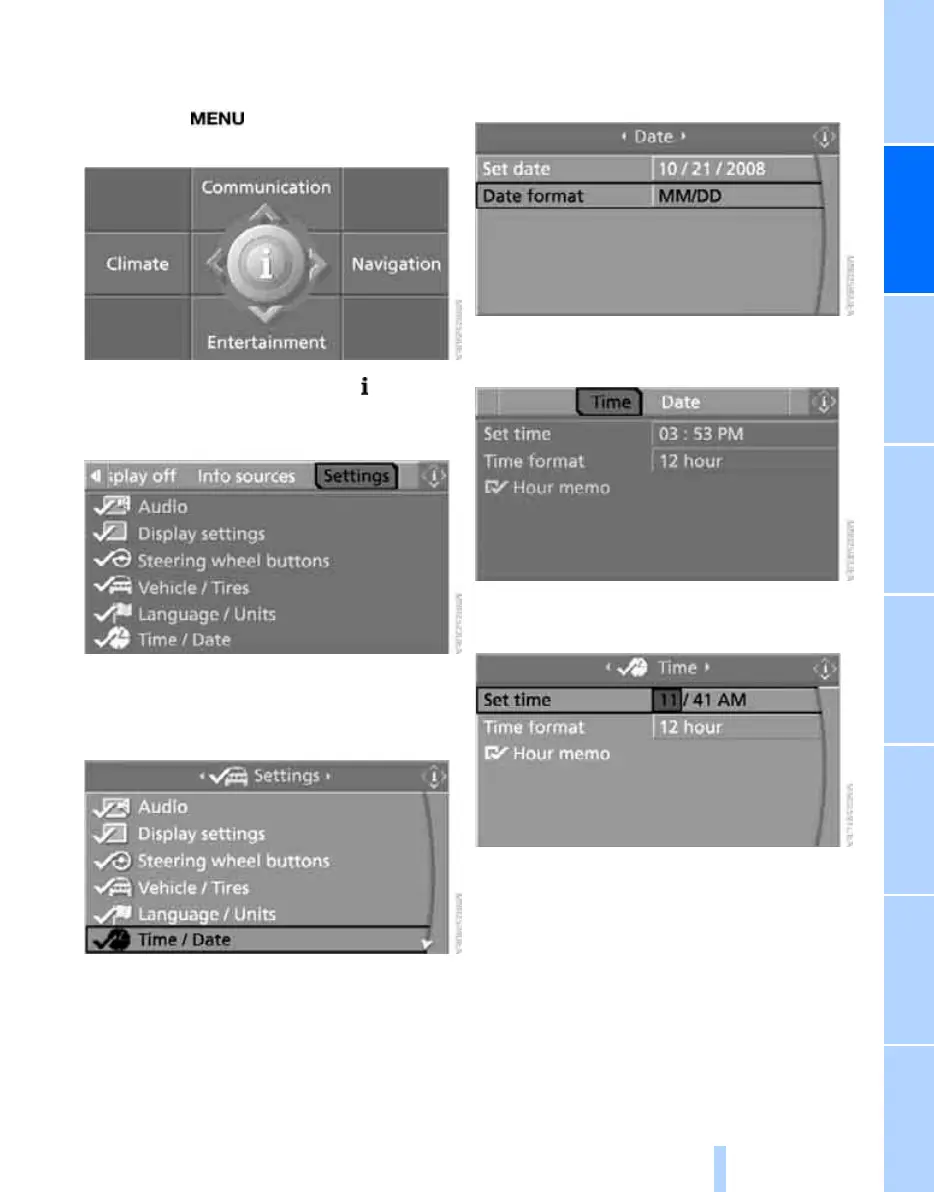
1. Press the button once or twice until
the start menu appears.
2. Press the controller to open the menu.
3. Turn the controller until "Settings" is
selected and press the controller.
Setting time
1. Turn the controller until "Time / Date" is
selected and press the controller.
2. Move the controller once to the front if nec-
essary to change to the first field from the
top.
3. Turn the controller until "Time" is selected
and press the controller.
4. Turn the controller until "Set time" is
selected and press the controller.
Making settings
1. Turn the controller to set the hours and
press the controller.
2. Turn the controller to set the minutes and
press the controller.
The changed time is stored.
Online Edition for Part no. 01 41 0 014 248 - © 08/07 BMW AG


 To Next Page
 Loading...