EasyManua.ls Logo

Canon EOS 600 - Appendix; LCD Display Panel Overview

Canon EOS 600
35 pages
Print Icon
To Next Page IconTo Next Page
To Previous Page IconTo Previous Page
Loading...
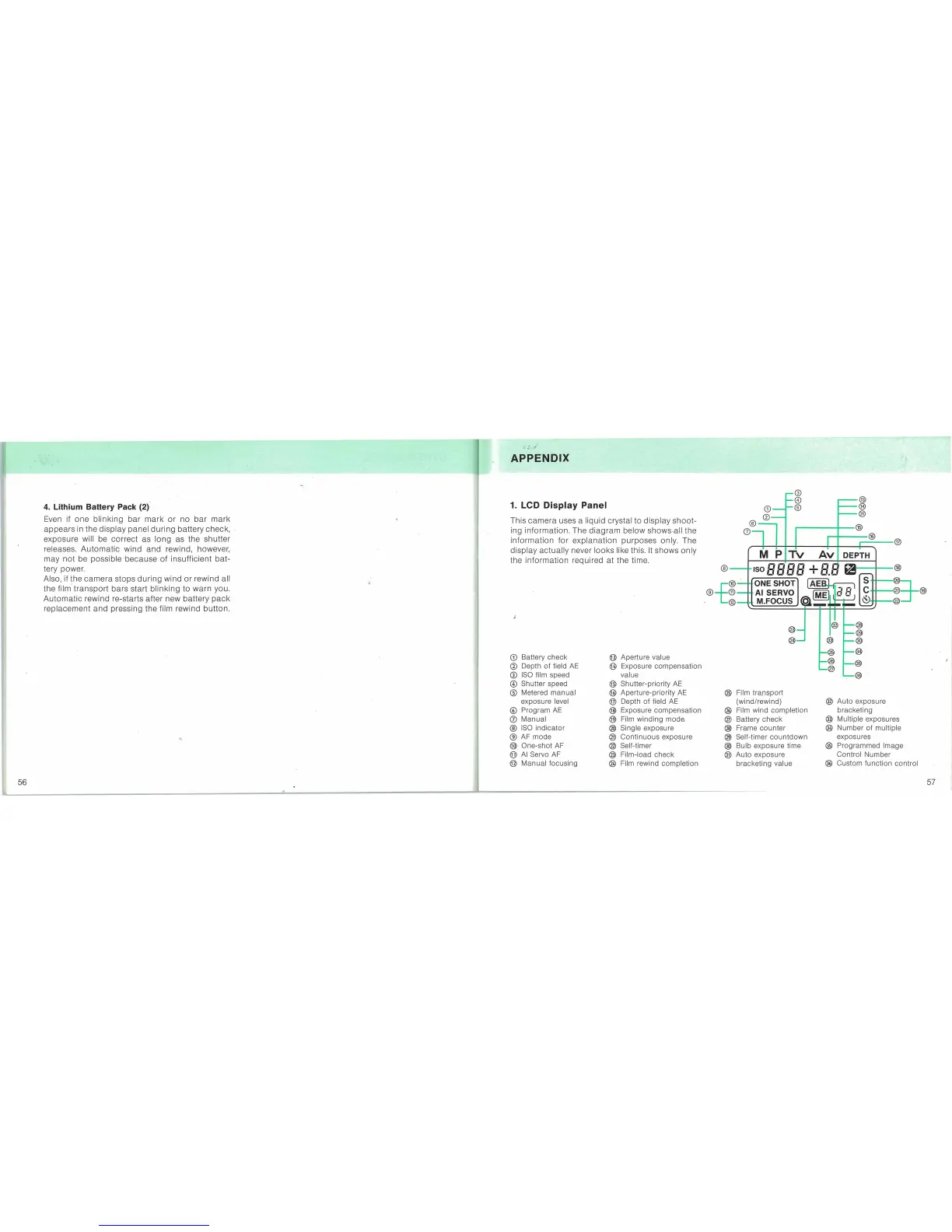
APPENDIX
1.
LeD
Display Panel
This ca,mera uses a liquid crystal to display
shoot-
ing information. The
diagram
below
shows~all
the
information
for
explanation purposes only. The
display
actually
never looks like this.
It
shows only
the
information
required
at
the time.
®
®
®
®
Auto
exposure
bracketing
® Multiple exposures
@
Number
of
multiple
exposures
®
Programmed
Image
Control
Number
@ Custom
function
control
G)
o
®
® Film
transport
(wi
nd/rewi
nd)
@ Film
wind
completion
® Battery
check
@ Frame
counter
@ Self-timer
countdown
@
Bulb
exposure time
®
Auto
exposu
re
bracketing
value
CD
@
0~
I
®.r-
_®_16
__
®
NI
PfTv
Av
IDEPTH
1---
®---ISO
Cl Cl
0 0 ..!..
Cl
cl
m----®
Lf Lf Lf
Lf
I Lf.Lf
riQ
~
@~jONESHOT
IAEBI-~
S
-®l
®-f®-
·AISERVO
~
laB
<;:
-@=r-@
.
@-_.
M.FOCUS
~_~
~._@
I~
@
@
Aperture value
@ Exposure
compensation
value
@ Shutter-priority
AE
@
Aperture-priority
AE
@ Depth
of
field
AE
@ Exposure
compensation
@ Film
winding
mode,
® Single exposure
®
Continuous
exposure
® Self-timer
® Film-load
check
@ Film rewind
completion
CD
Battery
check
CD
Depth
of
field
AE
CD
ISO
film speed
@
Sh
utter speed
® Metered
manual
exposure level
®
Program
AE
(j)
Manual
®
ISO
indicator
(2)
AF
mode
®
One-shot
AF
@
AI
Servo AF
@
Manual
focusing
4.
Lithium Battery Pack
(2)"
Even if one
blinking
bar
mark
or
no
bar
mark
appears
in the display panel
during
battery check,
exposure will be
correct
as long as the shutter
releases.
Automatic
wind
and
rewind, however,
may
not
be possible 'because
of
insufficient bat-
tery power.
Also, if the
camera
stops
during
wind
or
rewind all
the film'
transport
bars start blinking to warn you.
Automatic
rewind re-starts after new battery"
pack
replacement
and
pressing the film rewind button.
56
57

Other manuals for Canon EOS 600

Related product manuals