EasyManua.ls Logo

Canon FT QL - Film Rewinding

Canon FT QL
44 pages
Print Icon
To Next Page IconTo Next Page
To Previous Page IconTo Previous Page
Loading...
Film
Rewinding
When
the
film
reaches
the
end
and
the
film
advance
lever
stops,
rewind
the
film
into
the
cartridge
as
soon
as
possible.
Be
sure
not
to
open
the
back
cover
before
rewinding.
Otherwise,
the
entire
roll
will
be
exposed
and
ruined
as
the
exposed
film
is
naked
within
the
camera.
j
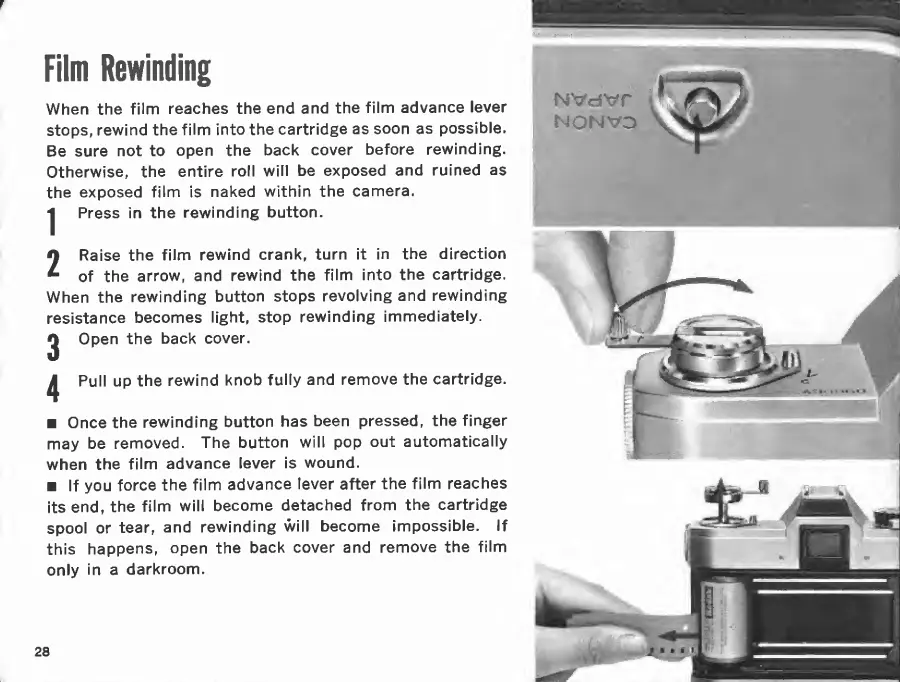
Press
in
the
rewinding
button.
2
Raise
the
film
rewind
crank,
turn
it
in
the
direction
of
the
arrow,
and
rewind
the
film
into
the
cartridge.
When
the
rewinding
button
stops
revolving
and
rewinding
resistance
becomes
light,
stop
rewinding
immediately.
2
Open
the
back
cover.
^
Pull
up
the
rewind
knob
fully
and
remove
the
cartridge.
Once
the
rewinding
button
has
been
pressed,
the
finger
may
be
removed.
The
button
will
pop
out
automatically
when
the
film
advance
lever
is
wound.
If
you
force
the
film
advance
lever
after
the
film
reaches
its
end,
the
film
will
become
detached
from
the
cartridge
spool
or
tear,
and
rewinding
will
become
impossible.
If
this
happens,
open
the
back
cover
and
remove
the
film
only
in
a
darkroom.
28
NONVD

Related product manuals