Home
Canon
All in One Printer
iR2018i
Page 16
Canon iR2018i - Page 16
444 pages
Manual
Save Page as PDF
To Next Page
To Next Page
To Previous Page
To Previous Page
Loading...
xv
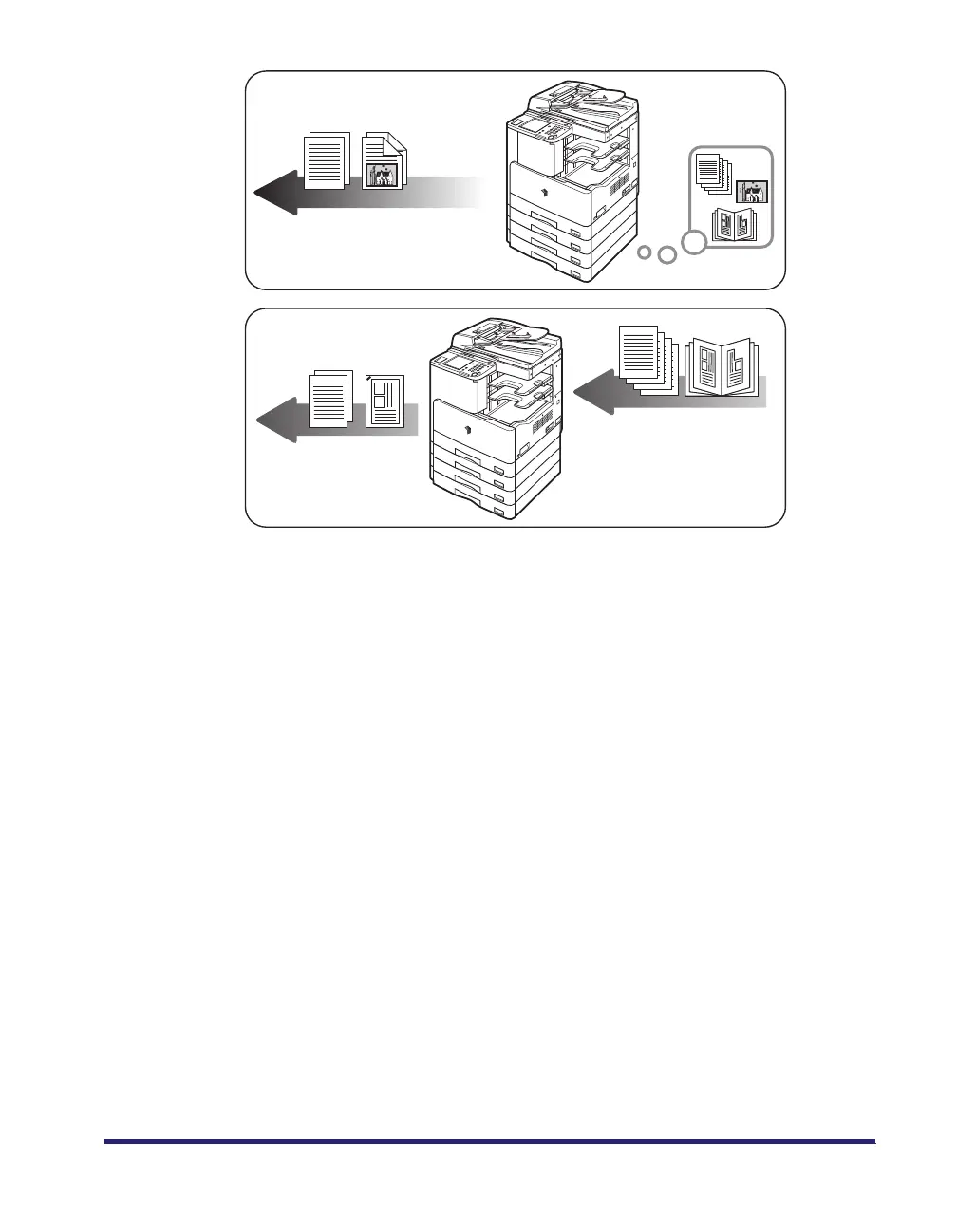
Outputting documents such as a copy,
fax, or outputting data sent from
a personal computer to the machine.
Printing data scanned from an
original, followed by finishing
options, such as stapling.
Printing
Copying
15
17
Table of Contents
Main Page
Default Chapter
3
Manuals for the Machine
3
Table of Contents
4
Preface
10
How to Use this Manual
10
Symbols Used in this Manual
10
Keys Used in this Manual
11
Displays Used in this Manual
12
Illustrations Used in this Manual
13
Available Features
14
Operations and Terms Used in this Manual
15
Legal Notices
17
Laser Safety
17
Additional Information
18
International Energy Star-Program
20
EMC Directive
20
WEEE Directive
21
Ipv6 Ready Logo
21
Trademarks
21
Copyright
21
Disclaimers
22
Legal Limitations on the Usage of Your Product and the Use of Images
22
Important Safety Instructions
23
Installation
23
Power Supply
25
Handling
26
Maintenance and Inspections
29
Consumables
31
Other Warnings
31
Before You Start Using this Machine
32
Installation Location and Handling
33
Installation Precautions
33
Avoid Installing the Machine in the Following Locations
33
Select a Safe Power Supply
37
Provide Adequate Installation Space
38
Moving the Machine
39
Handling Precautions
41
Parts and Their Functions
44
External View
44
Internal View
45
Control Panel Parts and Functions
46
Main Power and Control Panel Power
47
How to Turn on the Main Power
47
Control Panel Power Switch
53
System Settings
54
Obtaining and Registering a License Key
55
Obtaining a License Key
55
Registering a License Key
56
Basic Operations
58
Chapter 1
58
What this Machine Can Do
59
Network Interface
61
Using the Remote Ui
61
Network Scanning
61
Overview of the Ir2030/Ir2025/Ir2022I/Ir2018I
62
Switching the Functions Indicated on the Touch Panel Display
62
User Management and Restriction
63
Specifying Settings
64
Functions that Conserve Power
66
Checking and Canceling Print Jobs
67
Other Useful Functions
69
Paper Supply Indicator
70
Auto Orientation
71
Using the Touch Panel Display
72
Frequently Used Keys
72
Touch Panel Key Display
73
Numeric Keys
74
Adjusting the Brightness
75
Entering Characters from the Touch Panel Display
76
Alphanumeric Characters
76
Symbols
78
Values in Inches
81
Entering the Department ID and Password
82
Control Panel
85
Using the User ID Management
86
Placing Originals
88
Document Sizes
88
Orientation
89
Platen Glass
91
Feeder (DADF-P2)
95
Making Prints Using the Stack Bypass
98
Standard Size
99
Multi-Functional Operations
112
Available Paper Stock
113
System Configuration
117
Optional Equipment
117
Sample System Configurations
119
System Options
120
Available Combination of Options
121
Cassette Feeding Module-P1/Q1
123
Parts and Their Functions
123
Optional Accessory
124
Feeder (DADF-P2)
125
Parts and Their Functions
125
Platen Cover Type J
126
Parts and Their Functions
126
Finisher-U2
127
Parts and Their Functions
127
Finishing Modes
128
Staple Mode
129
Inner 2 Way Tray-E2
132
Parts and Their Functions
133
Card Reader-E1
134
Procedure before Using the Machine
135
Procedure after Using the Machine
136
Department ID Management
137
Changing the Password and Page Limit
137
Checking the Page Counts on a Control Card
146
Checking and Printing Counter Information
147
Clearing Page Totals
152
Accepting Print and Scan Jobs with Unknown Ids
155
Chapter 2
156
Chapter 3
156
Customizing Settings
156
What Are Additional Functions
157
Accessing the Additional Functions Screen
157
Additional Functions Settings Table
159
Common Settings
160
Timer Settings
162
Report Settings
163
Copy Settings
167
Communications Settings
167
Printer Settings
168
Address Book Settings
169
Specifying Common Settings
170
Initial Function at Power on
170
Default Display after Auto Clear
173
Tone Settings
175
Setting the Toner Save Mode
177
Printer Density
178
Inch Entry
180
Auto Paper Selection/Auto Drawer Switching
182
Identifying the Type of Paper in a Paper Source
185
Energy Consumption in the Sleep Mode
188
Output Tray Designation
190
Standard Paper for the Stack Bypass
193
Paper Feed Method
200
Changing the Language Shown on the Touch Panel Display
202
Reversing the Contrast of the Touch Panel Display
204
Displaying a Feeder Error Message Prompt
206
Data Compression Ratio for Remote Scans
208
Setting the Gamma Value for Remote Scans
210
Returning the Common Settings to Their Defaults
212
Timer Settings
214
Current Date and Time
214
Auto Sleep Time
220
Auto Clear Time
222
Cleaning and Adjusting the Machine
224
Cleaning
224
Improving Print Quality and Density (Special Mode M)
225
Preventing Paper Curls or Jams Due to High-Humidity Environment
227
(Special Mode N)
227
Preventing Paper Curls or Jams Due to High-Humidity Environment (Special Mode N)
227
Preventing Paper Jams When Printing on the Back of a Printed Paper (Special Mode O)
229
Preventing Paper Curls Due to Paper Type (Special Mode P)
231
Setting the Bond Special Fixing Mode
233
Cutting down Waiting Time for a Next Job (Special Mode S)
235
Adjusting Output Speed in the Rotate Collate Mode
237
Feeder Smudge Adjustment
239
Checking Job and Device Status
242
Checking the Counter
243
Checking Job Status
244
Copy/Print Job Details
250
Canceling Copy/Print Jobs
252
Chapter 4
254
Chapter 5
254
System Manager Settings
254
Specifying the System Manager Settings
255
Department ID Management
259
Registering the Department ID, Password, and Page Limit
260
Changing the Password and Page Limit
267
Erasing the Department ID and Password
272
Checking and Printing Counter Information
275
Clearing Page Totals
279
Accepting Print and Scan Jobs with Unknown Ids
283
Device Information Settings
285
Managing User Ids
287
Remote UI
289
Restricting the Send Function
291
Setting a Password for the Address Book
291
Restricting the New Address
293
Restricting PC Faxing
295
Restricting Recall
297
Confirming Entered Fax Numbers
299
Restricting Broadcasting
301
Checking the Job Log
303
Restricting the USB Interface Port
305
Displaying Department ID/User Name
307
Printing/Storing Received Documents When Document Forwarding Fails
309
Auto Online/Offline
312
Auto Online
312
Auto Offline
314
Detecting and Installing Drivers that Support Functions Specified on the Machine into Your Computer
316
Chapter 6
318
Routine Maintenance
318
Paper Drawers
319
Loading Paper
319
Adjusting a Paper Drawer to Hold a Different Paper Size
325
Feeder (DADF-P2)
331
Replacing the Stamp Cartridge
331
Finisher-U2 (Optional)
334
Replacing the Staple Cartridge
334
Replacing the Toner Cartridge
339
Drum Unit
345
Replacing the Drum Unit
345
Affixing the Counter Label for Service Technician
351
Routine Cleaning
352
Platen Glass and Underside of the Feeder/Platen Cover
353
Manual Feeder Cleaning
354
Offset Roller Cleaning
360
Transfer Roller Cleaning
361
Drum Cleaning
363
Fixing Unit Cleaning
365
Automatic Feeder Cleaning
371
Consumables
373
Toner Cartridge
374
Chapter 7
376
Troubleshooting
376
Reducing the Frequency of Paper Jams
377
Clearing Paper Jams
378
Screen Indicating the Locations of Paper Jams
378
Fixing Unit (Inside the Main Unit)
384
Duplex Unit (Duplex Unit-B1)
388
Feeder (DADF-P2)
391
Stack Bypass
396
Paper Drawer 1
397
Paper Drawers 2, 3, and 4
402
Finisher-U2 (Optional)
406
Inner 2 Way Tray-E2 (Optional)
411
Clearing Staple Jams
416
List of Error Messages
421
Self-Diagnostic Display
421
List of Error Codes Without Messages
423
If Memory Becomes Full During Scanning
425
Service Call Message
426
Contacting Your Local Authorized Canon Dealer
426
Chapter 8
428
Chapter 9 Appendix
428
Report Samples
429
Users Data List
429
Department ID List
429
Specifications
430
Main Unit
430
Feeder (DADF-P2)
432
Cassette Feeding Module-P1 (Optional for the Ir2018I)
433
Cassette Feeding Module-Q1 (Optional)
433
Finisher-U2 (Optional)
434
Duplex Unit (Duplex Unit-B1)
435
Inner 2 Way Tray-E2 (Optional)
435
Card Reader-E1 (Optional)
435
Relationship between Original Orientation and Preprinted Paper Output Chart
436
Index
438
Other manuals for Canon iR2018i
Brochure & Specs
8 pages
Related product manuals
Canon iR2010 Series
738 pages
Canon iR2022
17 pages
Canon iR2025
444 pages
Canon IR2020
30 pages
Canon iR2030
444 pages
Canon iR2022i
444 pages
Canon iR2000 Series
738 pages
Canon iR2200
768 pages
Canon iR2230
282 pages
Canon iR2318 series
308 pages
Canon iR2422 series
308 pages
Canon imageRunner iR2270
233 pages



 To Next Page