17
COMMON INTERFACE
ANT
Antenna
Connection
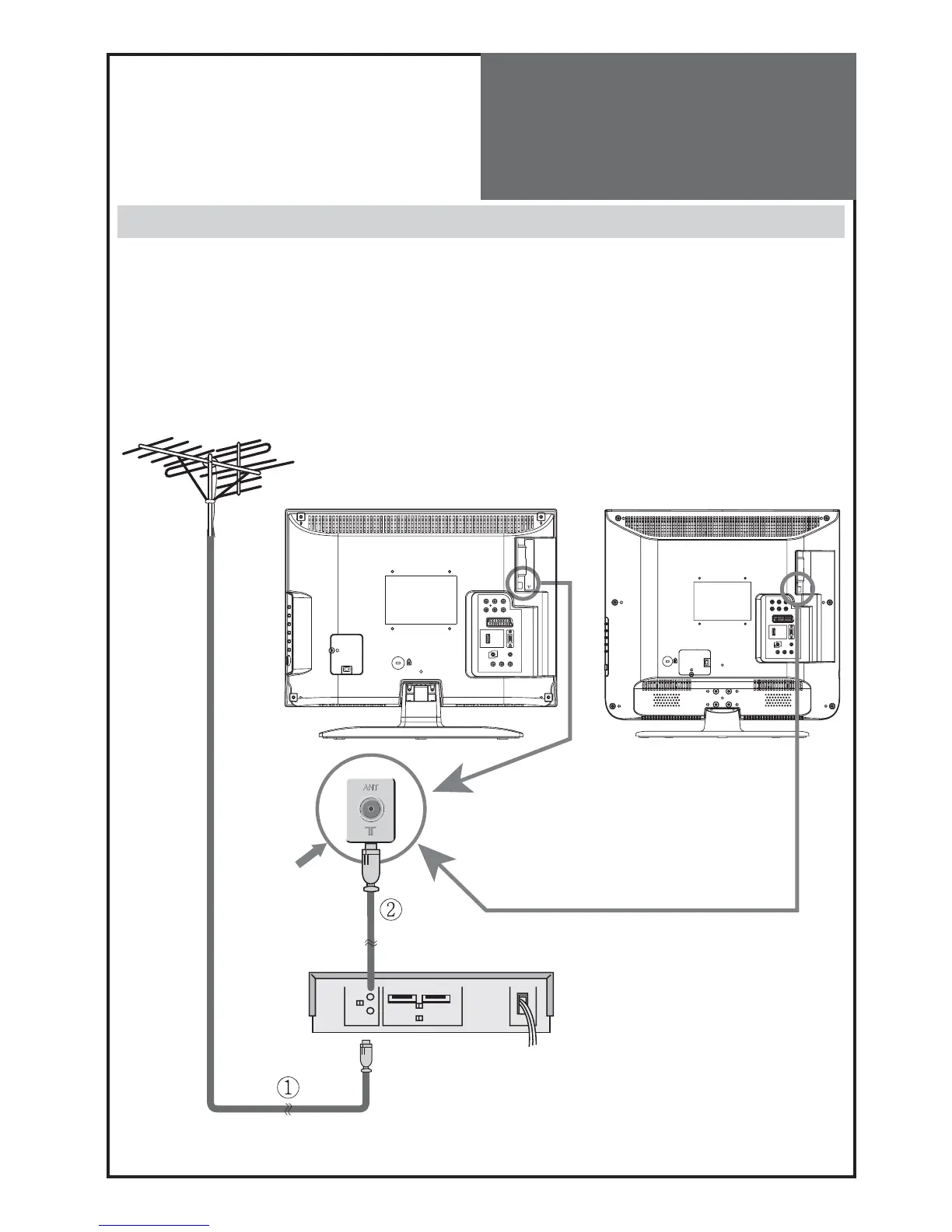
Aerial connection with VCR/DVD
Connect your ① aerial cable to the RF (aerial) IN terminal on the VCR/DVD.
Connect the RF OUT terminal of the VCR/DVD to the Aerial terminal on the TV set with an ② RF cable.
Note:
If you wish to use only the Aerial (RF) connection, then you should store the VCR/DVD channel on pro-
gramme number “
ZERO
” using the “Manual tuning” function (See page 26). If your VCR/DVD has this fa-
cility.
Now you can watch the VCR/DVD in TV mode by selecting the programme number “PR00”.
Otherwise you will have to use a scart connection from your VCR/DVD to this TV into AV1 or AV2 and select
the appropriate AV input on your TV to see VCR/DVD playback.
VCR/DVDRF IN
RF OUT
Aerial
terminal
DLT-20J1T / DLT-20J3T / DLT-20J9T
DLT-19W4T / DLT-22W4T / DLT-19L1T / DLT-22L1T /
DLT-19L2T / DLT-22L2T


 To Next Page
 Loading...




